Published: Oct 8, 2025
Reducing the download time of images can improve the perceived load time of the
page and LCP.
## How the insight fails
The insight highlights images that have unnecessarily large download sizes. The
estimated byte savings are calculated by comparing the download size of the
image to an efficient bytes-to-pixel ratio for the image format.
>
> > [!NOTE]
> > **Note:** Any images with estimated byte savings less than 4 KiB won't be flagged.
>
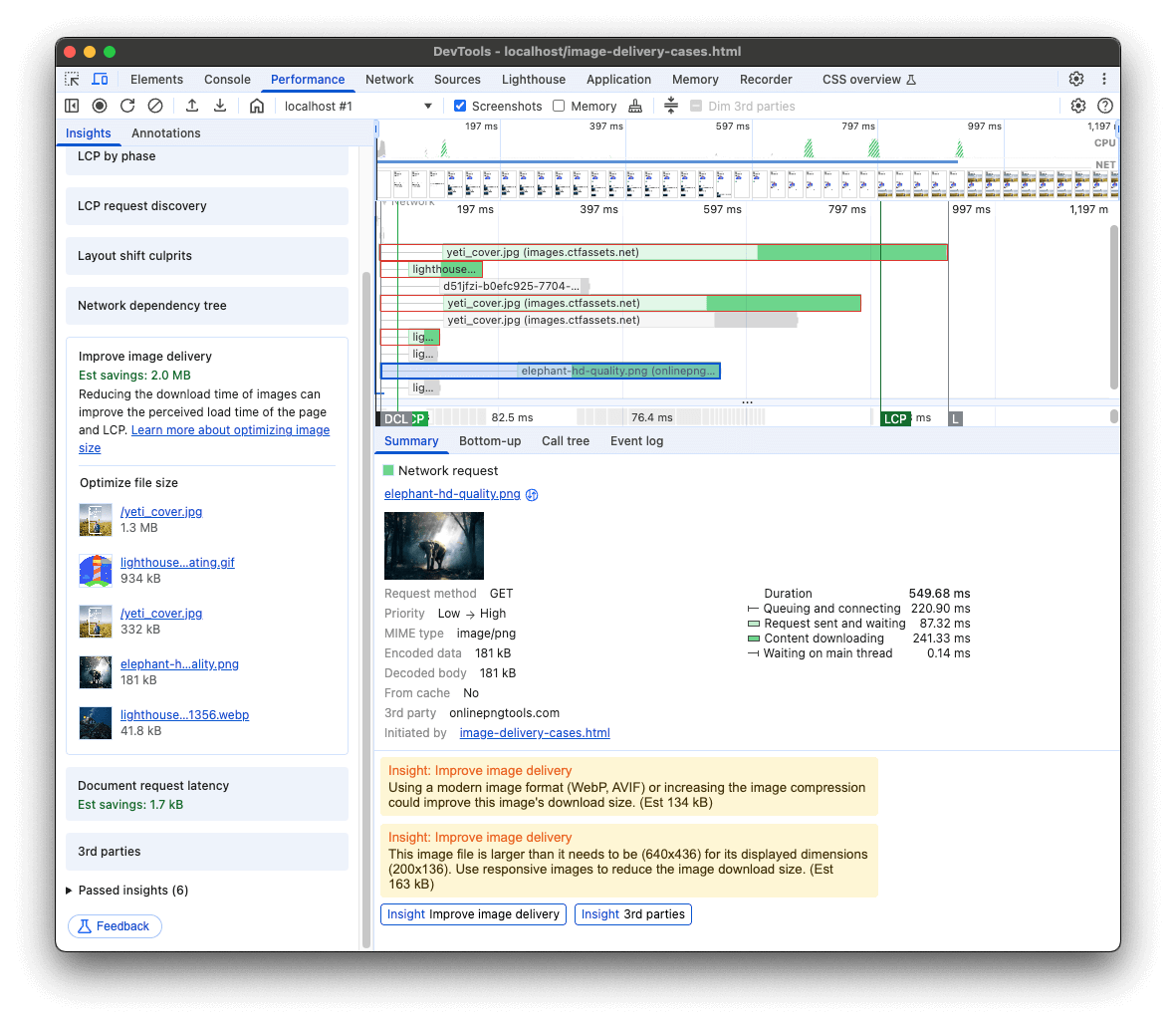 DevTools Improve Image Delivery Insight.
## How to improve image download time
There are several strategies recommended by this insight to improve image
download time depending on the displayed size and file format of the image.
[Deploying an image CDN](https://web.dev/articles/image-cdns) can be extremely
helpful for all of these strategies.
## Increase image compression factor
Most image formats support a compression level that can be tuned to improve the image file size at the cost of image quality. You can use image tools like [ImageOptim](https://imageoptim.com/mac), [Squoosh](https://squoosh.app/), and [Imagemin](https://github.com/imagemin/imagemin-cli) to optimize the image compression factor.
## Use modern image formats
AVIF and WebP are image formats that have superior compression and quality
characteristics compared to their older JPEG and PNG counterparts. Encoding your
images in these newer formats is a good strategy to reduce the download
size of images.
AVIF is supported in the [latest version of all major browsers](https://caniuse.com/avif)
and offers smaller file sizes compared to other formats with the same quality
settings. See
[Serving AVIF Images Codelab](https://codelabs.developers.google.com/codelabs/avif)
for more on AVIF.
WebP is supported by [all major browsers](https://caniuse.com/webp) and provides
better lossy and lossless compression for images on the web. See
[Use WebP images](https://web.dev/articles/serve-images-webp) for more on WebP.
>
> > [!NOTE]
> > **Note:** Webp and AVIF images videos won't work on iPhones before iOS 16.
>
## Use video formats for animated content
Large GIFs are inefficient for delivering animated content compared to videos.
Consider using MPEG4 or WebM videos for animations and PNG or WebP for static
images instead of GIF to save network bytes.
See [Replace animated GIFs with video for faster page loads](https://web.dev/articles/replace-gifs-with-videos)
to learn how to replace GIF images with videos.
>
> > [!NOTE]
> > **Note:** WebM videos won't work on iPhones before iOS 16.
>
## Serve images with responsive size
Ideally, your page should never serve images that are larger than the version
that's rendered on the user's screen. Anything larger than that just results
in wasted bytes and slows down page load time.
One strategy is to use vector-based image formats, like SVG. With a finite
amount of code, an SVG image can scale to any size. See [Replace complex icons with SVG](https://web.dev/articles/responsive-images#replace_complex_icons_with_svg) to learn more.
If vector-based images are not an option then it is best to serve images that
are "responsive". With responsive images, you generate multiple versions of each
image, and then specify which version to use in your HTML or CSS using media
queries, viewport dimensions, and so forth.
For example, the `![]() ` element has `srcset` and `sizes` attributes which can
specify image URLs for different sizes:
If you need to change the image completely then you can use the ``
element:
See [Responsive images](https://web.dev/learn/design/responsive-images) and
[The picture element](https://web.dev/learn/design/picture-element) to learn
more.
## Stack-specific guidance
This insight also offers stack-specific guidance for pages using the following
technologies:
### AMP
- Consider displaying all [`amp-img`](https://amp.dev/documentation/components/websites/amp-img) components in WebP formats while [specifying an appropriate fallback](https://amp.dev/documentation/components/amp-img/#specify-a-fallback-image) for other browsers.
- For animated content, use [`amp-anim`](https://amp.dev/documentation/components/amp-anim/) to minimize CPU usage when the content is offscreen.
### Drupal
- Consider using [a module](https://www.drupal.org/project/project_module) that automatically optimizes and reduces the size of images uploaded through the site while retaining quality.
- Ensure you are using the built-in [Responsive Image Styles](https://www.drupal.org/documentation/modules/responsive_image) provided from Drupal for all images rendered on the site.
### Joomla
Consider using a [plugin](https://extensions.joomla.org/instant-search/?jed_live%5Bquery%5D=webp)
or service that automatically converts your uploaded images to the optimal
formats.
### Magento
Consider using a [third-party Magento extension that optimizes images](https://marketplace.magento.com/catalogsearch/result/?q=optimize+image).
### WordPress
Consider using an [image optimization WordPress plugin](https://wordpress.org/plugins/search/optimize+images/)
that compresses your images while retaining quality.
## Resources
- [Using image CDNs](https://web.dev/articles/image-cdns)
- [Responsive images](https://web.dev/learn/design/responsive-images)
- [Use WebP images](https://web.dev/articles/serve-images-webp)
- [Replacing animated GIFs with video](https://web.dev/articles/replace-gifs-with-videos)
- [Serving responsive images](https://web.dev/articles/serve-responsive-images)
- [Serving images with correct dimensions](https://web.dev/articles/serve-images-with-correct-dimensions)
- [Replace complex icons with SVG](https://web.dev/articles/responsive-images#replace_complex_icons_with_svg)
- [Serving AVIF Images](https://codelabs.developers.google.com/codelabs/avif)