Use the Generic Sensor API to get access to on-device sensors like accelerometers, gyroscopes, and magnetometers.
 Alex Shalamov  Mikhail Pozdnyakov  Thomas Steiner [GitHub](https://github.com/tomayac) [LinkedIn](https://www.linkedin.com/in/thomassteinerlinkedin) [Mastodon](https://toot.cafe/@tomayac) [Bluesky](https://bsky.app/profile/tomayac.com) [Homepage](https://blog.tomayac.com/)
Today, sensor data is used in many platform-specific applications to enable use cases such as
immersive gaming, fitness tracking, and augmented or virtual reality. Wouldn't it be cool to bridge
the gap between platform-specific and web applications? Enter the
[Generic Sensor API](https://www.w3.org/TR/generic-sensor/), for the web!
## What is the Generic Sensor API?
The [Generic Sensor API](https://www.w3.org/TR/generic-sensor/) is a set of interfaces which expose
sensor devices to the web platform. The API consists of the base
[`Sensor`](https://w3c.github.io/sensors/#the-sensor-interface) interface and a set of concrete
sensor classes built on top. Having a base interface simplifies the implementation and specification
process for the concrete sensor classes. For instance, take a look at the
[`Gyroscope`](https://w3c.github.io/gyroscope/#gyroscope-interface) class. It is super tiny! The
core functionality is specified by the base interface, and `Gyroscope` merely extends it with three
attributes representing angular velocity.
Some sensor classes interface to actual hardware sensors such as, for example, the accelerometer or
gyroscope classes. These are referred to as low-level sensors. Other sensors, referred to as
[fusion sensors](https://w3c.github.io/sensors/#sensor-fusion), merge data from several low level
sensors to expose information a script would otherwise need to calculate. For example, the
[`AbsoluteOrientation`](https://www.w3.org/TR/orientation-sensor/#absoluteorientationsensor) sensor
provides a ready-to-use four-by-four rotation matrix based on the data obtained from the
accelerometer, gyroscope, and magnetometer.
You might think that the web platform already provides sensor data and you are absolutely right! For
instance, [`DeviceMotion`](https://developer.mozilla.org/docs/Web/API/DeviceMotionEvent) and
[`DeviceOrientation`](https://developer.mozilla.org/docs/Web/API/DeviceOrientationEvent)
events expose motion sensor data. So why do we need a new API?
Comparing to the existing interfaces, Generic Sensor API provides a great number of advantages:
- Generic Sensor API is a sensor framework that can be easily extended with new sensor classes and each of these classes will keep the generic interface. The client code written for one sensor type can be reused for another one with very few modifications!
- You can configure the sensor. For example, you can set the sampling frequency suitable for your application needs.
- You can detect whether a sensor is available on the platform.
- Sensor readings have high precision timestamps, enabling better synchronization with other activities in your application.
- Sensor data models and coordinate systems are clearly defined, allowing browser vendors to implement interoperable solutions.
- The Generic Sensor based interfaces are not bound to the DOM (meaning they are neither `navigator` nor `window` objects), and this opens up future opportunities for using the API within service workers or implementing it in headless JavaScript runtimes, such as embedded devices.
- [Security and privacy](https://developer.chrome.com/docs/capabilities/web-apis/generic-sensor#privacy-and-security) aspects are the top priority for the Generic Sensor API and provide much better security as compared to older sensor APIs. There is integration with the Permissions API.
- Automatic [synchronization with screen coordinates](https://developer.chrome.com/docs/capabilities/web-apis/generic-sensor#synchronization-with-screen-coordinates) is available for `Accelerometer`, `Gyroscope`, `LinearAccelerationSensor`, `AbsoluteOrientationSensor`, `RelativeOrientationSensor` and `Magnetometer`.
## Available generic sensor APIs
At the time of writing, there are several sensors that you can experiment with.
**Motion sensors:**
- `Accelerometer`
- `Gyroscope`
- `LinearAccelerationSensor`
- `AbsoluteOrientationSensor`
- `RelativeOrientationSensor`
- `GravitySensor`
**Environmental sensors:**
- `AmbientLightSensor` (Behind the `#enable-generic-sensor-extra-classes` flag in Chromium.)
- `Magnetometer` (Behind the `#enable-generic-sensor-extra-classes` flag in Chromium.)
## Feature detection
Feature detection of hardware APIs is tricky, since you need to detect both whether the browser
supports the interface in question, *and* whether the device has the corresponding sensor. Checking
whether the browser supports an interface is straightforward. (Replace `Accelerometer` with any of
the other interfaces mentioned [above](https://developer.chrome.com/docs/capabilities/web-apis/generic-sensor#available-generic-sensor-apis).)
if ('Accelerometer' in window) {
// The `Accelerometer` interface is supported by the browser.
// Does the device have an accelerometer, though?
}
For an actually meaningful feature detection result, you need to try to connect to the sensor, too.
This example illustrates how to do that.
let accelerometer = null;
try {
accelerometer = new Accelerometer({ frequency: 10 });
accelerometer.onerror = (event) => {
// Handle runtime errors.
if (event.error.name === 'NotAllowedError') {
console.log('Permission to access sensor was denied.');
} else if (event.error.name === 'NotReadableError') {
console.log('Cannot connect to the sensor.');
}
};
accelerometer.onreading = (e) => {
console.log(e);
};
accelerometer.start();
} catch (error) {
// Handle construction errors.
if (error.name === 'SecurityError') {
console.log('Sensor construction was blocked by the Permissions Policy.');
} else if (error.name === 'ReferenceError') {
console.log('Sensor is not supported by the User Agent.');
} else {
throw error;
}
}
## Polyfill
For browsers that do not support the Generic Sensor API, a
[polyfill](https://github.com/kenchris/sensor-polyfills) is available. The polyfill allows you to
load only the relevant sensors' implementations.
// Import the objects you need.
import { Gyroscope, AbsoluteOrientationSensor } from './src/motion-sensors.js';
// And they're ready for use!
const gyroscope = new Gyroscope({ frequency: 15 });
const orientation = new AbsoluteOrientationSensor({ frequency: 60 });
## What are all these sensors? How can I use them?
Sensors is an area that might need a brief introduction. If you are familiar with sensors, you can
jump right to the [hands-on coding section](https://developer.chrome.com/docs/capabilities/web-apis/generic-sensor#lets-code). Otherwise, let's look at each supported
sensor in detail.
### Accelerometer and linear acceleration sensor
Accelerometer sensor measurements
The [`Accelerometer`](https://developer.mozilla.org/docs/Web/API/Accelerometer) sensor
measures acceleration of a device hosting the sensor on three axes (X, Y, and Z). This sensor is an
inertial sensor, meaning that when the device is in linear free fall, the total measured
acceleration would be 0 m/s^2^, and when a device lying flat on a table, the acceleration
in upwards direction (Z axis) will be equal to the Earth's gravity, i.e. g ≈ +9.8 m/s^2^ as
it is measuring the force of the table pushing the device upwards. If you push the device to the
right, acceleration on the X axis would be positive, or negative if the device is accelerated from
the right toward the left.
Accelerometers can be used for things like: step counting, motion sensing, or simple device
orientation. Quite often, accelerometer measurements are combined with data from other sources to
create fusion sensors, such as, orientation sensors.
The
[`LinearAccelerationSensor`](https://developer.mozilla.org/docs/Web/API/LinearAccelerationSensor)
measures acceleration that is applied to the device hosting the sensor, excluding the contribution
of gravity. When a device is at rest, for instance lying flat on the table, the sensor would measure
≈ 0 m/s^2^ acceleration on three axes.
### Gravity sensor
It is already possible for users to manually derive readings close to those of a gravity sensor by
manually inspecting `Accelerometer` and `LinearAccelerometer` readings, but this can be cumbersome
and depend on the accuracy of the values provided by those sensors. Platforms such as Android can
provide gravity readings as part of the operating system, which should be cheaper in terms of
computation, provide more accurate values depending on the user's hardware, and be easier to use in
terms of API ergonomics. The
[`GravitySensor`](https://w3c.github.io/accelerometer/#gravitysensor-interface) returns the effect
of acceleration along the device's X, Y, and Z axis due to gravity.
### Gyroscope
Gyroscope sensor measurements
The [`Gyroscope`](https://developer.mozilla.org/docs/Web/API/Gyroscope) sensor measures
angular velocity in radians per second around the device's local X, Y, and Z axis. Most consumer
devices have mechanical ([MEMS](https://en.wikipedia.org/wiki/Microelectromechanical_systems))
gyroscopes, which are inertial sensors that measure rotation rate based on
[inertial Coriolis force](https://en.wikipedia.org/wiki/Coriolis_force). MEMS gyroscopes are prone
to drift that is caused by the sensor's gravitational sensitivity which deforms the sensor's
internal mechanical system. Gyroscopes oscillate at relative high frequencies, e.g., 10s of kHz, and
therefore, might consume more power compared to other sensors.
### Orientation sensors
Absolute orientation sensor measurements
The
[`AbsoluteOrientationSensor`](https://developer.mozilla.org/docs/Web/API/AbsoluteOrientationSensor)
is a fusion sensor that measures rotation of a device in relation to the Earth's coordinate system,
while the
[`RelativeOrientationSensor`](https://developer.mozilla.org/docs/Web/API/RelativeOrientationSensor)
provides data representing rotation of a device hosting motion sensors in relation to a stationary
reference coordinate system.
All modern 3D JavaScript frameworks support [quaternions](https://en.wikipedia.org/wiki/Quaternion)
and [rotation matrices](https://en.wikipedia.org/wiki/Rotation_matrix) to represent rotation;
however, if you use WebGL directly, the `OrientationSensor` conveniently has both a
[`quaternion` property](https://developer.mozilla.org/docs/Web/API/OrientationSensor/quaternion)
and a
[`populateMatrix()` method](https://developer.mozilla.org/docs/Web/API/OrientationSensor/populateMatrix).
Here are few snippets:
**[three.js](https://threejs.org/docs/index.html#api/core/Object3D.quaternion)**
let torusGeometry = new THREE.TorusGeometry(7, 1.6, 4, 3, 6.3);
let material = new THREE.MeshBasicMaterial({ color: 0x0071c5 });
let torus = new THREE.Mesh(torusGeometry, material);
scene.add(torus);
// Update mesh rotation using quaternion.
const sensorAbs = new AbsoluteOrientationSensor();
sensorAbs.onreading = () => torus.quaternion.fromArray(sensorAbs.quaternion);
sensorAbs.start();
// Update mesh rotation using rotation matrix.
const sensorRel = new RelativeOrientationSensor();
let rotationMatrix = new Float32Array(16);
sensor_rel.onreading = () => {
sensorRel.populateMatrix(rotationMatrix);
torus.matrix.fromArray(rotationMatrix);
};
sensorRel.start();
**[BABYLON](https://doc.babylonjs.com/typedoc/classes/babylon.abstractmesh#rotationquaternion)**
const mesh = new BABYLON.Mesh.CreateCylinder('mesh', 0.9, 0.3, 0.6, 9, 1, scene);
const sensorRel = new RelativeOrientationSensor({ frequency: 30 });
sensorRel.onreading = () => mesh.rotationQuaternion.FromArray(sensorRel.quaternion);
sensorRel.start();
**[WebGL](https://www.khronos.org/registry/webgl/specs/latest/2.0/)**
// Initialize sensor and update model matrix when new reading is available.
let modMatrix = new Float32Array([1, 0, 0, 0, 0, 1, 0, 0, 0, 0, 1, 0, 0, 0, 0, 1]);
const sensorAbs = new AbsoluteOrientationSensor({ frequency: 60 });
sensorAbs.onreading = () => sensorAbs.populateMatrix(modMatrix);
sensorAbs.start();
// Somewhere in rendering code, update vertex shader attribute for the model
gl.uniformMatrix4fv(modMatrixAttr, false, modMatrix);
Orientation sensors enable various use cases, such as immersive gaming, augmented and virtual
reality.
For more information about motion sensors, advanced use cases, and requirements, check out the
[motion sensors explainer](https://w3c.github.io/motion-sensors/) document.
## Synchronization with screen coordinates
By default, [spatial sensors'](https://w3c.github.io/sensors/#spatial-sensor) readings are resolved
in a local coordinate system that is bound to the device and does not take screen orientation into
account.
 Device coordinate system
However, many use cases like games or augmented and virtual reality require sensor readings to be
resolved in a coordinate system that is instead bound to the screen orientation.
 Screen coordinate system
Previously, remapping of sensor readings to screen coordinates had to be implemented in JavaScript.
This approach is inefficient and it also quite significantly increases the complexity of the web
application code; the web application must watch screen orientation changes and perform coordinates
transformations for sensor readings, which is not a trivial thing to do for Euler angles or
quaternions.
The Generic Sensor API provides a much simpler and reliable solution! The local coordinate system is
configurable for all defined spatial sensor classes: `Accelerometer`, `Gyroscope`,
`LinearAccelerationSensor`, `AbsoluteOrientationSensor`, `RelativeOrientationSensor`, and
`Magnetometer`. By passing the `referenceFrame` option to the sensor object constructor, the user
defines whether the returned readings will be resolved in
[device](https://w3c.github.io/accelerometer/#device-coordinate-system) or
[screen](https://w3c.github.io/accelerometer/#screen-coordinate-system) coordinates.
// Sensor readings are resolved in the Device coordinate system by default.
// Alternatively, could be RelativeOrientationSensor({referenceFrame: "device"}).
const sensorRelDevice = new RelativeOrientationSensor();
// Sensor readings are resolved in the Screen coordinate system. No manual remapping is required!
const sensorRelScreen = new RelativeOrientationSensor({ referenceFrame: 'screen' });
## Let's code!
The Generic Sensor API is very simple and easy-to-use! The Sensor interface has
[`start()`](https://w3c.github.io/sensors/#sensor-start) and
[`stop()`](https://w3c.github.io/sensors/#sensor-stop) methods to control sensor state and several
event handlers for receiving notifications about sensor activation, errors and newly available
readings. The concrete sensor classes usually add their specific reading attributes to the base
class.
### Development environment
During development you'll be able to use sensors through `localhost`. If you are developing for
mobile devices, set up
[port forwarding](https://developer.chrome.com/docs/devtools/remote-debugging/local-server)
for your local server, and you are ready to rock!
When your code is ready, deploy it on a server that supports HTTPS.
[GitHub Pages](https://pages.github.com/) are served over HTTPS, making it a great place to share
your demos.
### 3D model rotation
In this simple example, we use the data from an absolute orientation sensor to modify the rotation
quaternion of a 3D model. The `model` is a three.js
[`Object3D`](https://threejs.org/docs/index.html#api/core/Object3D) class instance that has a
[`quaternion`](https://threejs.org/docs/index.html#api/core/Object3D.quaternion) property. The
following code snippet from the
[orientation phone](https://github.com/w3c/generic-sensor-demos/tree/master/orientation-phone)
demo, illustrates how the absolute orientation sensor can be used to rotate a 3D model.
function initSensor() {
sensor = new AbsoluteOrientationSensor({ frequency: 60 });
sensor.onreading = () => model.quaternion.fromArray(sensor.quaternion);
sensor.onerror = (event) => {
if (event.error.name == 'NotReadableError') {
console.log('Sensor is not available.');
}
};
sensor.start();
}
The device's orientation will be reflected in 3D `model` rotation within the WebGL scene.
 Sensor updates orientation of a 3D model
### Punchmeter
The following code snippet is extracted from the
[punchmeter demo](https://github.com/w3c/generic-sensor-demos/tree/master/punchmeter),
illustrating how the linear acceleration sensor can be used to calculate the maximum velocity of a
device under the assumption that it is initially laying still.
this.maxSpeed = 0;
this.vx = 0;
this.ax = 0;
this.t = 0;
/* ... */
this.accel.onreading = () => {
let dt = (this.accel.timestamp - this.t) * 0.001; // In seconds.
this.vx += ((this.accel.x + this.ax) / 2) * dt;
let speed = Math.abs(this.vx);
if (this.maxSpeed < speed) {
this.maxSpeed = speed;
}
this.t = this.accel.timestamp;
this.ax = this.accel.x;
};
The current velocity is calculated as an approximation to the integral of the acceleration function.
 Measurement of a punch speed
## Debugging and sensor overriding with Chrome DevTools
In some cases you don't need a physical device to play with the Generic Sensor API. Chrome DevTools
has great support for
[simulating device orientation](https://developer.chrome.com/docs/devtools/device-mode/orientation).
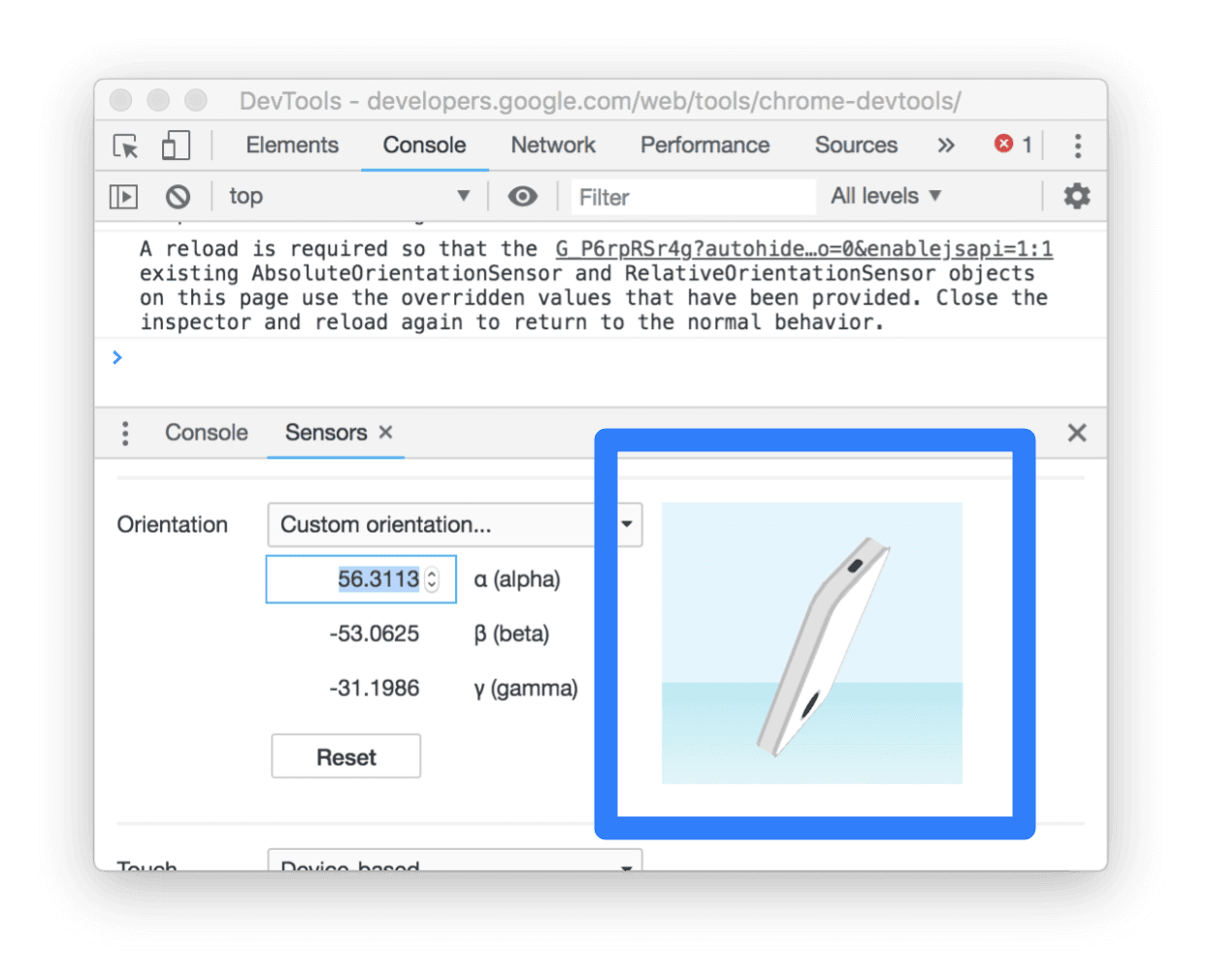 Simulating device orientation with Chrome DevTools
## Privacy and security
Sensor readings are sensitive data which can be subject to various attacks from malicious web pages.
Implementations of Generic Sensor APIs enforce a few limitations to mitigate the possible security
and privacy risks. These limitations must be taken into account by developers who intend to use the
API, so let's briefly list them.
### Only HTTPS
Because Generic Sensor API is a powerful feature, the browser only allows it on secure contexts. In
practice it means that to use Generic Sensor API you'll need to access your page through HTTPS.
During development you can do so via but for production you'll
need to have HTTPS on your server. See the [Safe and secure](https://web.dev/articles/secure) collection for best practices
and guidelines.
### Permissions Policy integration
The [Permissions Policy integration](https://developer.chrome.com/docs/privacy-sandbox/permissions-policy) in Generic
Sensor API controls access to sensors data for a frame.
By default the `Sensor` objects can be created only within a main frame or same-origin subframes,
thus preventing cross-origin iframes from unsanctioned reading of sensor data. This default behavior
can be modified by explicitly enabling or disabling of the corresponding
[policy-controlled features](https://w3c.github.io/webappsec-permissions-policy/#features).
The snippet below illustrates granting accelerometer data access to a cross-origin iframe, meaning
that now `Accelerometer` or `LinearAccelerationSensor` objects can be created there.
### Sensor readings delivery can be suspended
Sensor readings are only accessible by a visible web page, i.e., when the user is actually
interacting with it. Moreover, sensor data would not be provided to the parent frame if the user
focus changes to a cross-origin subframe. This prevents the parent frame infering user input.
## What's next?
There is a set of already specified sensor classes to be implemented in the near future such as
[Ambient Light Sensor](https://w3c.github.io/ambient-light/) or
[Proximity Sensor](https://w3c.github.io/proximity/); however, thanks to the great extensibility of
Generic Sensor framework we can anticipate appearance of even more new classes representing various
sensor types.
Another important area for future work is improving the Generic Sensor API itself, the Generic
Sensor specification is currently a Candidate Recommendation, which means that there is still time
to make fixes and bring new functionality that developers need.
## You can help!
The sensor specifications reached
[Candidate Recommendation](https://www.w3.org/Consortium/Process/Process-19991111/tr.html#RecsCR)
maturity level, hence, the feedback from web and browser developers is highly appreciated. Let us
know what features would be great to add or if there is something you would like to modify in the
current API.
Please feel free to file [specification issues](https://github.com/w3c/sensors/issues/new) as well
as [bugs](https://issues.chromium.org/issues/new) for the Chrome implementation.
## Resources
- Demo projects:
- Generic Sensor API specification:
- Specification issues:
- W3C working group mailing list: [public-device-apis@w3.org](mailto:public-device-apis@w3.org)
- Chrome Feature Status:
- Implementation bugs: [http://crbug.com?q=component:Blink\>Sensor](http://crbug.com?q=component:Blink%3ESensor)
## Acknowledgements
This article was reviewed by [Joe Medley](https://github.com/jpmedley) and
[Kayce Basques](https://github.com/kaycebasques).