 Kasper Kulikowski [X](https://twitter.com/i_am_kaspa) [GitHub](https://github.com/Kulikowski) [LinkedIn](https://www.linkedin.com/in/kasper-kulikowski)
Published: May 19, 2026, Last updated: May 28, 2026
| Explainer | Web | Extensions | Chrome Status | Intent |
|---|---|---|---|---|
| [GitHub](https://github.com/webmachinelearning/webmcp) | [ Origin trial](https://developer.chrome.com/origintrials/#/register_trial/4163014905550602241) | | [View](https://chromestatus.com/feature/5117755740913664) | [Intent to Experiment](https://groups.google.com/a/chromium.org/g/blink-dev/c/gmYffo5WOE8/m/OJxuQRP3AAAJ) |
WebMCP supports agents that use generative AI models. To test any system using
generative AI, your tests need to support probabilistic outcomes: one input
could lead to thousands of answers with varying degrees of accuracy. This
testing technique is called [evaluations](https://developer.chrome.com/docs/ai/evals) or evals.
> [!TIP]
> **Tip:** Learn more about [why evals matter](https://developer.chrome.com/docs/ai/evals/introduction) and how to [design evals](https://developer.chrome.com/docs/ai/evals/design) for your websites and web applications.
Before releasing tools into production, you must confirm agents understand when
to call the tool, how to execute it, and what answers are acceptable. Address
opportunities for failure before they happen.
Write evaluations to test your system's touchpoints with a large language model
(LLM):
- Check that the model understands your tool's purpose, based on its description and schema.
- Verify that the model chooses the right tool with the correct parameters to support user intent.
- Confirm that the model is acting upon information it received, for example to use information to call another tool.
- Verify successful user journeys. Given the user's intent, can an agent successfully fulfil user journey on my website with provided tools?
You should continue to write classic deterministic tests for any system
interaction that doesn't communicate with the model.
## Failure modes
Developers should test their systems to prevent failures before they happen. To
do so, you need to understand when the system may fail, both on its own and in
interacting with external factors. For WebMCP, the tool itself may fail and
agents may fail to use the tools as expected.
WebMCP tools may fail and when the agent may fail with WebMCP tools.
For example, say your user wants to add a t-shirt to their cart.
| Failure | Example | Troubleshoot |
|---|---|---|
| Agent fails to select the correct tool or directly calls the wrong tool. | The agent skips `addToCart` and goes directly to `checkout`.  | - Is the tool's `description` clear, complete, and accurately reflecting what the tool does? - Is the `functionName` intuitive and descriptive? - Is the tool correctly exposed to the LLM in the current state/context? - Is the schema of this tool potentially too similar to another tool, leading to call ambiguity? |
| Agent calls tools in the wrong order | The agent calls `checkout` and then `addToCart`.  | - Do tool descriptions overlap, confusing the LLM about the required sequence? - Does the output of a preceding tool provide necessary context for the next tool call? - Is the state correctly updated and any new tools exposed to the LLM as expected? - Is the end-to-end use case still correct if certain tools are called in different order? - Have you tested the specific tool call chain in isolation by forcing the preceding calls to confirm the LLM chooses the correct next step? |
| Agent calls tool with incorrect arguments | The agent calls `addToCart`, but adds shoes instead of a t-shirt.  | - Is the `inputSchema` clearly defined, including `enum` values and a good `description` for each property? - Are all required parameters explicitly marked and checked? - Does the argument's description explicitly guide the LLM on how to map user input to the expected structured data (such as a specific ID or format)? |
What if the user wants to check what's in their cart?
| Failure | Example | Troubleshoot |
|---|---|---|
| The tool output is incorrect or the tool misses something. | The user asks to `viewCart`, but the agent outputs the total cart cost, instead of the product names and individual prices. 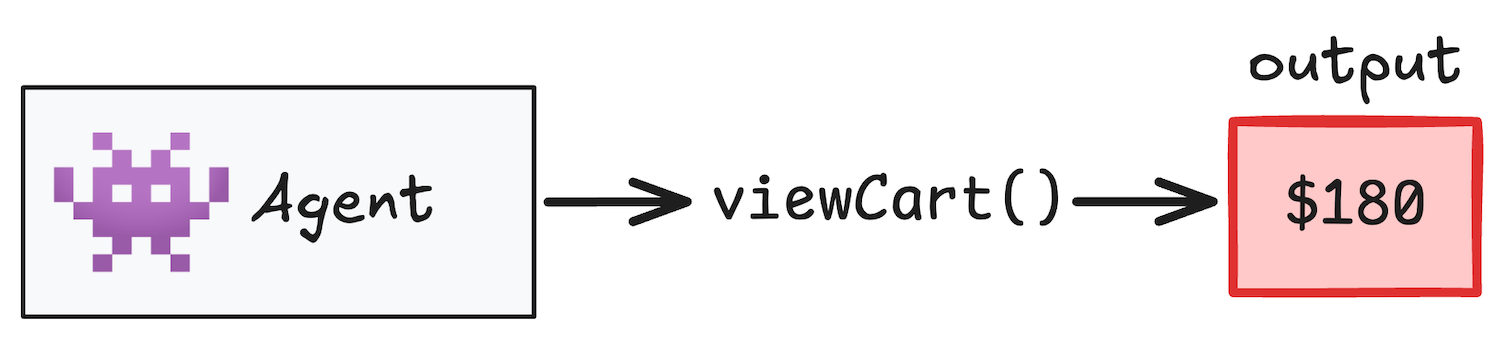 | - Does the underlying tool logic have bugs (check with deterministic tests)? - Was the UI state correctly updated and did the Agent receive the right information about the side effect? - If the output is used by the LLM for subsequent calls, is the output formatted clearly for LLM ingestion? - Is the output overly verbose? Does it contain only the minimum essential information the LLM needs for the next action? |
Finally, a tool could in any way that JavaScript fails. To troubleshoot,
investigate the following:
- Does the tool code properly handle all potential runtime errors and exceptions?
- Is the error reported back to the agent and model gracefully?
- Are external APIs or services the tool relies on healthy?
- Is the error structure clear enough that the model can differentiate between a temporary issue (retry) and a critical failure?
## Test tools in isolation
If an agent can't figure out which tool to call for a request like,
"I'd like a small pizza," it won't stand a chance in a complex user journey.
By testing tools in isolation, you can optimize your schemas and descriptions
before ever running a browser simulation.
> [!TIP]
> **Tip:** You can trigger a WebMCP tool call using `document.modelContext.executeTool(...)`.
### Measure call accuracy
Take a look at our demo, the
[WebMCP zaMaker](https://googlechromelabs.github.io/webmcp-tools/demos/pizza-maker/).
When the user prompts, "I'd like a small pizza," you can expect a model response
indicating the intention to perform a `set_pizza_size` call with the
`"size":"Small"` argument.
The `expectedCall` function defines the expected function and argument. This approach confirms that the agent will choose the correct tool to support user intent, based on the provided schema.
{
"messages": [
{
"role": "user",
"content": "I'd like a small pizza."
}
],
"expectedCall": [
{
"functionName": "set_pizza_size",
"arguments": { "size": "Small" }
}
]
}
`expectedCall` is used to perform a rule-based, deterministic test:
It's possible to tie your WebMCP tools to a component's lifecycle, which means
you must test when your application state matches the what WebMCP expects. To
manage this, provide a full tool list that's relevant to the state that you want
to evaluate. For example, a user is co-browsing with their agent and opens
WebMCP zaMaker.
### Application state
[
...
{
"name": "add_topping",
"description": "Add one or more toppings to the pizza",
...
},
{
"name": "set_pizza_size",
"description": "Set the pizza size directly.",
"inputSchema": {
"type": "object",
"properties": {
"size": {
"type": "string",
"enum": [
"Small",
"Medium",
"Large",
"Extra Large"
],
"description": "The specific size name."
},
}
}
},
{
"name": "set_pizza_style",
"description": "Set the style of the pizza (colors/theme)",
...
},
...
]
### Expected call
...
"expectedCall": [
{
"functionName": "set_pizza_size",
"arguments": { "size": "Small" }
}
]
...
On opening, WebMCP exposes `add_topping`, `set_pizza_size`, and
`set_pizza_style` tools. To accurately test any of these individual tools,
you should include all of the tools to create a simulated, complete state.
NOTE: An agent might have access to additional tools, but the best you can do is
evaluate the tools you provide.
Now that you know the agent calls the right tool as-needed, you can test if the
tool call has the correct parameters and that the result is as-expected. There
are two steps: deterministic tests and probabilistic tests.
### Run deterministic tests
As WebMCP tools are built with JavaScript or as HTML annotations, you can write deterministic tests to perform the following tasks:
- Verify tool logic.
- Confirm dependencies were called correctly.
- Confirm the user interface updated as expected, along with any other intentional side effects.
- Verify that information returned matches expected value.
- Validate test parameters.
For example, if your tool uses a `SearchComponent` function, you can test by
passing a mock of `SearchComponent`. Remember to simulate the environment that
the tool is operating in to get the best possible results. This is the same
technique you'd use writing another application integration test..
### Run probabilistic tests
If you require a model output to properly call the next tools, you need to write
evals.
It's possible for users to give direct queries to the model that asks
specifically for what the tool does, or an ambiguous query that implies a tool
should be used. For example, "Add pepperoni to my pizza" is a direct query.
"I want all of the meat on my pizza" is more ambiguous and requires the model
to understand that it needs the add_topping tool abd which of the toppings could
be defined as meat.
When creating datasets for your evals, include both direct queries that test
baseline tool execution and open-ended queries that test model reasoning and
tool selection logic.
If you run a coffee shop, you could support users that ask their agent to
reorder the same coffee they ordered last month. Write a tool to search previous
orders, `OrderHistoryService`, and another to order the coffee. To test the
order history service, you could send a mock that returns a coffee product ID.
In this example, you evaluate if the model understands query's intention, picks
the right tool, and if that tool provides the right information to take action.
If the model doesn't call `get_order_history`, it won't know what `item_id`
to use for `order_product`.
## End-to-end testing
Write end-to-end tests to give you confidence that users and their agents can
complete their journeys successfully. In addition to testing the individual
tools, you're also testing that multi-step actions are performed in the correct
order.
For example, you run an online clothing shop. A user asks their agent:
"I am looking to buy a black jacket and a pair of jeans. Could you provide a
breakdown of the materials used?"
A successful agentic journey might look as follows:
1. Navigate to the clothes category.
2. Find one of the requested items of clothing (order is unimportant).
3. Find specific item (`search_clothes`).
4. Get the product details that contain the material list (`get_product_details`).
5. Repeat step 2-4 for each requested item.
When the agent reaches step 2, it could search for the black first first or the
jeans, the order is unimportant. However, the rest of the steps must be
followed sequentially.
Write an end-to-end eval to verify the agent calls tools in the expected order:
{
"messages": [
{
"role": "user",
"content": "I am looking to buy a black jacket and a pair of jeans.
Could you provide a breakdown of the materials used ?"
}
],
"expectedCall": [
{
"functionName": "navigate_to_category",
"arguments": { "category": "clothes" }
},
{
"unordered": [
{
"ordered": [
{
"functionName": "search_clothes",
"arguments": { "query": "black jacket" }
},
{
"functionName": "get_product_details",
"arguments": { "productId": "JACKET002" }
}
]
},
{
"ordered": [
{
"functionName": "search_clothes",
"arguments": { "query": "jeans" }
},
{
"functionName": "get_product_details",
"arguments": { "productId": "JEANS001" }
}
]
}
]
}
]
}
### Evaluate mid-chain failures
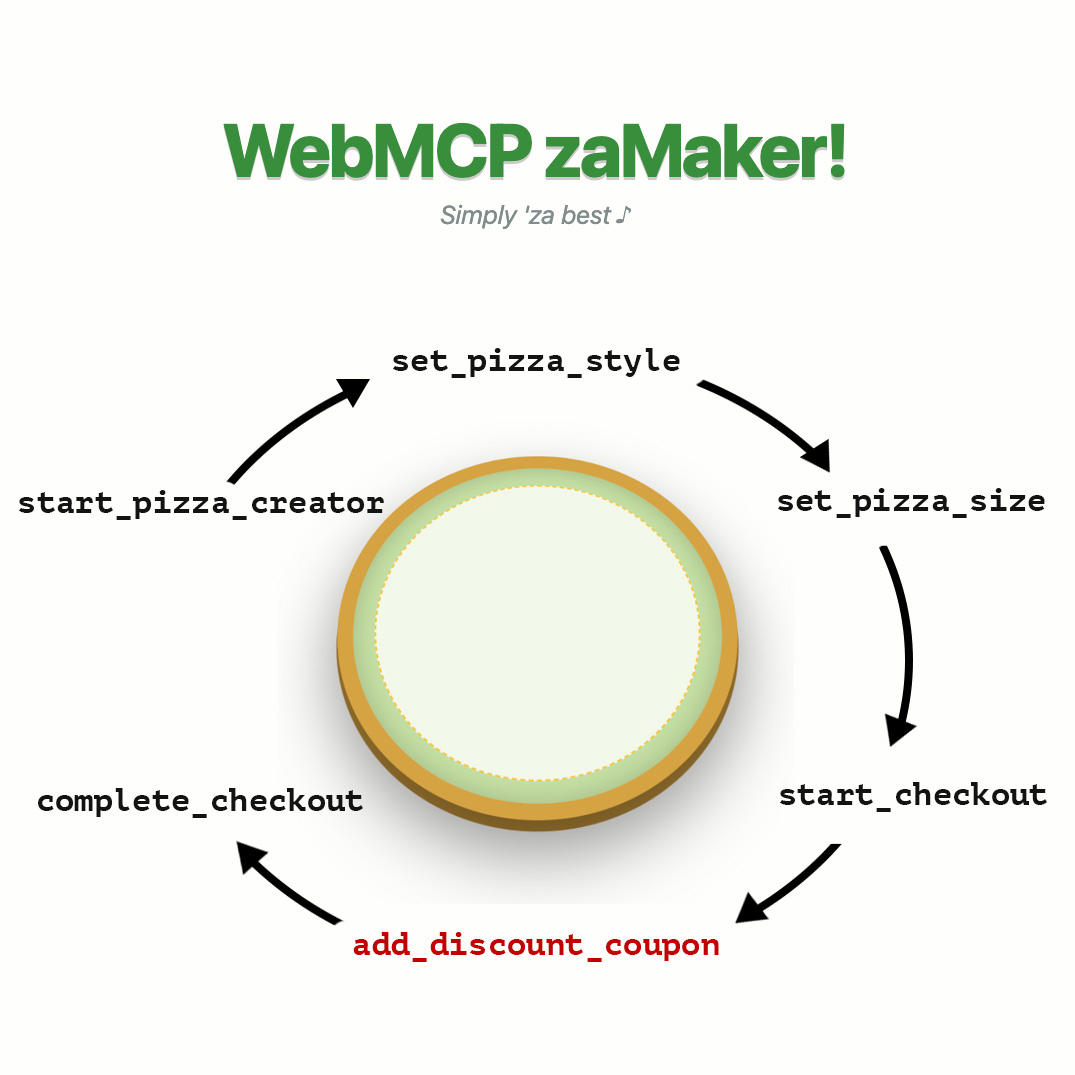 When a user requests to order a pizza with a discount coupon, a chain of tools are called sequentially: `start_pizza_creator`, `set_pizza_style`, `set_pizza_size`, `start_checkout`, `add_discount_coupon`, and `complete_checkout`. The `add_discount_coupon` failed, but the process was still able to complete, meaning the user did not receive a discount.
There may be times when an agent must call multiple tools sequentially. What
happens if a tool fails in the middle of this process? For example, a user
wants to order a pizza with their coupon code:
"I'd like a small Pesto pizza. Use my promo code, `FreePizza`."
It's possible the agent could fail at the `add_discount_coupon` and proceed to
checkout for a full price pizza. To test the `add_discount_coupon` tool, you
can can manually execute this sequence of tool calls, without the interacting
with a model, to simulate this scenario. Bring your application to the state
where you anticipate the tool fails. In this case, that's after the
`start_checkout` tool. Then, you can evaluate the `add_discount_coupon` in
isolation.
## Experiment with WebMCP
Start experimenting with evals for tools in isolation and evaluating your own
WebMCP-enabled sites with any WebMCP compatible agent:
- Download our [experimental evaluation tools on GitHub](https://github.com/GoogleChromeLabs/webmcp-tools/tree/main/evals-cli).
- Review our course, [Create AI evaluations](https://developer.chrome.com/docs/ai/evals).