 Thomas Steiner [GitHub](https://github.com/tomayac) [LinkedIn](https://www.linkedin.com/in/thomassteinerlinkedin) [Mastodon](https://toot.cafe/@tomayac) [Bluesky](https://bsky.app/profile/tomayac.com) [Homepage](https://blog.tomayac.com/)
Published: May 20, 2025
To meet your users' needs, whatever platform or hardware they use, you can set
up a fallback to the cloud with Firebase AI Logic for the built-in
[Prompt API](https://developer.chrome.com/docs/ai/prompt-api).
## Build a hybrid AI experience
[Built-in AI](https://developer.chrome.com/docs/ai/built-in) comes with a
[number of benefits](https://developer.chrome.com/docs/ai/built-in#benefits-on-device),
most notably:
- **Local processing of sensitive data:** If you work with sensitive data, you can offer AI features to users with end-to-end encryption.
- **Offline AI usage:** Your users can access AI features, even when they're offline or have lapsed connectivity
While these benefits don't apply to cloud applications, you can ensure a
seamless experience for those who cannot access built-in AI.
> [!CAUTION]
> **Caution:** When you fallback to the cloud, there may be legal or functional consequences for your application. If you process sensitive information, be sure to make the appropriate terms and conditions available for user review and consent.
## Get started with Firebase
Learn how to
[create a Firebase project and add Firebase to your web app](https://firebase.google.com/docs/web/setup).
Firebase projects are Google Cloud projects, with Firebase-specific
configurations and services. Learn more about
[Google Cloud and Firebase](https://firebase.google.com/docs/projects/learn-more#firebase-cloud-relationship).
### Install the SDK
This workflow uses npm and requires module bundlers or JavaScript framework
tooling. Firebase AI Logic is optimized to work with module bundlers to
eliminate unused code and decrease SDK size.
1. Install the Firebase JS SDK:
npm install firebase
2. [Initialize Firebase in your application.](https://firebase.google.com/docs/ai-logic/hybrid/web/get-started?api=dev#add-sdk)
## Set up and secure Firebase AI Logic
1. In the Firebase console, go to **AI Services** \>
[**AI Logic**](https://console.firebase.google.com/project/_/ailogic/?useAutoProject=true).
2. Click **Get started** to launch the setup workflow.
3. When asked to choose a "Gemini API provider", we recommend selecting the
**Gemini Developer API**, which lets you get started quickly at no cost.
At any point later, you can always
[set up the Vertex AI Gemini API](https://console.firebase.google.com/project/_/ailogic?openVertexAiOnboarding=true&useAutoProject=true)
(and its requirement for billing).
4. Continue in the console's workflow to set up the required APIs and
associated services for Firebase AI Logic.
Starting early July 2026, this stage of the workflow automatically
[enforces Firebase App Check for AI Logic](https://firebase.google.com/docs/ai-logic/app-check),
which is a *critical* service to help protect the Gemini API when it's
directly accessed from your app. As part of getting started (see steps later
in this guide), you'll need to configure the App Check *debug provider*
for local development when App Check is enforced.
> [!NOTE]
> **Note:** To release your app's AI feature to end users, you need to [register your app with a production App Check attestation provider](https://firebase.google.com/docs/ai-logic/app-check) so that they can use the feature when App Check is enforced.
5. Continue to the next sections in this guide to configure the App Check
*debug provider* for local development and then send your first request to
the Gemini API.
### Configure the App Check *debug provider* for local development
Here's how to use the debug provider while running your app from `localhost`
interactively (for example, during local development):
> [!WARNING]
> **Warning:** Do ***not*** try to enable `localhost` debugging by adding `localhost` to the allowed domains for reCAPTCHA. Doing so would allow anyone to run your app from their local machines!
1. In your debug build, enable debug mode by setting
`self.FIREBASE_APPCHECK_DEBUG_TOKEN` to `true` before you initialize
App Check. For example:
self.FIREBASE_APPCHECK_DEBUG_TOKEN = true;
initializeAppCheck(app, { /* App Check options */ });
2. Visit your web app locally and open the browser's developer tools. In the
debug console, you'll see a debug token:
AppCheck debug token: "123a4567-b89c-12d3-e456-789012345678".
You will need to safelist it in the Firebase console for it to work.
3. Register your debug token with App Check:
1. In the Firebase console, go to the
**Security** \> **App Check** \>
[**Apps** tab](https://console.firebase.google.com/project/_/appcheck/apps/?useAutoProject=true).
2. Find your app, click the overflow menu
(), and then select
**Manage debug tokens**.
3. Follow the on-screen instructions to register your debug token.
For details about the debug provider (including how to get a new debug token),
check out the
[official App Check docs](https://firebase.google.com/docs/app-check/web/debug-provider).
> [!CAUTION]
> **Here are some critical points about the
> App Check debug provider:**
>
> - **Keep your debug token and debug build private.** Don't commit your debug token to a public repository, and don't ship your debug token or debug build in production builds of your app.
> - **Register your app with a production attestation provider before
> releasing to end users.** You'll need to [register your app with a production App Check attestation provider](https://firebase.google.com/docs/ai-logic/app-check) (for example, reCAPTCHA Enterprise) so that your end-users can use your feature with App Check enforced.
## Send a request to the Gemini API
1. [Initialize and create an instance.](https://firebase.google.com/docs/ai-logic/hybrid/web/get-started?api=dev#initialize-service-and-model)
2. Prompt the model with text or multimodal input. See examples in the
following subsections of this guide.
> [!NOTE]
> **Note:** The following examples demonstrate [streaming responses from the model](https://developer.chrome.com/docs/ai/streaming), so you can work with chunks of output as received or the complete response.
### Text prompts
You can use plain text for your instructions to the model. For example, you
could ask the model to tell you a joke.
You have some options for how the request is routed:
- Use the built-in AI by default when it's available by setting the `mode` to
`'prefer_on_device'` in the `getGenerativeModel()` function. If the built-in
model isn't available, the request will fall back seamlessly to use the cloud
model (if you're online).
- Use the cloud model by default when you're online by setting the `mode` to
`'prefer_in_cloud'` in the `getGenerativeModel()` function. If you're offline,
the request will fall back seamlessly to use the built-in AI when available.
// Initialize the Google AI service.
const googleAI = getAI(firebaseApp);
// Create a `GenerativeModel` instance with a model that supports your use case.
const model = getGenerativeModel(googleAI, { mode: 'prefer_on_device' });
const prompt = 'Tell me a joke';
const result = await model.generateContentStream(prompt);
for await (const chunk of result.stream) {
const chunkText = chunk.text();
console.log(chunkText);
}
console.log('Complete response', await result.response);
### Multimodal prompts
You can also prompt with image or audio, in addition to text. You could tell the
model to describe an image's contents or transcribe an audio file.
Images need to be passed as a base64-encoded string as a Firebase `FileDataPart`
object, which you can do with the helper function `fileToGenerativePart()`.
// Converts a File object to a `FileDataPart` object.
// https://firebase.google.com/docs/reference/js/vertexai.filedatapart
async function fileToGenerativePart(file) {
const base64EncodedDataPromise = new Promise((resolve) => {
const reader = new FileReader();
reader.onload = () => resolve(reader.result.split(',')[1]);
reader.readAsDataURL(file);
});
return {
inlineData: { data: await base64EncodedDataPromise, mimeType: file.type },
};
}
const fileInputEl = document.querySelector('input[type=file]');
fileInputEl.addEventListener('change', async () => {
const prompt = 'Describe the contents of this image.';
const imagePart = await fileToGenerativePart(fileInputEl.files[0]);
// To generate text output, call generateContent with the text and image
const result = await model.generateContentStream([prompt, imagePart]);
for await (const chunk of result.stream) {
const chunkText = chunk.text();
console.log(chunkText);
}
console.log(Complete response: ', await result.response);
});
## Demo
Visit the [Firebase AI Logic
demo](https://chrome.dev/web-ai-demos/firebase-ai-logic/) on different devices
and browsers. You can see how the model response comes from either the built-in
AI model or the cloud.
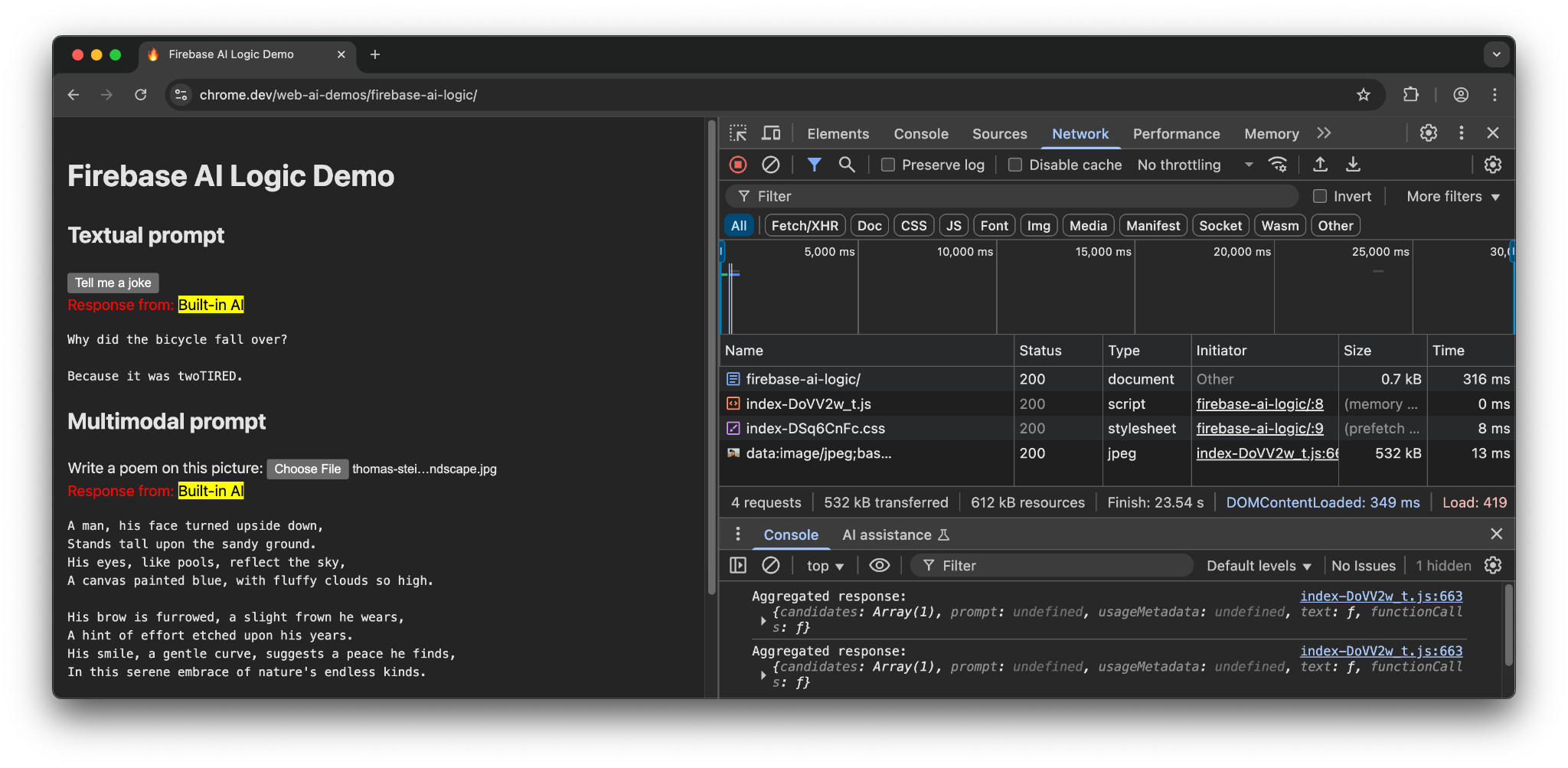
When on supported hardware in Chrome, the demo uses the Prompt API and Gemini
Nano. There are only 3 requests made for the main document, the JavaScript file,
and the CSS file.
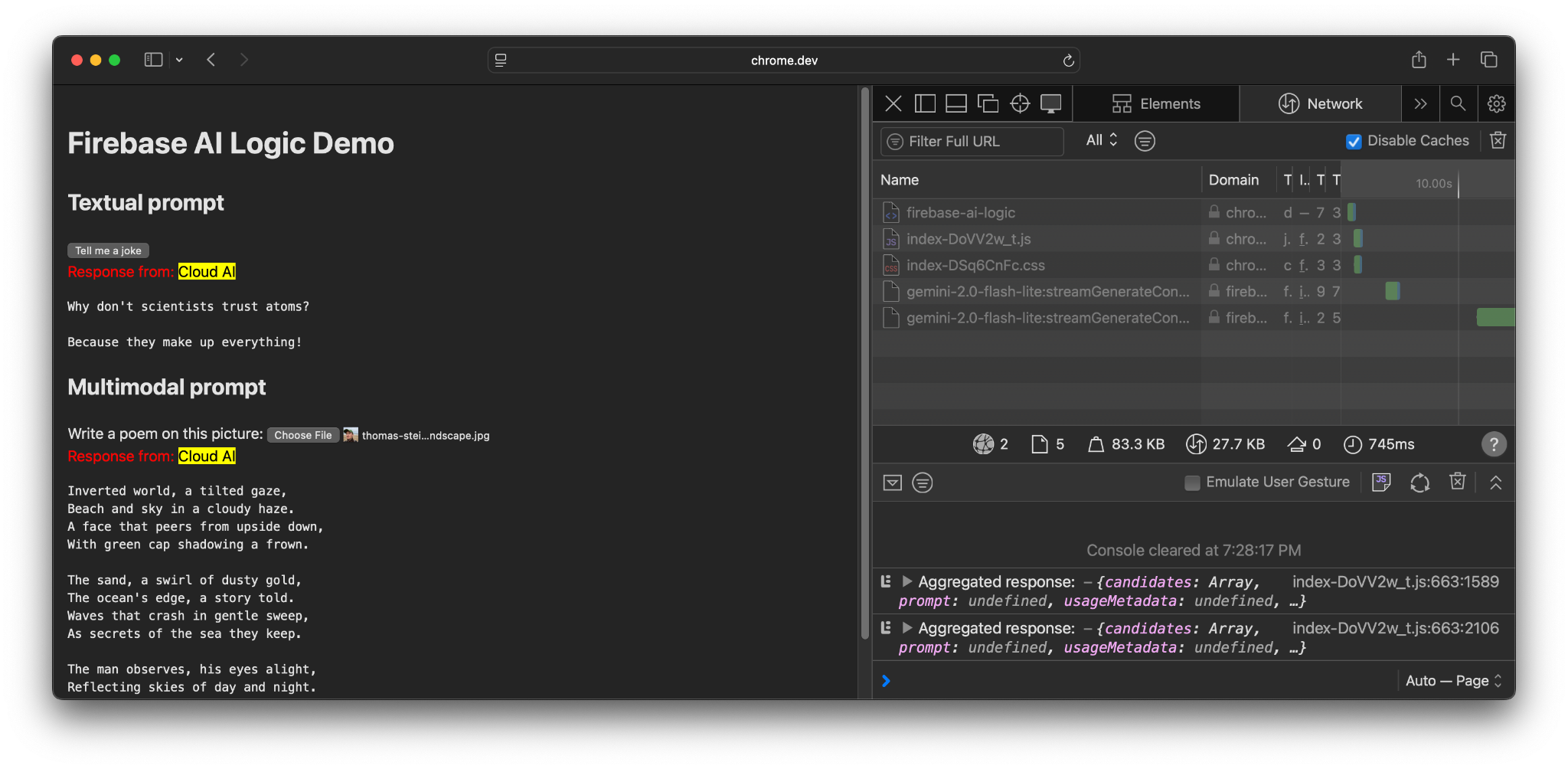
When in another browser or an operating system without built-in AI support,
there is an additional request made to the Firebase endpoint,
`https://firebasevertexai.googleapis.com`.
## Participate and share feedback
Firebase AI Logic can be a great option to integrate AI capabilities to your web
apps. By providing a fallback to the cloud when the Prompt API is unavailable,
the SDK ensures wider accessibility and reliability of AI features.
Remember that cloud applications create new expectations for privacy and
functionality, so it's important to inform your users of where their data is
being processed.
- For feedback on Chrome's implementation, file a [bug report](https://issues.chromium.org/issues/new?component=1617227&priority=P2&type=bug&template=0&noWizard=true) or a [feature request](https://issues.chromium.org/issues/new?component=1617227&priority=P2&type=feature_request&template=0&noWizard=true).
- For feedback on Firebase AI Logic, file a [bug report](https://github.com/firebase/firebase-js-sdk/issues).