Kinuko Yasuda [X](https://twitter.com/kinu) [GitHub](https://github.com/kinu)
> [!NOTE]
> **Note:** Signed Exchanges are supported in Chrome 73 and later.
[Signed HTTP Exchange](https://wicg.github.io/webpackage/draft-yasskin-http-origin-signed-responses.html)
(or "SXG") is a subset of the emerging technology called
[Web Packages](https://github.com/WICG/webpackage), which enables publishers to
safely make their content portable, i.e. available for redistribution by other
parties, while still keeping the content's integrity and attribution. Portable
content has many benefits, from enabling faster content delivery to
facilitating content sharing between users, and simpler offline experiences.
So, how do Signed HTTP Exchanges work? This technology allows a publisher to
[sign a single HTTP exchange](https://wicg.github.io/webpackage/draft-yasskin-http-origin-signed-responses.html#rfc.section.3)
(i.e., a request/response pair), in the way that the signed exchange can be
served from any caching server. When the browser loads this Signed Exchange,
it can safely show the publisher's URL in the address bar because the signature
in the exchange is sufficient proof that the content originally came from the
publisher's origin.
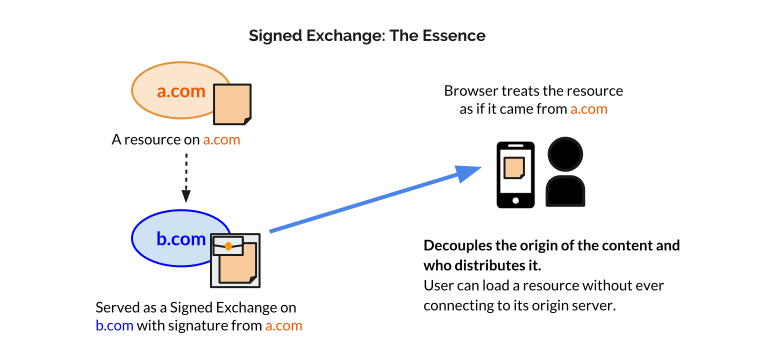
This decouples the origin of the content from who distributes it. Your content
can be published on the web, without relying on a specific server, connection,
or hosting service! We're excited about possible uses of SXG such as:
- **Privacy-preserving prefetching:** While prefetching resources (e.g.,
[by link rel=prefetch](https://w3c.github.io/resource-hints/#dfn-prefetch))
for a subsequent navigation can make the navigation feel a lot faster, it
also has privacy downsides. For instance, prefetching resources for
cross-origin navigations will disclose to the destination site that the user
is potentially interested in a piece of information even if the user
ultimately didn't visit the site. On the other hand, SXG allows for
prefetching cross-origin resources from a fast cache without ever reaching
out to the destination site, thereby only communicating user interest if and
when the navigation occurs. We believe that this can be useful for sites
whose goal is to send their users to other websites. In particular, Google
plans to use this on Google search result pages to
[improve AMP URLs](https://www.ampproject.org/latest/blog/a-first-look-at-using-web-packaging-to-improve-amp-urls/)
and speed up clicks on search results.
- **Benefits of a CDN without ceding control of your certificate private key:**
Content that has suddenly become popular (e.g. linked from
[reddit.com](https://www.reddit.com/)'s first page) often overloads the site
where the content is served, and if the site is relatively small, it tends
to slow down or even temporarily become unavailable. This situation can be
avoided if the content is shared using fast, powerful cache servers, and SXG
makes this possible without sharing your TLS keys.
## Trying out Signed Exchanges
Signed Exchanges are available in Chrome 73 and later, and were previously
available as an origin trial.
### Creating your SXG
In order to create SXGs for your origin (as a publisher), you need a
certificate key to sign the signature, and the certificate must have a special
["CanSignHttpExchanges" extension](https://wicg.github.io/webpackage/draft-yasskin-http-origin-signed-responses.html#cross-origin-cert-req)
to be processed as a valid SXG. As of November 2018, [DigiCert](https://www.digicert.com/)
is the only CA that supports this extension, and you can request the
certificate that works for SXG from
[this page](https://www.digicert.com/account/ietf/http-signed-exchange.php).
Once you get a certificate for SXG you can create your own SXGs by using the
[reference generator tools](https://github.com/WICG/webpackage/tree/main/go/signedexchange)
published on github.
You can also take a look at the actual SXG example files in the
[Chrome's code repository](https://cs.chromium.org/chromium/src/content/test/data/sxg/)
(e.g. [this one](https://cs.chromium.org/chromium/src/content/test/data/sxg/test.example.org_hello.txt.sxg)
is the simplest one created for
[a simple text file](https://cs.chromium.org/chromium/src/content/test/data/sxg/hello.txt)).
Note that they are generated primarily for local testing, please do not expect
that they have valid certificates and timestamps in the signature.
## Testing the Feature Locally
For creating SXGs for testing purposes, you can create
[a self-signed certificate](https://github.com/WICG/webpackage/tree/main/go/signedexchange#creating-our-first-signed-exchange)
and enable `chrome://flags/#allow-sxg-certs-without-extension` to have your
Chrome process the SXGs created with the certificate without the special extension.
Code like the following should work if your server, certificate, and SXGs
are correctly set up:
Sample
Note that SXG is only supported by the anchor tag (``) and `link rel=prefetch`
in Chrome 73 and later. Also note that the signature's validity is capped to 7
days per spec, so your signed contents will expire relatively quickly.
## Providing Feedback
We are keen to hear your feedback on this experiment at
[webpackage-dev@chromium.org](mailto:webpackage-dev@chromium.org). You can
also join [the spec discussion](https://github.com/WICG/webpackage/issues),
or report
[a chrome bug](https://issues.chromium.org/issues/new?noWizard=true&template=0&component=1456695)
to the team. Your feedback will greatly help the standardization process
and also help us address implementation issues.
## Feedback