 François Beaufort [GitHub](https://github.com/beaufortfrancois)
` or `"autocomplete"` which we'll cover as
well in this article.
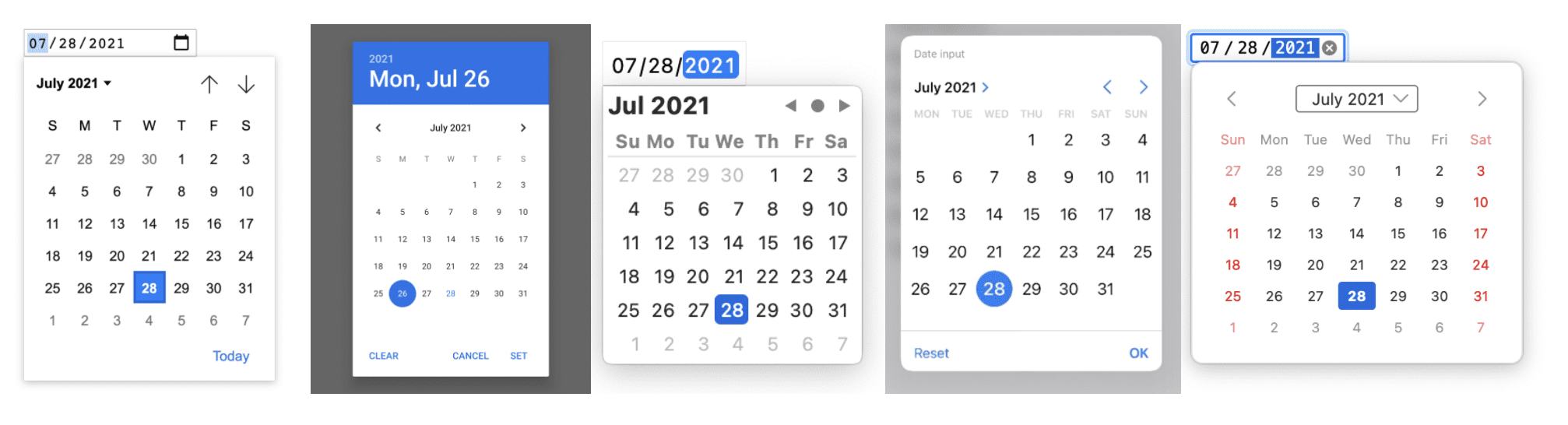 Browser date pickers in Chrome desktop, Chrome mobile, Safari desktop, Safari mobile, and Firefox desktop (July 2021).
> [!NOTE]
> **Note:** Unlike a third-party picker widget, a browser picker is familiar to the user, has great platform-specific support, and is always maintained as part of the browser.
## How to show a picker
Calling `showPicker()` on an `Show the date picker
A browser picker can also be prepopulated with items from `` or
`"autocomplete"`.
The example below shows you how to open a browser picker with ``.
Show the suggestions
## Feature detection
To check if `showPicker()` is supported, use:
```javascript
if ('showPicker' in HTMLInputElement.prototype) {
// showPicker() is supported.
}
```
## Demo
A demo is available at for you
to play with all pickers supported by the browser.
## Browser support
`showPicker()` is available in Chrome 99 or later.
## What's next
At the time of writing, `showPicker()` is new to the web platform. The feature
may need additional work in the future:
- We may want to add a similar `showPicker()` to the `` element in the future, if web developers ask for it.
- It's possible `closePicker()` might be useful, and we could consider adding that if web developers ask for it.
- We could add a [permissions policy](https://developer.chrome.com/docs/privacy-sandbox/permissions-policy) which allows cross-origin iframes to show browser pickers when their parent chain allows them to do so.
## Feedback
The Chrome team and the web standards community want to hear about your
experiences with `showPicker()`.
### Tell us about the design
Is there something about `showPicker()` that doesn't work like you expected? Or
are there missing methods or properties that you need to implement your idea?
Have a question or comment on the security model?
- File a spec issue on the [WHATWG GitHub repo](https://github.com/whatwg/html/issues), or add your thoughts to an existing issue.
### Problem with the implementation?
Did you find a bug with Chrome's implementation? Or is the implementation
different from the spec?
- File a bug at . Be sure to include as much detail as you can, and simple instructions for reproducing.
### Show support
Are you planning to use `showPicker()`? Your public support helps the Chrome
team prioritize features and shows other browser vendors how critical it is to
support them.
Send a tweet to [@ChromiumDev](https://twitter.com/ChromiumDev) and let us know where and how you are using it.
## Helpful links
- [MDN documentation](https://developer.mozilla.org/docs/Web/API/HTMLInputElement/showPicker)
- [WHATWG explainer](https://github.com/whatwg/html/pull/7319)
- [WHATWG specification](https://html.spec.whatwg.org/multipage/input.html#dom-input-showpicker)
- [TAG review](https://github.com/w3ctag/design-reviews/issues/688)
- [Demo](https://cdpn.io/web-dot-dev/fullpage/LEVKVdr) \| [Demo source](https://codepen.io/web-dot-dev/pen/LEVKVdr)
- [Chromium bug](https://bugs.chromium.org/p/chromium/issues/detail?id=939561)
- [ChromeStatus.com entry](https://www.chromestatus.com/feature/5692248021794816)
## Acknowledgements
Thanks to [Joe Medley](https://github.com/jpmedley) for reviewing this article.
Calendar image photo by [Eric Rothermel](https://unsplash.com/@erothermel) on [Unsplash](https://unsplash.com/photos/FoKO4DpXamQ).