 José Luis Zapata [GitHub](https://github.com/zapata131) [LinkedIn](https://www.linkedin.com/in/zapata131) [Bluesky](https://bsky.app/profile/zapata131.bsky.social) [Homepage](https://www.zapata131.com)
Published: May 09, 2025
Passkeys are [a phishing-resistant alternative to passwords](https://www.google.com/url?q=https://fidoalliance.org/passkey-adoption-doubles-in-2024-more-than-15-billion-online-accounts-can-leverage-passkeys/&sa=D&source=docs&ust=1744029433814276&usg=AOvVaw1yLP_VNxNbjlRFbKvmmT11).
Even though passkeys offer many benefits, most users authenticate with passwords
today. To encourage adoption, you need to ask your users to create passkeys, but
this introduces friction. What if users could automatically create a passkey
without extra steps?
## The solution: Automatic passkey creation
With **passkey creation** , a website can ask the user's password manager to
create a passkey automatically. This works as long as a password is saved for
your site and was used *recently* to sign in. The password manager will notify
the user only if a passkey was created successfully. This ensures that users can
benefit from passkey security without extra effort and can be implemented
alongside other authentication methods.
We recommend you call Conditional Create which enables passkey creation
immediately after a successful sign-in with a password.
This is available in Chrome 136 on all desktop platforms and is coming soon to
Android.
Here's how to implement it:
const cred = await navigator.credentials.create({
publicKey: options,
mediation: 'conditional' // Enables automatic passkey creation
});
To check whether **conditional creation** is supported:
if (window.PublicKeyCredential && PublicKeyCredential.getClientCapabilities) {
const capabilities = await PublicKeyCredential.getClientCapabilities();
if (capabilities.conditionalCreate) {
// Conditional passkey creation is available
}
### Disable automatic passkey creation
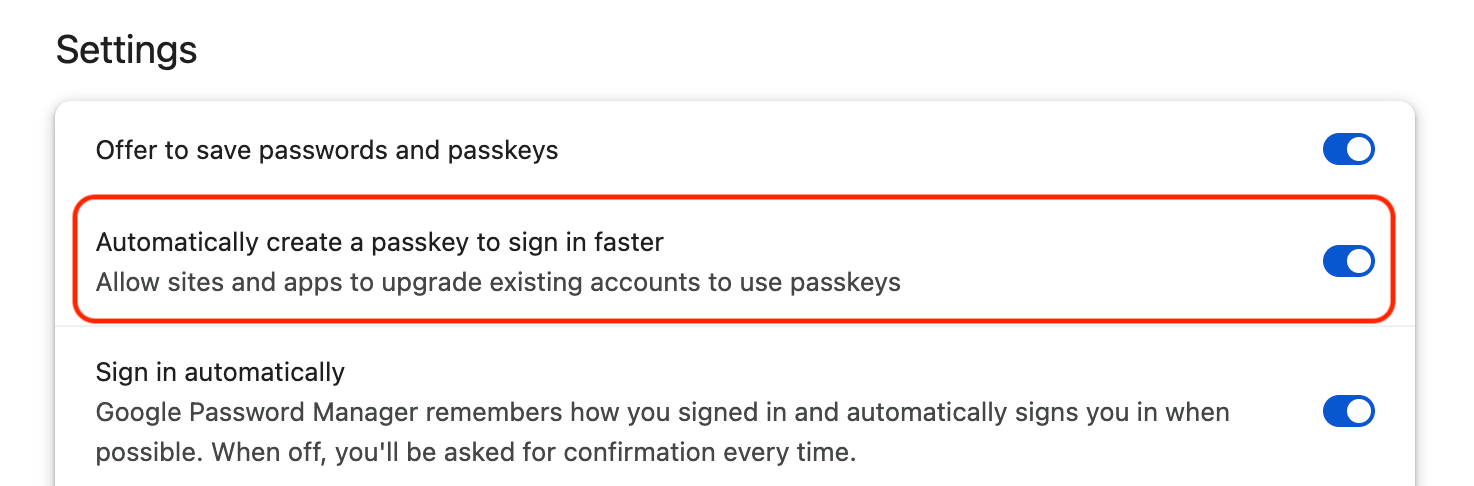
Users can optionally disable automatic passkey creation from
`chrome://password-manager/settings` by clicking the **Automatically create a
passkey to sign in faster** toggle.
## Why use automatic passkey creation?
- **Seamless transition**: Users get a passkey without additional steps.
- **Reduced phishing risk**: Passkeys eliminate password-based attacks.
- **Better user experience**: No disruptive prompts, authentication just works.
## Get started
Automatic passkey creation is a great way to improve security and streamline
authentication.
[Learn more about automatic passkey
creation](https://developer.chrome.com/docs/identity/webauthn-conditional-create), start integrating
automatic passkey creation today and help users move beyond passwords.
## Share feedback
Tell us what you think about automatic passkey creation.
[Give feedback](https://docs.google.com/forms/d/e/1FAIpQLSeg-k4vBeSpw4753yUwK0bRc6JofDYo8KnBh1dvES0VyvOTgA/viewform?usp=header)
## Learn more
Read other resources about passkeys:
- [Passkey adoption stats](https://fidoalliance.org/passkey-adoption-doubles-in-2024-more-than-15-billion-online-accounts-can-leverage-passkeys/)
- [Passwordless login with passkeys](https://goo.gle/passkeys)
- [Help users adopt passkeys more seamlessly](https://web.dev/articles/webauthn-conditional-creation)
- [Passkey registration](https://web.dev/articles/passkey-registration)