 Matthias Rohmer [X](https://twitter.com/matthiasrohmer) [GitHub](https://github.com/matthiasrohmer) [LinkedIn](https://www.linkedin.com/in/matthias-rohmer-b09191b0) [Bluesky](https://bsky.app/profile/matthiasrohmer.bsky.social)
Published: September 22, 2026
[Video](https://www.youtube.com/watch?v=vukchAoaTdE)
Chrome 153 and Chrome 154 rolled out to stable over the past month, delivering a
wave of developer improvements ready for your everyday workflow. This edition
highlights fine-grained JavaScript execution controls in DevTools for agents, ad
script tracking in the Application panel, full soft navigation support and CPU
performance tier overrides in Performance, support for inactive styles and
keyboard-accessible adorners in Elements, source inspection and performance
trace recording in AI assistance, and modernized device presets in Device Mode.
> [!NOTE]
> **Note:** Chrome now releases twice a month! Because of that the What's new in DevTools series switches to a monthly recap of features that landed over the *past* month and are *now* available for you to use. Let us know what you think and how we can improve this series for you on social media by posting to [@ChromeDevTools on X](https://x.com/ChromeDevTools).
## DevTools for agents
The Chrome DevTools MCP server introduces new security controls, performance
tuning, and memory analysis capabilities for coding agents:
- **Agent Plugins 1.0 package**: Added support for the Agent Plugins 1.0 package, allowing agents to load and execute modular plugin extensions.
- **JavaScript execution controls** : Configure `--no-javascript-evaluation` or turn off JavaScript execution tools to inspect pages without evaluating scripts, extending across navigations and initialization scripts.
- **On-demand source maps**: Added an option to disable source maps and lazy-load source maps on demand, preventing high memory usage on large sites.
- **Configurable file system roots and CLI path permissions** : The CLI now includes `--allow-unrestricted-paths` by default and supports configurable file system roots.
- **Heap snapshot inspection** : Query objects directly by retained size or property name with `query_heapsnapshot`, view self and retained sizes for edges, and inspect memory retained by V8 execution contexts.
- **PWA automation tools**: Added dedicated tools for automating Progressive Web App installation and lifecycle checks.
- **Console stack traces** : Retrieve optional stack traces when listing console messages with `list_console_messages`.
Learn more in the [chrome-devtools-mcp
repository](https://github.com/ChromeDevTools/chrome-devtools-mcp).
> [!TIP]
> **Tip:** [Modern Web Guidance](https://goo.gle/mwg) helps your coding agent to use the platform's newest features through guides. Notable additions in September include new guides for [progress-ring](https://github.com/GoogleChrome/modern-web-guidance/blob/v0.0.187/skills/modern-web-guidance/guides/ui-components/progress-ring.md), [scrollspy](https://github.com/GoogleChrome/modern-web-guidance/blob/v0.0.187/skills/modern-web-guidance/guides/ui-components/scrollspy.md), and [spinner](https://github.com/GoogleChrome/modern-web-guidance/blob/v0.0.187/skills/modern-web-guidance/guides/ui-components/spinner.md).
## Application: Ad script tracking in the Ads section, and cookie flag editing
Following the introduction of four experimental ad metrics for the Chrome User
Experience Report (CrUX), this new sub-panel is a centralized location to debug
and optimize page-wide ad-related information. This includes:
- A dashboard for the new experimental metrics: Viewport ad density, Viewport ad count, Total CPU usage by ads, Total network usage by ads.
- Segmentation of CPU and network usage by ads elements
- A table of ads scripts in the main frame.
- A toggle that highlights ads on the page.
Learn more about the new ad metrics in our [documentation](https://developer.chrome.com/docs/ads).
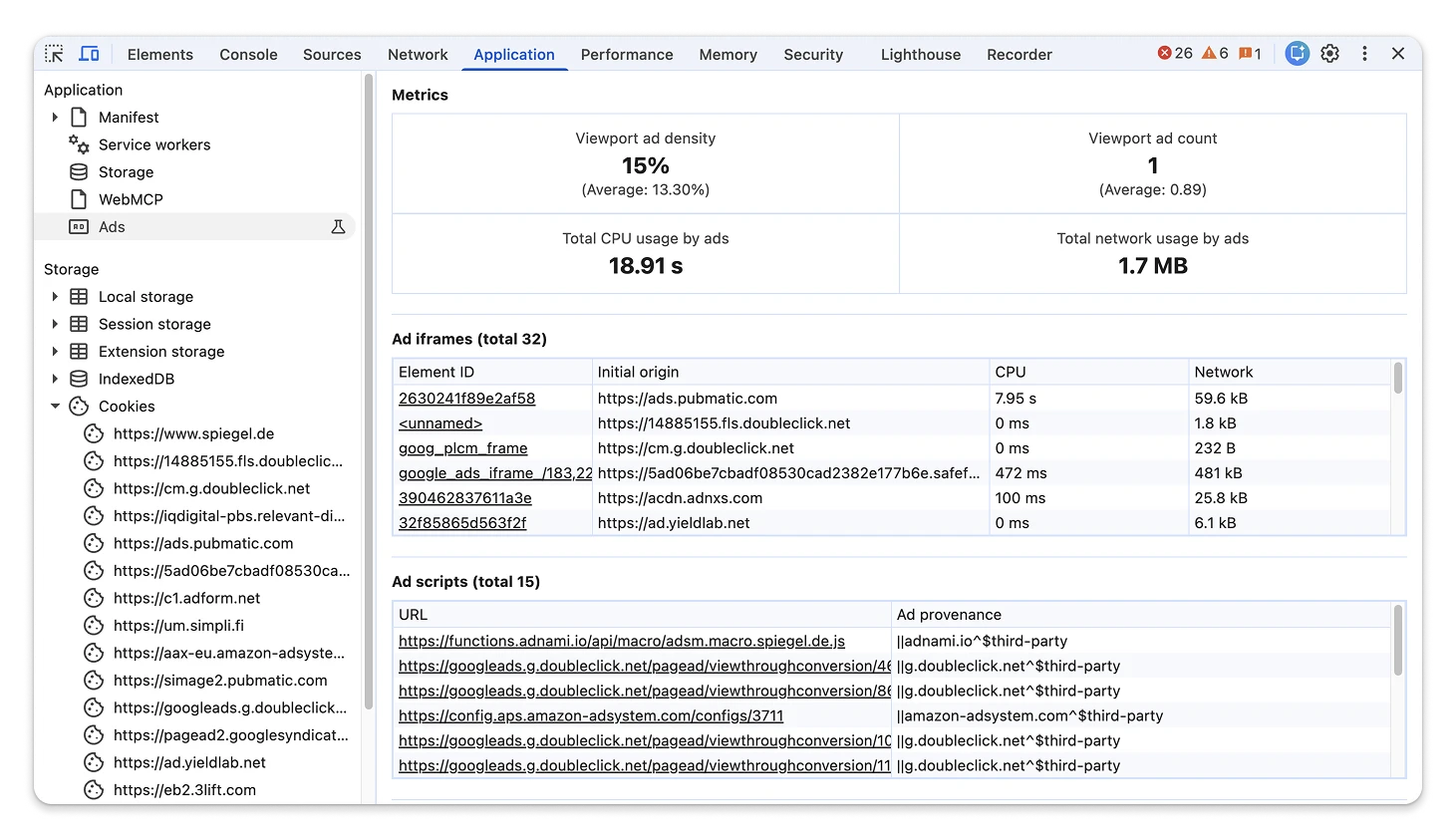 Application panel Ads tab displaying the new Ad scripts table and revealing an ad script in Sources.
Chromium issues: [514957134](https://crbug.com/514957134),
[512927903](https://crbug.com/512927903),
[540469610](https://crbug.com/540469610)
## Performance: Full soft navigation support, CPU performance tier overrides, and extension track search
The **Performance** panel offers end-to-end soft navigation measurement,
hardware calibration overrides, and deeper trace search:
- **Full soft navigation support** : Following the introduction of soft navigation support in Live Metrics and trace views in [Chrome
152](https://developer.chrome.com/blog/new-in-devtools-152#performance_soft_navigation_metrics_in_live_metrics_and_custom_screenshot_presets), soft navigation analysis is now available in **Insights** , completing full end-to-end support for measuring soft navigations in the **Performance** panel.
- **CPU performance tier override over CDP** : DevTools now supports configuring, calculating, and dispatching calibrated CPU performance tier overrides over Chrome DevTools Protocol (`Emulation.setCPUPerformanceOverride`), enabling reproducible performance testing across hardware tiers.
- **Extension track search in flame chart** : Pressing `Ctrl+F` in the **Performance** panel flame chart now matches entries in custom tracks registered using the Extensibility API, searching their tooltip text, properties, and user details.
- **CPU profile thread visualization** : The **Performance** panel flame chart now renders threads that contain only CPU profile samples, ensuring background executions such as WebAssembly threads appear in timeline views.
Soft navigation end-to-end workflow in the Performance panel.
Chromium issues: [449760252](https://crbug.com/449760252),
[483092899](https://crbug.com/483092899),
[540020488](https://crbug.com/540020488)
## Elements: Inactive styles, keyboard-accessible adorners, and tree outline fixes
Inspecting and authoring CSS is faster and more accessible in the **Elements**
panel:
- **Inactive styles support** : DevTools can now continue showing style rules that previously matched the selected element when they no longer apply, clearly distinguishing them with an inactive visual indicator. Enable inactive styles and configure their collapsing behavior in **Settings**.
- **Keyboard-accessible adorners** : Interactive adorners in the DOM tree---including **View Source** , **Starting Style** , **Scroll Snap** , and **Reveal** ---are now keyboard focusable and can be activated using `Enter` or `Space`.
- **Drag-and-drop reordering**: Reordering DOM nodes by dragging elements in the DOM tree now functions reliably across shadow DOM boundaries, with clear drop placement indicators.
- **Smoother CSS property toggling** : Toggling CSS property checkboxes in the **Styles** tab no longer triggers duplicate UI repaints or visual flashing.
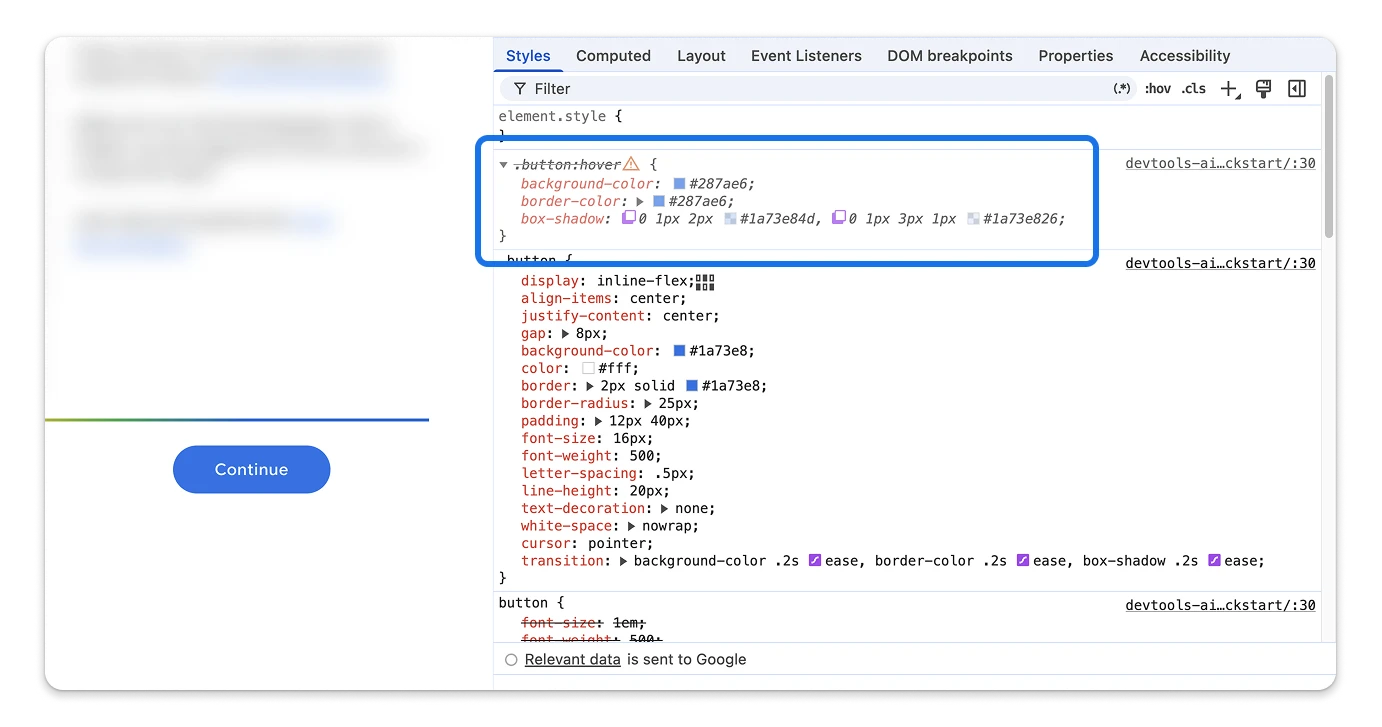 Elements panel showing an inactive CSS rule.
Chromium issues: [539424116](https://crbug.com/539424116),
[554057179](https://crbug.com/554057179),
[555088527](https://crbug.com/555088527),
[548477554](https://crbug.com/548477554)
## Device Mode: Modernized device presets grouped by form factor
The **Device Mode** toolbar and **Settings** \> **Devices** view organize
emulated hardware into clear categories:
- **Form factor grouping** : Emulated devices are now grouped into **Mobile** , **Foldables** , **Tablets \& Desktops** , and **Smart Displays**.
- **Updated hardware catalog**: Added modern presets---including iPhone 16, Pixel 9, Pixel 10, Galaxy Z Fold 6, iPad Pro 13", and Nest Hub Max---while retiring outdated legacy device definitions.
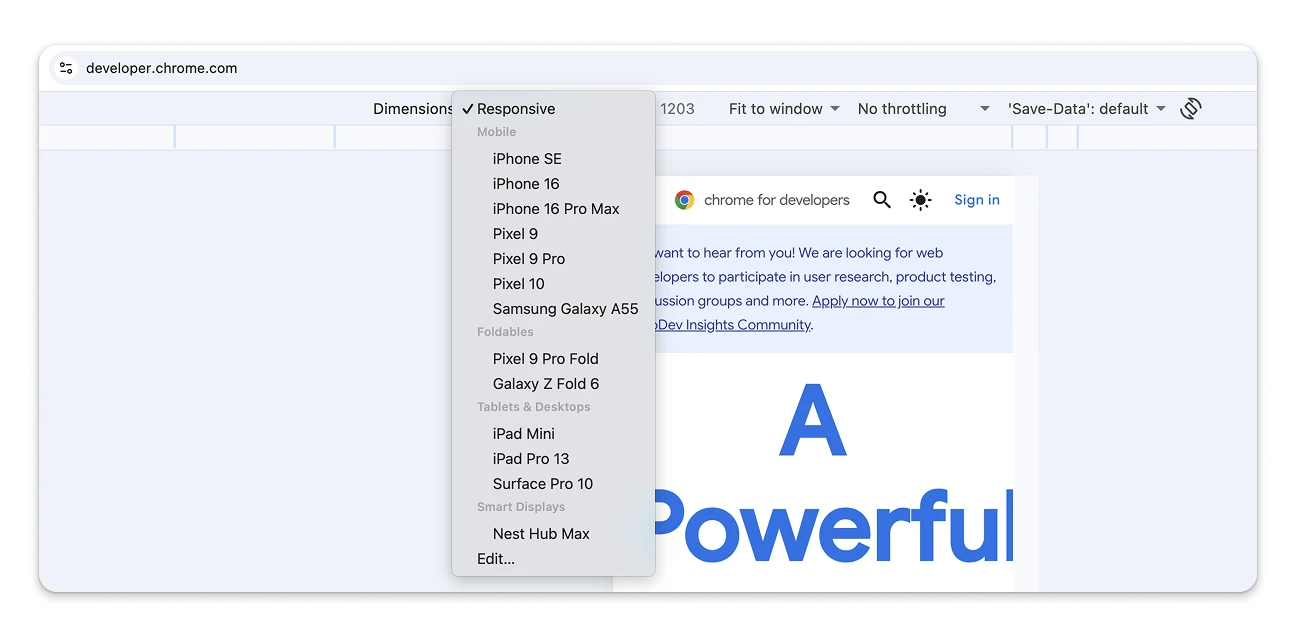 Device Mode showing the modernized device presets grouped by form factor.
Chromium issues: [526856234](https://crbug.com/526856234),
[526857820](https://crbug.com/526857820)
## Network: Edit and resend as fetch in Console, and local overrides security
Network request inspection and debugging workflows have been streamlined and
secured:
- **Edit and resend as fetch in Console** : Selecting **Edit and resend as
fetch** on any network request now automatically focuses the **Console** panel with the `fetch()` expression already pasted into the prompt, complete with parameter comments and a reference link to the original request.
- **Local overrides security hardening** : The **Network** panel now prevents path traversal (`%2E%2E`) in local overrides and prohibits creating overrides on non-http(s) schemes like `data:`, `blob:`, `javascript:`, and `about:`.
- **Caret escaping in Copy as curl (cmd)** : Copying network requests as curl commands for Windows `cmd.exe` now caret-escapes parentheses and backticks, preventing command syntax errors when pasted into alternative shells.
- **Binary payload cursor synchronization** : The **Payload** tab maintains your scroll and cursor position when switching between Hex, Base64, and UTF-8 views.
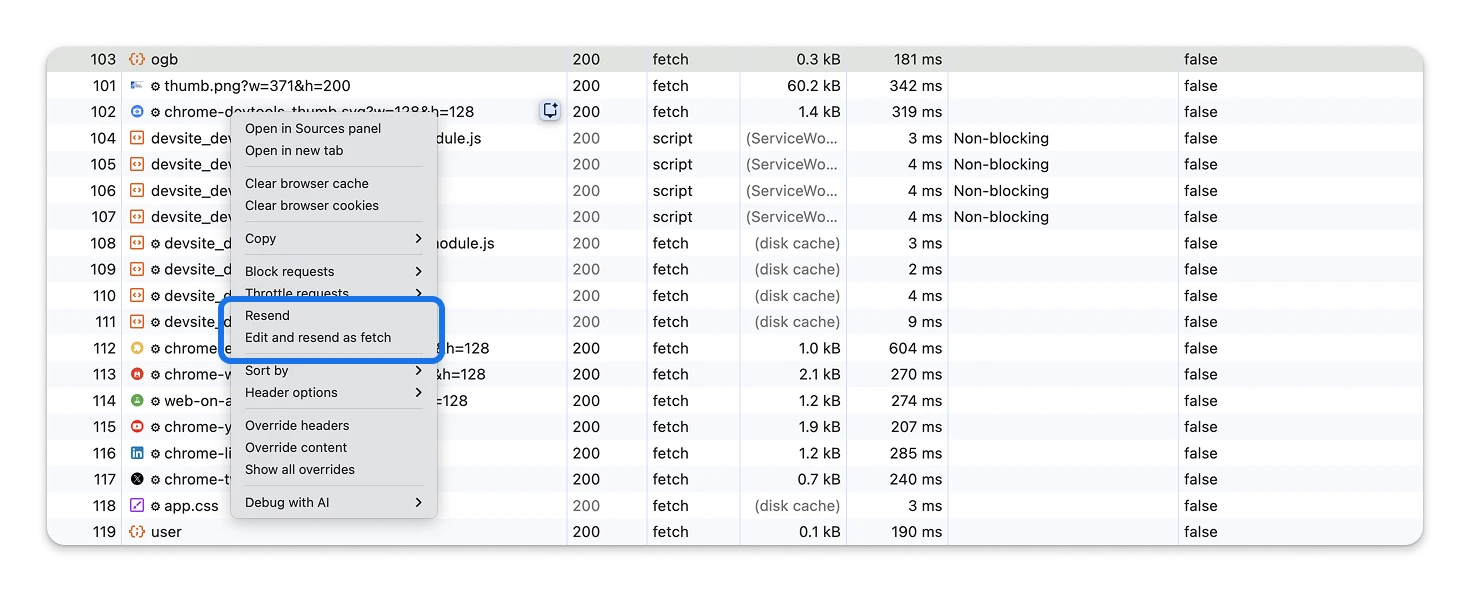 Right-clicking a network request and selecting Edit and resend as fetch, which auto-focuses the Console panel with the fetch expression already pasted and ready to edit.
Chromium issues: [40726969](https://crbug.com/40726969),
[513843792](https://crbug.com/513843792),
[513836026](https://crbug.com/513836026),
[407750982](https://crbug.com/407750982)
## Memory: Heap snapshot edge filtering, size sorting, and object querying
The **Memory** panel provides more granular tools for analyzing heap snapshots:
- **Edge sorting and filtering** : You can now filter edges in heap snapshots by a minimum retained size and filter out primitive values (`null`, `undefined`, `true`, `false`) to focus on meaningful object references. Edges can be sorted by retained size, self size, or name.
- **Direct object querying**: DevTools supports querying heap snapshot objects directly by retained size threshold or property name, streamlining memory leak investigations.
- **Context retention analysis**: Heap snapshots can calculate and report the aggregate memory kept alive specifically by V8 execution contexts.
- **Resilient snapshot parsing**: Invalid or corrupted heap snapshot files now surface clear errors rather than causing parsing hangs.
Chromium issues: [497855658](https://crbug.com/497855658)
## Accessibility improvements
Chrome 153 and Chrome 154 include the following accessibility enhancements:
- **Elements** : VoiceOver on macOS now announces "expanded" and "collapsed" state changes through a polite live region when navigating DOM tree items. (Chromium issue: [540028208](https://crbug.com/540028208))
- **Issues** : Resolved duplicate screen reader announcements in the **Issues** counter, reading a single clean summary and applying correct non-button semantics within the **Issues** panel. (Chromium issue: [536977880](https://crbug.com/536977880))
- **Elements** : Interactive adorners (**View Source** , **Starting Style** , **Scroll Snap** , and **Reveal** ) are fully focusable and activatable using the keyboard. (Chromium issue: [554057179](https://crbug.com/554057179))
- **Live regions** : Added the `AccessibilityAnnouncementRecordingView` to record and debug live announcements and `ariaNotify` calls. (Chromium issue: [527462118](https://crbug.com/527462118))
Chromium issues: [540028208](https://crbug.com/540028208),
[536977880](https://crbug.com/536977880),
[554057179](https://crbug.com/554057179),
[527462118](https://crbug.com/527462118)