 Matthias Rohmer [X](https://twitter.com/matthiasrohmer) [GitHub](https://github.com/matthiasrohmer) [LinkedIn](https://www.linkedin.com/in/matthias-rohmer-b09191b0) [Bluesky](https://bsky.app/profile/matthiasrohmer.bsky.social)
Published: June 2, 2026
[Video](https://www.youtube.com/watch?v=wBNCPp5gdqg)
Chrome 149 brings major upgrades to AI assistance, introduces experimental
WebMCP debugging tools in the Application panel, and expands code completion
support to CSS.
## DevTools for agents
The MCP server and CLI of Chrome DevTools for agents are now officially
stable! Read the [full announcement here](https://developer.chrome.com/blog/devtools-for-agents-v1.md.txt).
Key features and new tools added up to the v1.1.1 release include:
- **Custom third-party, page-exposed tools:** pages can now define [custom debugging tools](https://github.com/ChromeDevTools/chrome-devtools-mcp/blob/main/docs/tool-reference.md#third-party) through JavaScript, discoverable and callable by DevTools for agents.
- **WebMCP debugging:** DevTools for agents can now [list and execute WebMCP tools](https://github.com/ChromeDevTools/chrome-devtools-mcp/blob/main/docs/tool-reference.md#third-party).
- **Custom HTTP headers emulation:** Adds support for HTTP headers (such as Auth tokens or custom User-Agents) to the emulation tool.
Third-party tools and WebMCP debugging are still experimental and not yet
enabled by default. Check the [tool reference](https://github.com/ChromeDevTools/chrome-devtools-mcp/blob/main/docs/tool-reference.md)
for info on WebMCP tools, learn more about [third-party tools in our documentation](https://developer.chrome.com/docs/devtools/agents/use-cases/third-party-tools.md.txt).
For the most recent updates around DevTools for agents, and to contribute, visit
the [GitHub repository](https://github.com/ChromeDevTools/devtools-mcp-server).
Get started [with our documentation](https://developer.chrome.com/docs/devtools/agents/get-started.md.txt) or get up to speed with
the comprehensive Google I/O video session [Supercharge your AI coding workflow with Chrome DevTools for agents](https://www.youtube.com/watch?v=1AD81ZselPk).
> [!TIP]
> **Tip:** With **Modern Web Guidance** the Chrome team released a set of skills to help coding agents build with the web's newest features, while supporting your Baseline target. Find install instructions [in our documentation](https://developer.chrome.com/docs/modern-web-guidance.md.txt) and learn more in the dedicated Google I/O video session [Unlock modern web capabilities in your AI coding workflows](https://www.youtube.com/watch?v=bo3i0FzDUYo).
## AI assistance
The **AI assistance** panel has received a significant user interface update and
new tools to improve the conversational experience and provide deeper page
insights:
- **Agent walkthrough:** AI assistance now renders widgets directly within the chat interface instead of plain text Markdown. These widgets cover Core Web Vitals and related insights, LCP elements, LCP breakdown, Bottom-up thread activity, and more. A **Reveal** link inside the widget brings you to the source of this information inside DevTools.
- **Copy to coding agent**: Conversations now end with a dedicated button to copy the conversation, either summarized as a prompt, or the verbatim conversation, for you to paste it in your coding agent of choice.
- **Upgraded capabilities**: AI assistance now has access to Lighthouse and related insights, allowing it to holistically analyze your page and give targeted advice.
- **Improved responses**: Using Gemini 3 under the hood, and refined preambles, AI assistance gives more concise, and more actionable answers.
- **Improved navigation:** You can now navigate through your previous chat prompts using the **Up Arrow** and **Down Arrow** keys, making it fast and intuitive to refine or re-run previous queries.
AI assistance with the prompt "How can I improve the performance of this page?" on the Astro.js demo site [DevTools Times](https://chrome.dev/devtools-times), showing the Agent walkthrough, widgets, and Copy to coding agent to Antigravity.
In favor of Copy to coding agent, we will deprecate support
for [automated styling fixes through AI assistance](https://developer.chrome.com/docs/devtools/ai-assistance/chat.md.txt#auto-workspace),
with Chrome 152. Share your thoughts about this plan in the dedicated
[feedback bug](https://issues.chromium.org/issues/519074659)
> [!TIP]
> **Tip:** Learn more about the updates to AI assistance in the dedicated Google I/O video session [Break boundaries with Gemini in Chrome DevTools](https://www.youtube.com/watch?v=HKZ9mw6TaCo).
## WebMCP
This release introduces experimental WebMCP debugging tools within the
**Application** panel sidebar. WebMCP (Web Model Context Protocol) allows web
pages to register tools to be used by visiting LLM agents. Learn more about the
proposed standard [in our documentation](https://developer.chrome.com/docs/ai/webmcp.md.txt).
The new debugging tools lets developers:
- Inspect client-side tools and their schemas.
- Manually run tools execution with custom parameters.
- Track and filter active or pending tool invocation events.
- Monitor execution status and inspect return payloads.
WebMCP is a proposed web standard in early preview. Enable the `#devtools-webmcp-support` and
`#enable-webmcp-testing` flags on chrome://flags to start experimenting.
> [!TIP]
> **Tip:** Learn more about WebMCP in the Google I/O video session [Build your website for the agentic era](https://www.youtube.com/watch?v=HdCc-KezQPk).
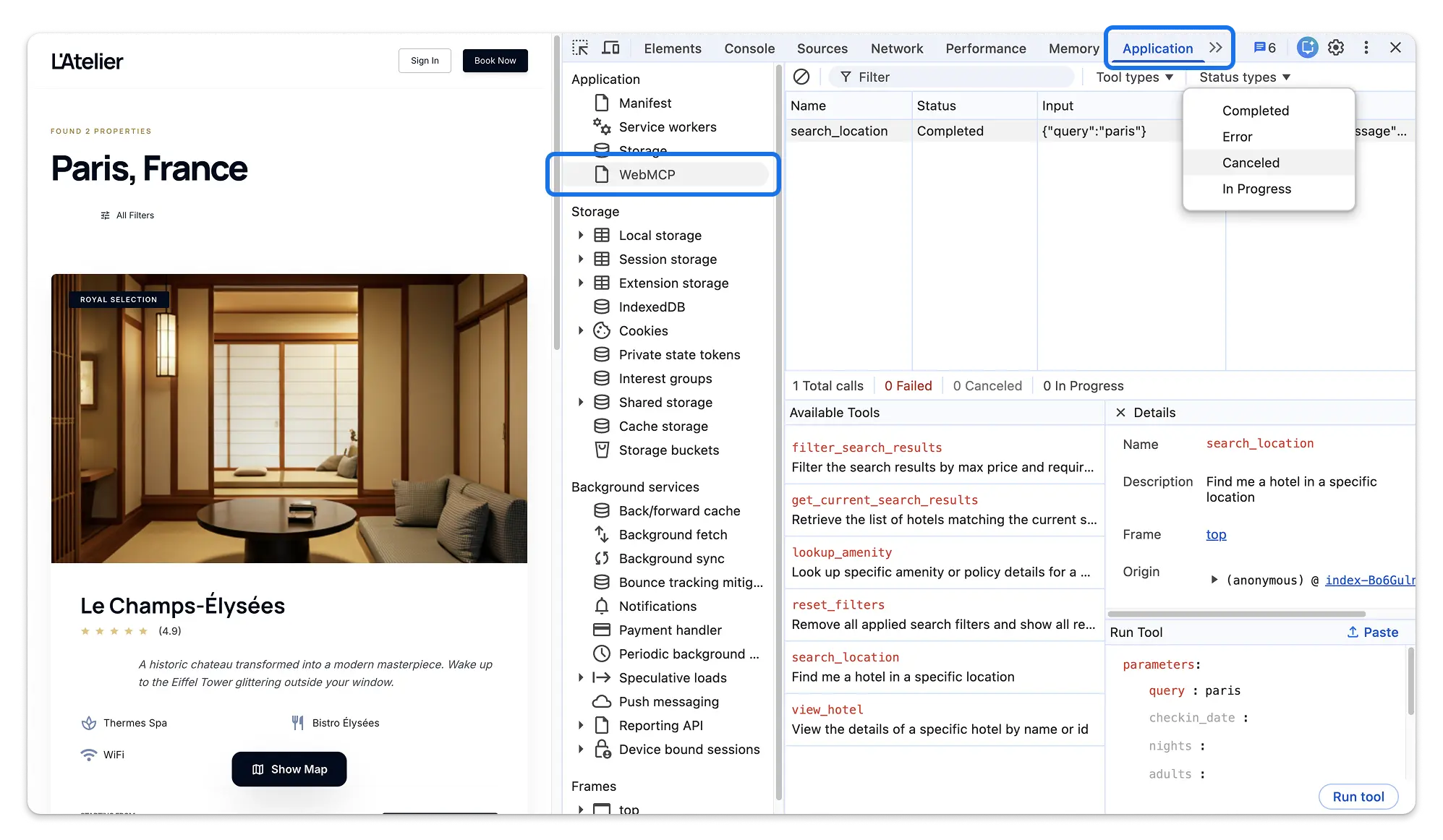 The new WebMCP debugging tools inspecting the demo site [L'Atelier](https://googlechromelabs.github.io/webmcp-tools/demos/hotel-chain/#/search?q=paris), showing past tool invocations, available tools and filter options.
Chromium issues: [494516094](https://issues.chromium.org/issues/494516094)
## Code completion for CSS
The **Styles** tab now features code completion for CSS with Gemini, building on
the [support for the Console \& Sources panels](https://developer.chrome.com/docs/devtools/ai-assistance/code-generation.md.txt).
Enable code suggestions in **Settings \> AI innovations \> Code suggestions**.
This helps you to play around with more complex combinations of CSS properties,
like gradients or box shadows, without remembering their exact syntax. Or to
quickly build out grid- and flex- layouts, relying on multiple related
properties.
The toolbar at the bottom of the **Styles** tab displays the status through a
loading spinner. Suggestions update or clear as you type, ensuring that the
AI-generated text stays relevant to your manual edits.
## APCA color contrast guidelines promoted to stable
The Advanced Perceptual Contrast Algorithm (APCA) contrast calculator has
officially left its experimental phase and is now available as a standard
preference setting. APCA replaces the legacy AAA/AA contrast guidelines with a
modern perceptual contrast model optimized for modern displays and text
rendering.
You can now enable or disable APCA guidelines using the checkbox located under
**Settings \> Preferences \> Elements \> Enable APCA contrast guidelines**.
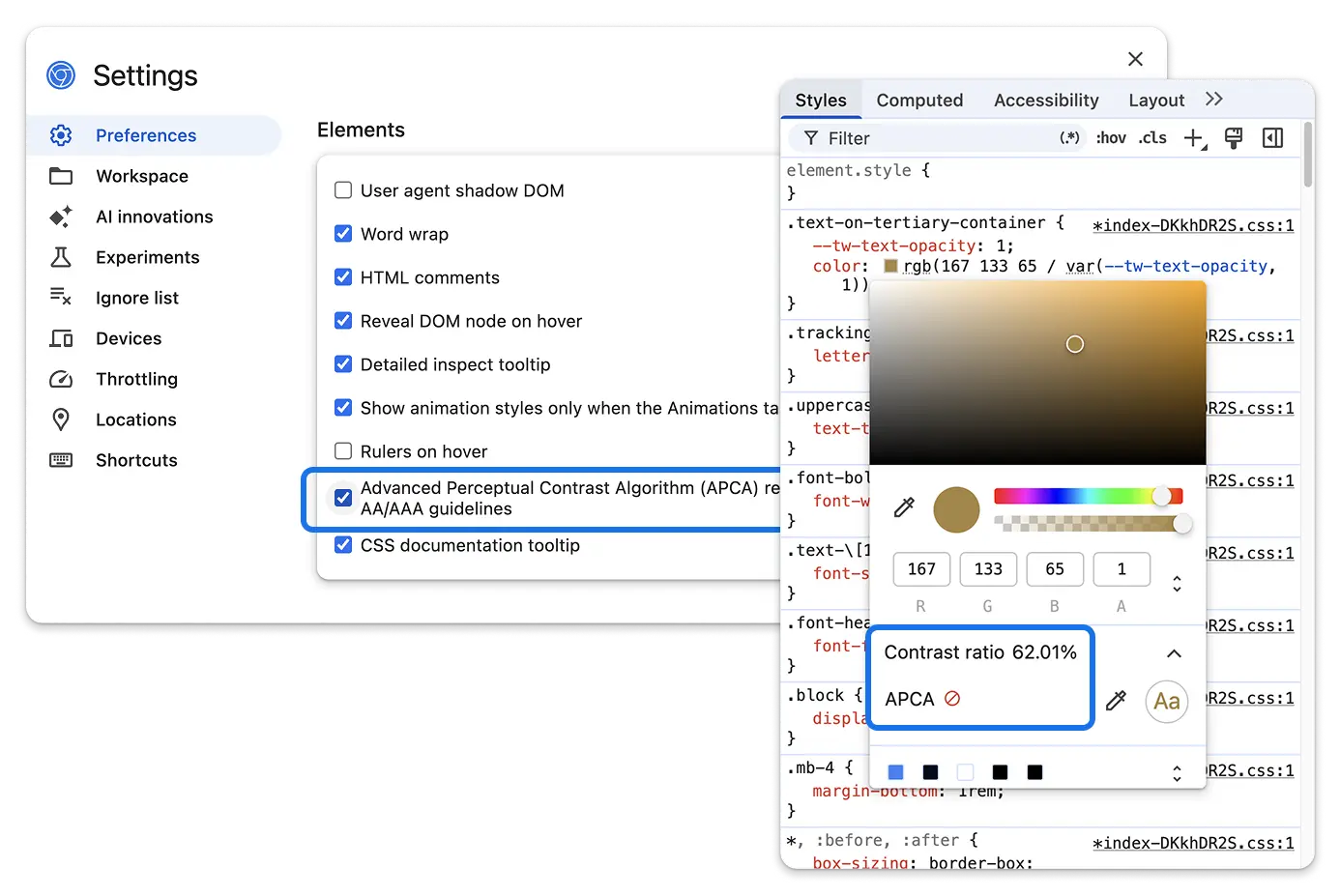 The APCA algorithm toggle in the DevTools settings and the new algorithm in effect in the Styles tab.
## Dynamic Device Mode user agent
The Responsive device mode previously used a hardcoded User Agent string
(Android 6.0; Nexus 5). This caused modern websites to degrade functionality or
trigger compatibility modes because the reported OS was recognized as over a
decade old.
The hard coded user agent has been replaced with a dynamic heuristic that
auto-updates based on the current calendar year, ensuring DevTools always
reports a plausible, modern environment without requiring manual maintenance.
## Other highlights
A collection of smaller improvements and bug fixes in this release:
- **Console** : Added a **Collapse / Expand all** toggle button to the Console panel toolbar to quickly expand or collapse all active console groups and stack traces at once. ([427657550](https://issues.chromium.org/issues/427657550))
- **Application** : Clickable hyperlinks have replaced static text for storage bucket fields in the Application metadata view. Clicking a bucket link automatically navigates to and highlights that specific bucket in the *Storage Buckets* sidebar panel. ([435311130](https://issues.chromium.org/issues/435311130))
- **Application** : Re-enabled full storage inspection support for Service Workers after resolving a crash regression. ([406991275](https://issues.chromium.org/issues/406991275), [466134219](https://issues.chromium.org/issues/466134219))
- **Application** : Added support for inspecting `form_submission` prerendering events within the Preloading panel. ([346555939](https://issues.chromium.org/issues/346555939), [488078903](https://issues.chromium.org/issues/488078903))
- **Application** : Implemented Device-Bound Session Credentials (DBSC) management, allowing developers to clear or delete active sessions from the context menu or by pressing the `Delete` or `Backspace` keys. ([471017387](https://issues.chromium.org/issues/471017387))
- **Elements** : Highlights on DOM nodes representing hidden issues in the Issues panel now dynamically update (appearing or disappearing) in response to issue filter actions. ([40272723](https://issues.chromium.org/issues/40272723))
- **Network** : Server-Sent Events (SSE) are now fully serialized and included in HAR exports, enabling ongoing, live event stream captures to be saved and re-imported into DevTools. ([494294071](https://issues.chromium.org/issues/494294071))
- **Performance** : Fixed Core Web Vitals tracking in the Live Metrics view to pin tracking strictly to the primary frame execution context, preventing dynamic iframe churn from resetting metrics. ([494350655](https://issues.chromium.org/issues/494350655))
- **Performance** : Upgraded `web-vitals` to v5.2.0, introducing native upstream fixes for memory leaks during INP monitoring. ([484342204](https://issues.chromium.org/issues/484342204))