 Surma [X](https://twitter.com/dassurma) [GitHub](https://github.com/surma) [Homepage](https://surma.dev/)
## It's consistently fast, yo
In my [previous](https://web.dev/articles/emscripting-a-c-library)
[articles](https://web.dev/articles/emscripten-npm) I talked about how WebAssembly
allows you to bring the library ecosystem of C/C++ to the web. One app that
makes extensive use of C/C++ libraries is [squoosh](https://squoosh.app/), our
web app that allows you compress images with a variety of codecs that have been
compiled from C++ to WebAssembly.
WebAssembly is a low-level virtual machine that runs the bytecode that is stored
in `.wasm` files. This byte code is strongly typed and structured in such a way
that it can be compiled and optimized for the host system much quicker than
JavaScript can. WebAssembly provides an environment to run code that had
sandboxing and embedding in mind from the very start.
In my experience, most performance problems on the web are caused by forced
layout and excessive paint but every now and then an app needs to do a
computationally expensive task that takes a lot of time. WebAssembly can help
here.
> [!NOTE]
> **Note:** Due to legal concerns, I won't name any browsers in this article.
## The Hot Path
In squoosh we wrote a [JavaScript function](https://github.com/GoogleChromeLabs/squoosh/blob/edd2c51eb6d0676a2e7b7e974337d58cbf00f1d1/src/codecs/rotate/processor.ts)
that rotates an image buffer by multiples of 90 degrees. While
[OffscreenCanvas](https://developer.chrome.com/blog/offscreen-canvas) would be ideal for
this, it isn't supported across the browsers we were targeting, and a little
[buggy in Chrome](https://bugs.chromium.org/p/chromium/issues/detail?id=906619).
This function iterates over every pixel of an input image and copies it to a
different position in the output image to achieve rotation. For a 4094px by
4096px image (16 megapixels) it would need over 16 million iterations of the
inner code block, which is what we call a "hot path". Despite that rather big
number of iterations, two out of three browsers we tested finish the task in 2
seconds or less. An acceptable duration for this type of interaction.
```javascript
for (let d2 = d2Start; d2 >= 0 && d2 < d2Limit; d2 += d2Advance) {
for (let d1 = d1Start; d1 >= 0 && d1 < d1Limit; d1 += d1Advance) {
const in_idx = ((d1 * d1Multiplier) + (d2 * d2Multiplier));
outBuffer[i] = inBuffer[in_idx];
i += 1;
}
}
```
One browser, however, takes over 8 seconds. The way browsers optimize JavaScript
is *really complicated*, and different engines optimize for different things.
Some optimize for raw execution, some optimize for interaction with the DOM. In
this case, we've hit an unoptimized path in one browser.
WebAssembly on the other hand is built entirely around raw execution speed. So
if we want fast, *predictable* performance across browsers for code like this,
WebAssembly can help.
## WebAssembly for predictable performance
In general, JavaScript and WebAssembly can achieve the same peak performance.
However, for JavaScript this performance can only be reached on the "fast path",
and it's often tricky to stay on that "fast path". One key benefit that
WebAssembly offers is predictable performance, even across browsers. The strict
typing and low-level architecture allows the compiler to make stronger
guarantees so that WebAssembly code only has to be optimized once and will
always use the "fast path".
### Writing for WebAssembly
Previously we took C/C++ libraries and compiled them to WebAssembly to use their
functionality on the web. We didn't really touch the code of the libraries, we
just wrote small amounts of C/C++ code to form the bridge between the browser
and the library. This time our motivation is different: We want to write
something from scratch with WebAssembly in mind so we can make use of the
advantages that WebAssembly has.
#### WebAssembly architecture
When writing *for* WebAssembly, it's beneficial to understand a bit more about
what WebAssembly actually is.
To quote [WebAssembly.org](https://webassembly.org/):
> [!NOTE]
> **Note:** WebAssembly (abbreviated Wasm) is a binary instruction format for a stack-based virtual machine. Wasm is designed as a portable target for compilation of high-level languages like C/C++/Rust, enabling deployment on the web for client and server applications.
When you compile a piece of C or Rust code to WebAssembly, you get a `.wasm`
file that contains a module declaration. This declaration consists of a list of
"imports" the module expects from its environment, a list of exports that this
module makes available to the host (functions, constants, chunks of memory) and
of course the actual binary instructions for the functions contained within.
Something that I didn't realize until I looked into this: The stack that makes
WebAssembly a "stack-based virtual machine" is not stored in the chunk of
memory that WebAssembly modules use. The stack is completely VM-internal and
inaccessible to web developers (except through DevTools). As such it is possible
to write WebAssembly modules that don't need any additional memory at all and
only use the VM-internal stack.
> [!NOTE]
> **Note:** Compilers like Emscripten still use the WebAssembly memory to implement their own stack. This is necessary so you can access values anywhere on the stack through constructs like pointers in C, something the VM-internal stack does not allow. So, somewhat confusingly, when you run C via WebAssembly, *two* stacks are in use!
In our case we will need to use some additional memory to allow arbitrary access
to the pixels of our image and generate a rotated version of that image. This is
what `WebAssembly.Memory` is for.
#### Memory management
Commonly, once you use additional memory you will find the need to somehow
manage that memory. Which parts of the memory are in use? Which ones are free?
In C, for example, you have the `malloc(n)` function that finds a memory space
of `n` consecutive bytes. Functions of this kind are also called "allocators".
Of course the implementation of the allocator in use must be included in your
WebAssembly module and will increase your file size. This size and performance
of these memory management functions can vary quite significantly depending on
the algorithm used, which is why many languages offer multiple implementations
to choose from ("dmalloc", "emmalloc", "wee_alloc", etc.).
In our case we know the dimensions of the input image (and therefore the
dimensions of the output image) before we run the WebAssembly module. Here we
saw an opportunity: Traditionally, we'd pass the input image's RGBA buffer as a
parameter to a WebAssembly function and return the rotated image as a return
value. To generate that return value we would have to make use of the allocator.
But since we know the total amount of memory needed (twice the size of the input
image, once for input and once for output), we can put the input image into the
WebAssembly memory using *JavaScript*, run the WebAssembly module to generate a
2nd, rotated image and then use JavaScript to read back the result. We can get
away without using any memory management at all!
### Spoiled for choice
If you looked at the [original JavaScript function](https://github.com/GoogleChromeLabs/squoosh/blob/edd2c51eb6d0676a2e7b7e974337d58cbf00f1d1/src/codecs/rotate/processor.ts)
that we want to WebAssembly-fy, you can see that it's a purely computational
code with no JavaScript-specific APIs. As such it should be fairly straight
forward to port this code to any language. We evaluated 3 different languages
that compile to WebAssembly: C/C++, Rust and AssemblyScript. The only question
we need to answer for each of the languages is: How do we access raw memory
without using memory management functions?
> [!NOTE]
> **Note:** I skipped the "boring" parts in the code samples and focused on the actual hot path and the memory access. The full version of each sample along with the benchmark can be found in the [gist](https://gist.github.com/surma/0eb306fa9acc8bdf2f58150b2f1e82b4).
#### C and Emscripten
Emscripten is a C compiler for the WebAssembly target. Emscripten's goal is to
function as a drop-in replacement for well-known C compilers like GCC or clang
and is mostly flag compatible. This is a core part of the Emscripten's mission
as it wants to make compiling existing C and C++ code to WebAssembly as easy as
possible.
Accessing raw memory is in the very nature of C and pointers exist for that very
reason:
```c
uint8_t* ptr = (uint8_t*)0x124;
ptr[0] = 0xFF;
```
Here we are turning the number `0x124` into a pointer to unsigned, 8-bit
integers (or bytes). This effectively turns the `ptr` variable into an array
starting at memory address `0x124`, that we can use like any other array,
allowing us to access individual bytes for reading and writing. In our case we
are looking at an RGBA buffer of an image that we want to re-order to achieve
rotation. To move a pixel we actually need to move 4 consecutive bytes at once
(one byte for each channel: R, G, B and A). To make this easier we can create an
array of unsigned, *32-bit* integers. By convention, our input image will start
at address 4 and our output image will start directly after the input image
ends:
```c
int bpp = 4;
int imageSize = inputWidth * inputHeight * bpp;
uint32_t* inBuffer = (uint32_t*) 4;
uint32_t* outBuffer = (uint32_t*) (inBuffer + imageSize);
for (int d2 = d2Start; d2 >= 0 && d2 < d2Limit; d2 += d2Advance) {
for (int d1 = d1Start; d1 >= 0 && d1 < d1Limit; d1 += d1Advance) {
int in_idx = ((d1 * d1Multiplier) + (d2 * d2Multiplier));
outBuffer[i] = inBuffer[in_idx];
i += 1;
}
}
```
> [!NOTE]
> **Note:** The reason we chose to start at address 4 and not 0 is because address 0 has a special meaning in many languages: It's the dreaded null pointer. While technically 0 is a perfectly valid address, many languages exclude 0 as a valid value for pointers and either throw an exception or just tumble into undefined behavior.
After porting the entire JavaScript function to C, we can compile [the C file](https://gist.github.com/surma/0eb306fa9acc8bdf2f58150b2f1e82b4#file-rotate-c)
with `emcc`:
```bash
$ emcc -O3 -s ALLOW_MEMORY_GROWTH=1 -o c.js rotate.c
```
As always, emscripten generates a glue code file called `c.js` and a wasm module
called `c.wasm`. Note that the wasm module gzips to only \~260 Bytes, while the
glue code is around 3.5KB after gzip. After some fiddling, we were able to ditch
the glue code and instantiate the WebAssembly modules with the vanilla APIs.
This is often possible with Emscripten as long as you are not using anything
from the C standard library.
> [!NOTE]
> **Note:** We are working with the Emscripten team to make the glue code smaller or even non-existent at times.
#### Rust
> [!NOTE]
> **Note:** Since the release of this article, we have learned more about how to optimize Rust for WebAssembly. Please see the [update section](https://developer.chrome.com/blog/hotpath-with-wasm.md.txt#update_rust) at the end of this article.
Rust is a new, modern programming language with a rich type system, no runtime
and an ownership model that guarantees memory-safety and thread-safety. Rust
also supports WebAssembly as a core feature and the Rust team has
contributed a lot of excellent tooling to the WebAssembly ecosystem.
One of these tools is [`wasm-pack`](https://rustwasm.github.io/wasm-pack/), by
the [rustwasm working group](https://github.com/rustwasm/team). `wasm-pack`
takes your code and turns it into a web-friendly module that works
out-of-the-box with bundlers like webpack. `wasm-pack` is an extremely
convenient experience, but currently only works for Rust. The group is
considering to add support for other WebAssembly-targeting languages.
In Rust, slices are what arrays are in C. And just like in C, we need to create
slices that use our start addresses. This goes against the memory safety model
that Rust enforces, so to get our way we have to use the `unsafe` keyword,
allowing us to write code that doesn't comply with that model.
> [!NOTE]
> **Note:** This is not a best practice. In our experience it is usually worth it to use binding mechanisms like [embind in Emscripten](https://web.dev/articles/embind) or [wasm-bindgen](https://rustwasm.github.io/wasm-bindgen/) for Rust to work at a higher level.
```javascript
let imageSize = (inputWidth * inputHeight) as usize;
let inBuffer: &mut [u32];
let outBuffer: &mut [u32];
unsafe {
inBuffer = slice::from_raw_parts_mut::(4 as *mut u32, imageSize);
outBuffer = slice::from_raw_parts_mut::((imageSize * 4 + 4) as *mut u32, imageSize);
}
for d2 in 0..d2Limit {
for d1 in 0..d1Limit {
let in_idx = (d1Start + d1 * d1Advance) * d1Multiplier + (d2Start + d2 * d2Advance) * d2Multiplier;
outBuffer[i as usize] = inBuffer[in_idx as usize];
i += 1;
}
}
```
Compiling the Rust files using
```bash
$ wasm-pack build
```
yields a 7.6KB wasm module with about 100 bytes of glue code (both after gzip).
#### AssemblyScript
[AssemblyScript](https://github.com/AssemblyScript/assemblyscript) is a fairly
young project that aims to be a TypeScript-to-WebAssembly compiler. It's
important to note, however, that it won't just consume any TypeScript.
AssemblyScript uses the same syntax as TypeScript but switches out the standard
library for their own. Their standard library models the capabilities of
WebAssembly. That means you can't just compile any TypeScript you have lying
around to WebAssembly, but it *does* mean that you don't have to learn a new
programming language to write WebAssembly!
```javascript
for (let d2 = d2Start; d2 >= 0 && d2 < d2Limit; d2 += d2Advance) {
for (let d1 = d1Start; d1 >= 0 && d1 < d1Limit; d1 += d1Advance) {
let in_idx = ((d1 * d1Multiplier) + (d2 * d2Multiplier));
store(offset + i * 4 + 4, load(in_idx * 4 + 4));
i += 1;
}
}
```
Considering the small type surface that our `rotate()` function has, it was
fairly easy to port this code to AssemblyScript. The functions `load(ptr:
usize)` and `store(ptr: usize, value: T)` are provided by AssemblyScript to
access raw memory. To compile [our AssemblyScript file](https://gist.github.com/surma/0eb306fa9acc8bdf2f58150b2f1e82b4#file-rotate-ts),
we only need to install the `AssemblyScript/assemblyscript` npm package and run
```bash
$ asc rotate.ts -b assemblyscript.wasm --validate -O3
```
AssemblyScript will provide us with a \~300 Bytes wasm module and *no* glue code.
The module just works with the vanilla WebAssembly APIs.
### WebAssembly Forensics
Rust's 7.6KB is surprisingly big when compared to the 2 other languages. There
are a couple of tools in the WebAssembly ecosystem that can help you analyze
your WebAssembly files (regardless of the language the got created with) and
tell you what is going on and also help you improve your situation.
#### Twiggy
[Twiggy](https://github.com/rustwasm/twiggy) is another tool from Rust's
WebAssembly team that extracts a bunch of insightful data from a WebAssembly
module. The tool is not Rust-specific and allows you to inspect things like the
module's call graph, determine unused or superfluous sections and figure out
which sections are contributing to the total file size of your module. The
latter can be done with Twiggy's `top` command:
```bash
$ twiggy top rotate_bg.wasm
```

In this case we can see that a majority of our file size stems from the
allocator. That was surprising since our code is not using dynamic allocations.
Another big contributing factor is a "function names" subsection.
#### wasm-strip
`wasm-strip` is a tool from the [WebAssembly Binary Toolkit](https://github.com/WebAssembly/wabt), or wabt for short. It contains a
couple of tools that allow you to inspect and manipulate WebAssembly modules.
`wasm2wat` is a disassembler that turns a binary wasm module into a
human-readable format. Wabt also contains `wat2wasm` which allows you to turn
that human-readable format back into a binary wasm module. While we did use
these two complementary tools to inspect our WebAssembly files, we found
`wasm-strip` to be the most useful. `wasm-strip` removes unnecessary sections
and metadata from a WebAssembly module:
```bash
$ wasm-strip rotate_bg.wasm
```
This reduces the file size of the rust module from 7.5KB to 6.6KB (after gzip).
#### wasm-opt
`wasm-opt` is a tool from [Binaryen](https://github.com/WebAssembly/binaryen).
It takes a WebAssembly module and tries to optimize it both for size and
performance based only on the bytecode. Some tools like Emscripten already run
this tool, some others do not. It's usually a good idea to try and save some
additional bytes by using these tools.
```bash
wasm-opt -O3 -o rotate_bg_opt.wasm rotate_bg.wasm
```
With `wasm-opt` we can shave off another handful of bytes to leave a total of
6.2KB after gzip.
#### #!\[no_std\]
After some consultation and research, we re-wrote our Rust code without using
Rust's standard library, using the
[`#![no_std]`](https://doc.rust-lang.org/unstable-book/language-features/lang-items.html#writing-an-executable-without-stdlib)
feature. This also disables dynamic memory allocations altogether, removing the
allocator code from our module. Compiling [this Rust file](https://gist.github.com/surma/0eb306fa9acc8bdf2f58150b2f1e82b4#file-rotate-rs)
with
```bash
$ rustc --target=wasm32-unknown-unknown -C opt-level=3 -o rust.wasm rotate.rs
```
yielded a 1.6KB wasm module after `wasm-opt`, `wasm-strip` and gzip. While it is
still bigger than the modules generated by C and AssemblyScript, it is small
enough to be considered a lightweight.
> [!NOTE]
> **Note:** According to Twiggy, the main contributor to the file size is `core::fmt`, a module that generates turns data into strings (like C's `printf()`). It is used by code paths that could trigger an exception as they generate a human-readable exception messages. Rust's WebAssembly team is aware of this and is actively working on improvements here.
### Performance
Before we jump to conclusions based on file size alone --- we went on this journey
to optimize performance, not file size. So how did we measure performance and
what were the results?
#### How to benchmark
Despite WebAssembly being a low-level bytecode format, it still needs to be sent
through a compiler to generate host-specific machine code. Just like JavaScript,
the compiler works in multiple stages. Said simply: The first stage is much
faster at compiling but tends to generate slower code. Once the module starts
running, the browser observes which parts are frequently used and sends those
through a more optimizing but slower compiler.
Our use-case is interesting in that the code for rotating an image will be used
once, maybe twice. So in the vast majority of cases we will never get the
benefits of the optimizing compiler. This is important to keep in mind when
benchmarking. Running our WebAssembly modules 10,000 times in a loop would give
unrealistic results. To get realistic numbers, we should run the module once and
make decisions based on the numbers from that single run.
> [!NOTE]
> **Note:** Ideally, we should have automated this process of reloading the page and running the module once, and doing that process a large number of times. We decided that a few manual runs are good enough to make an informed decision based on those averaged numbers.
#### Performance comparison
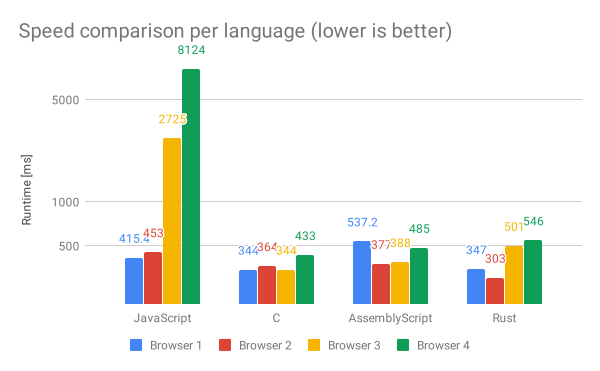 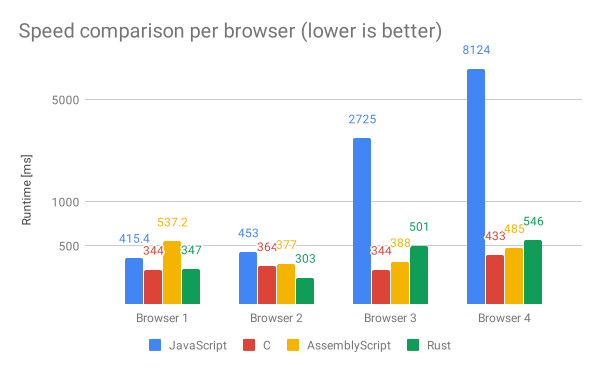
These two graphs are different views onto the same data. In the first graph we
compare per browser, in the second graph we compare per language used. Please
note that I chose a logarithmic timescale. It's also important that all
benchmarks were using the same 16 megapixel test image and the same host
machine, except for one browser, which could not be run on the same machine.
Without analyzing these graphs too much, it is clear that we solved our original
performance problem: All WebAssembly modules run in \~500ms or less. This
confirms what we laid out at the start: WebAssembly gives you *predictable*
performance. No matter which language we choose, the variance between browsers
and languages is minimal. To be exact: The standard deviation of JavaScript
across all browsers is \~400ms, while the standard deviation of all our
WebAssembly modules across all browsers is \~80ms.
### Effort
Another metric is the amount of effort we had to put in to create and integrate
our WebAssembly module into squoosh. It is hard to assign a numeric value to
effort, so I won't create any graphs but there are a few things I would like to
point out:
AssemblyScript was frictionless. Not only does it allow you to use TypeScript to
write WebAssembly, making code-review very easy for my colleagues, but it also
produces glue-free WebAssembly modules that are very small with decent
performance. The tooling in the TypeScript ecosystem, like prettier and tslint,
will likely just work.
Rust in combination with `wasm-pack` is also extremely convenient, but excels
more at bigger WebAssembly projects were bindings and memory management are
needed. We had to diverge a bit from the happy-path to achieve a competitive
file size.
C and Emscripten created a very small and highly performant WebAssembly module
out of the box, but without the courage to jump into glue code and reduce it to
the bare necessities the total size (WebAssembly module + glue code) ends up
being quite big.
## Conclusion
So what language should you use if you have a JS hot path and want to make it
faster or more consistent with WebAssembly. As always with performance
questions, the answer is: It depends. So what did we ship?
> [!NOTE]
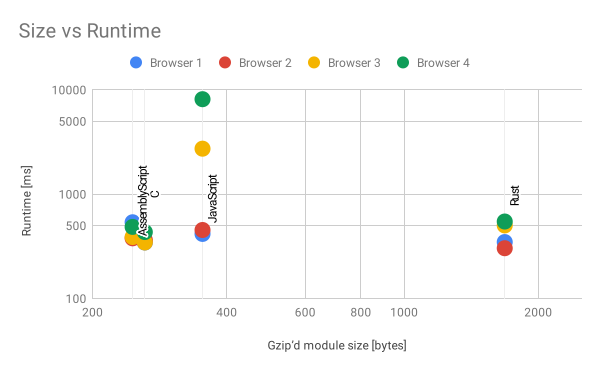
> **Note:** Again, please note that *both* axis are logarithmic and that the x axis goes to 2000 Bytes, while the y axis goes up to 10 seconds.
Comparing at the module size / performance tradeoff of the different languages
we used, the best choice seems to be either C or AssemblyScript. [We decided to ship Rust](https://github.com/GoogleChromeLabs/squoosh/pull/438/files). There
are multiple reasons for this decision: All the codecs shipped in Squoosh so far
are compiled using Emscripten. We wanted to broaden our knowledge about the
WebAssembly ecosystem and use a different language *in production*.
AssemblyScript is a strong alternative, but the project is relatively young and
the compiler isn't as mature as the Rust compiler.
While the difference in file size between Rust and the other languages size
looks quite drastic in the scatter graph, it is not that big a deal in reality:
Loading 500B or 1.6KB even over 2G takes less than a 1/10th of a second. And
Rust will hopefully close the gap in terms of module size soon.
In terms of runtime performance, Rust has a faster average across browsers than
AssemblyScript. Especially on bigger projects Rust will be more likely to
produce faster code without needing manual code optimizations. But that
shouldn't keep you from using what you are most comfortable with.
That all being said: AssemblyScript has been a great discovery. It allows web
developers to produce WebAssembly modules without having to learn a new
language. The AssemblyScript team has been very responsive and is actively
working on improving their toolchain. We will definitely keep an eye on
AssemblyScript in the future.
## Update: Rust
After publishing this article, [Nick Fitzgerald](https://twitter.com/fitzgen)
from the Rust team pointed us to their excellent Rust Wasm book, which contains
[a section on optimizing file size](https://rustwasm.github.io/book/reference/code-size.html). Following the
instructions there (most notably enabling link time optimizations and manual
panic handling) allowed us to write "normal" Rust code and go back to using
`Cargo` (the `npm` of Rust) without bloating the file size. The Rust module ends
up with 370B after gzip. For details, please take a look at [the PR I opened on Squoosh](https://github.com/GoogleChromeLabs/squoosh/pull/462).
*Special thanks to [Ashley Williams](https://twitter.com/ag_dubs), [Steve Klabnik](https://twitter.com/steveklabnik), [Nick Fitzgerald](https://twitter.com/fitzgen) and [Max Graey](https://twitter.com/MaxGraey) for all their help on this journey.*