 Jacques Newman [GitHub](https://github.com/janewman) [LinkedIn](https://www.linkedin.com/in/jacques-newman-48804b106)
Published: March 5, 2026
The `focusgroup` HTML attribute is a proposed declarative way to add keyboard
arrow-key navigation to composite widgets such as toolbars, tablists, menus,
listboxes, etc. without writing any roving-tabindex JavaScript. One attribute
replaces hundreds of lines of boilerplate. We want your feedback before this
ships.
## Try it out and give us your feedback
You can try `focusgroup` today in Chrome, Edge, and other Chromium browsers by
enabling it one of two ways:
1. **Local testing:** In the browser, open the `about://flags` page and enable the **Experimental Web Platform features** flag. Or, launch the browser from the command line by using the `--enable-blink-features=Focusgroup` command line parameter.
2. **Origin trial:** Register for the [focusgroup origin trial](https://developer.chrome.com/origintrials#/register_trial/4231694799868002305) to test it on your site with real users.
Then explore the
[interactive demos](https://microsoftedge.github.io/Demos/focusgroup/)
to see every pattern in action.
**We need your input.** [File a focusgroup issue](https://github.com/openui/open-ui/issues/new?labels=focusgroup&title=%5Bfocusgroup%5D+)
to tell us what you think.
This is a **cross-browser effort:** the proposal originates from Microsoft
through the [OpenUI Community Group](https://open-ui.org/) with strong support
from Google. The API shape may change based on your feedback.
Let's dive into the problem focusgroup solves and how the API works.
## The problem: manual roving tabindex
If you've ever built a toolbar, tablist, menu, or listbox, you've written some
version of this code. The
[ARIA Authoring Practices Guide (APG)](https://www.w3.org/WAI/ARIA/apg/)
recommends that composite widgets
present a single Tab stop and let users move between items with arrow keys. This
pattern is known as the "roving tabindex". Many UI frameworks reimplement this
from scratch:
```html
```
From here, developers need to use JavaScript that listens for arrow keys to move
focus, and adjust the tabindex attribute for all elements. This is the
*simplified* version. A production implementation also needs to handle:
- **Writing mode and RTL:** Adjust arrow key directions based on content direction.
- **Last-focused memory:** Restore focus to the previously active item when a user Tabs back in.
- **Disabled and hidden items:** Skip over them during navigation.
- **Dynamic items:** Update the roving index when items are added or removed.
Most UI libraries including
[React](https://www.npmjs.com/package/react-roving-tabindex),
[Angular CDK](https://material.angular.dev/cdk/a11y/overview#listkeymanager),
and [Fluent UI](https://developer.microsoft.com/en-us/fluentui#/controls/web/focuszone) each
ship their own version of this logic. That's a lot of duplicated effort to get
something that could be a platform primitive.
## The solution: the `focusgroup` attribute
With focusgroup, the same toolbar becomes:
```html
```

Try it live:
[Toolbar Pattern \> Basic Toolbar](https://microsoftedge.github.io/Demos/focusgroup/toolbar.html#basic-toolbar).
That's it. No JavaScript for arrow key navigation. No manual tabindex
management. Here's what the browser now handles for you:
- **Arrow key navigation:** Navigate between items, while respecting writing mode and directionality.
- **A single Tab stop:** The browser collapses participating items into one Tab stop automatically. Developers don't need to set `tabindex="-1"` on non-active items.
- **Last-focused memory:** When a user leaves the focusgroup and returns, focus is restored to the item they left.
- **ARIA semantics:** The browser supplies appropriate roles (like `role="toolbar"`) based on the behavior chosen when generic elements are used.
Developers keep only the logic unique to their features such as toggling pressed
state, opening menus, managing selection, or any custom commands.
## API overview
The `focusgroup` attribute takes a space-separated list of tokens. The first
token is always a **behavior token** that declares the widget pattern. Optional
modifier tokens follow: `focusgroup=" [inline|block] [wrap] [nomemory]"`.
### Behavior tokens
The behavior token is required (unless using `none` to opt out of an ancestor
focusgroup). It declares the composite widget pattern, ensuring that the right
roles can be inferred when not otherwise specified. The tokens follow the
patterns that are described in the
[Aria Authoring Practices guide](https://www.w3.org/WAI/ARIA/apg/)
and are listed in the following table:
| **Behavior** | **APG pattern** | **Minimum container role (when applied)** | **Minimum child role (when applied)** | **Default modifiers** |
|---|---|---|---|---|
| `toolbar` | [Toolbar](https://www.w3.org/WAI/ARIA/apg/patterns/toolbar/) | [toolbar](https://developer.mozilla.org/docs/Web/Accessibility/ARIA/Roles/toolbar_role) | (none) | `inline` |
| `tablist` | [APG Tabs](https://www.w3.org/WAI/ARIA/apg/patterns/tabs/) | [tablist](https://developer.mozilla.org/docs/Web/Accessibility/ARIA/Roles/tablist_role) | [tab](https://developer.mozilla.org/docs/Web/Accessibility/ARIA/Roles/tab_role) | `inline wrap` |
| `radiogroup` | [Radio Group](https://www.w3.org/WAI/ARIA/apg/patterns/radio/) | [radiogroup](https://developer.mozilla.org/docs/Web/Accessibility/ARIA/Roles/radiogroup_role) | [radio](https://developer.mozilla.org/docs/Web/Accessibility/ARIA/Roles/radio_role) | (none) |
| `listbox` | [Listbox](https://www.w3.org/WAI/ARIA/apg/patterns/listbox/) | [listbox](https://developer.mozilla.org/docs/Web/Accessibility/ARIA/Roles/listbox_role) | [option](https://developer.mozilla.org/docs/Web/Accessibility/ARIA/Roles/option_role) | (none) |
| `menu` | [Menu](https://www.w3.org/WAI/ARIA/apg/patterns/menu/) | [menu](https://developer.mozilla.org/docs/Web/Accessibility/ARIA/Roles/menu_role) | [menuitem](https://developer.mozilla.org/docs/Web/Accessibility/ARIA/Roles/menuitem_role) | `block wrap` |
| `menubar` | [Menubar](https://www.w3.org/WAI/ARIA/apg/patterns/menu/) | [menubar](https://developer.mozilla.org/docs/Web/Accessibility/ARIA/Roles/menubar_role) | [menuitem](https://developer.mozilla.org/docs/Web/Accessibility/ARIA/Roles/menuitem_role) | `inline wrap` |
| `none` | n/a | n/a | n/a | n/a |
See the [explainer](https://open-ui.org/components/scoped-focusgroup.explainer/)
for full details on how role mapping works.
### Axis restriction (`inline` and `block`)
If the chosen behavior doesn't have any default modifiers, all four arrow keys
work to move focus. You can restrict navigation to a single logical axis by
using the `inline` or `block` modifier:
- `inline`: The focusgroup only responds to arrow keys on the inline axis, left and right in most English language contexts ([horizontal, top to
bottom)](https://developer.mozilla.org/docs/Web/CSS/Reference/Properties/writing-mode).
- `block`: The focusgroup only responds to arrow keys on the block axis, up and down in most English language contexts (horizontal, top to bottom).
Axis restriction is aligned with CSS logical properties and automatically adapts
to writing mode and direction.
### Wrap-around navigation
By default, arrow key navigation stops at the edges of the focusgroup. Add the
`wrap` modifier to loop from the last item back to the first (and from the first
back to the last). If a behavior has wrap by default, use the `nowrap` modifier
to disable this behavior.
Try it live: [Tablist Pattern \> Horizontal Tablist with
Wrapping](https://microsoftedge.github.io/Demos/focusgroup/tablist.html#horizontal-tablist-with-wrapping).
In that example, when focus is on the **FAQ** tab and the user presses the Right
arrow key, focus wraps back to the **Overview** tab.
### The `focusgroupstart` attribute
The `focusgroupstart` attribute marks which element receives focus when Tabbing
into a focusgroup for the first time (or every time when memory is disabled):
```html
```
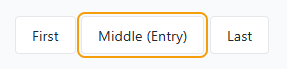
Both Tab and Shift+Tab land on "Middle (Entry)" because it has `focusgroupstart`
and memory is disabled with the `nomemory` modifier. Try it live:
[Toolbar Pattern \> Entry Point with `focusgroupstart`](https://microsoftedge.github.io/Demos/focusgroup/toolbar.html#entry-point-with-focusgroupstart).
### Disable memory (nomemory)
By default, focusgroups remember the last-focused item and restore it on
re-entry with Tab. For patterns where focus should always return to a fixed entry
point (like in the previous demo), use the `nomemory` modifier in the focusgroup
attribute to disable it.
This modifier can also be combined with programmatic movement of
`focusgroupstart` to give you full control over the item that is focused when
entering the group. Memory is cleared when the remembered element becomes
unavailable; for example, if it is removed, hidden, disabled, inert, or excluded
from the focusgroup.
### Opt out (`focusgroup="none"`)
Use `focusgroup="none"` to exclude an element and its subtree from an ancestor
focusgroup's arrow navigation. The opted-out element and its subtree remain
reachable using Tab, but arrow keys skip over them:
```html
```

Using the right arrow key navigates to New, then Open, Save, Close, and Exit,
skipping the Help and Shortcuts buttons entirely. But a user can still Tab into
the help section to access these buttons. Try it live:
[Additional Concepts \> Opt-Out Segments with focusgroup="none"](https://microsoftedge.github.io/Demos/focusgroup/additional-concepts.html#opt-out-segments-with-focusgroup-none).
## Common patterns
### Tablist
A tab control with arrow key navigation between tabs.
```html
...
...
...
...
```
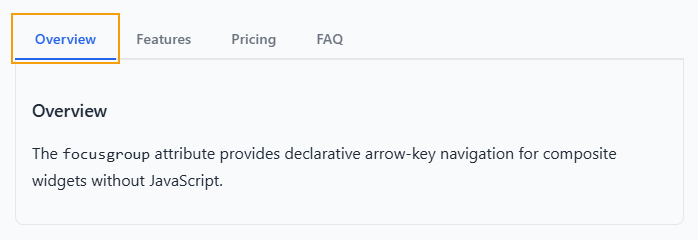
Try it live: [Tablist Pattern \> Horizontal Tablist with
Wrapping](https://microsoftedge.github.io/Demos/focusgroup/tablist.html#horizontal-tablist-with-wrapping).
What to notice:
- The `focusgroupstart` attribute is on the *selected* tab, so focus always enters there.
- The `nomemory` modifier ensures that even if the user had previously focused on a different tab, re-entry always goes to the selected tab.
- The `inline` modifier restricts arrow navigation to the left and right keys only. This matches the expected behavior outlined by the [APG Tabs
pattern](https://www.w3.org/WAI/ARIA/apg/patterns/tabs/).
- The `wrap` modifier lets users use the arrow keys continuously through all tabs.
- Developer code, omitted for brevity, handles the actual selection: updating `aria-selected`, toggling panel visibility, and moving the `focusgroupstart` attribute on selection change.
### Menu and menubar
A simple vertical menu with up and down arrow navigation.
```html
```
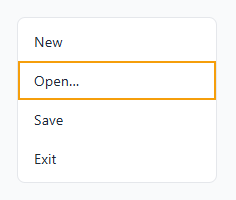
Try it live:
[Menu and Menubar Pattern \> Simple Vertical Menu](https://microsoftedge.github.io/Demos/focusgroup/menu.html#simple-vertical-menu).
With the `block` modifier, only up and down arrow keys navigate items. Left and
right arrow keys are free for behavior that you define (for example, opening
submenus). For a menubar with nested submenus, each level is an independent
focusgroup. Try it live:
[Menu and Menubar pattern \> Menubar with Popover Submenus](https://microsoftedge.github.io/Demos/focusgroup/menu.html#menubar-with-popover-submenus)
```html
```
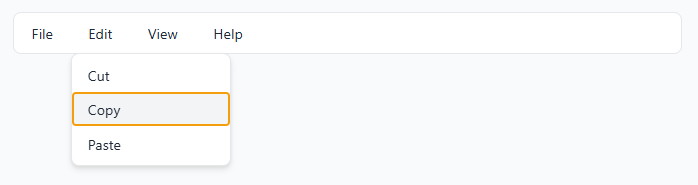
Try it live:
[Menu and Menubar Pattern \> Menubar with Popover Submenus](https://microsoftedge.github.io/Demos/focusgroup/menu.html#menubar-with-popover-submenus).
While the menubar uses the `inline` modifier for left and right navigation, the
submenus use the `block` modifier for up and down navigation. Nested focusgroups
are completely independent so they don't interfere with each other.
### Radiogroup
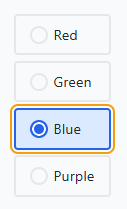
A custom radio group with arrow key navigation and full styling control.
```html
RedGreenBluePurple
```
Try it live:
[Radio Group Pattern \> Comparison: Native versus Focusgroup](https://microsoftedge.github.io/Demos/focusgroup/radiogroup.html#comparison-native-vs-focusgroup).
While the `focusgroup` attribute handles arrow key navigation; you must
implement the selection code. In this demo, JavaScript code manages the checked
state (by using the `aria-checked` attribute).
## Key concepts
### Focusgroup item participation
All **sequentially focusable descendants** of the element with `focusgroup` set
to a valid behavior are considered to participate in that focusgroup. This means
that elements with a negative `tabindex` are not considered, but natively
focusable elements such as `