Opt-in optimized text wrapping, for beauty over speed.
 Adam Argyle [X](https://twitter.com/argyleink) [GitHub](https://github.com/argyleink) [Bluesky](https://bsky.app/profile/nerdy.dev)
From Chrome 117 you can use a new text wrapping feature---`text-wrap: pretty`
from [CSS Text Level 4](https://www.w3.org/TR/css-text-4/#text-wrap).
p {
text-wrap: pretty;
}
Typographic [widows and orphans](https://fonts.google.com/knowledge/glossary/widows_orphans) are single
words that stand alone at the end of a paragraph or text block. Widows are words
alone at the top of a text block and orphans are alone at the end of a text
block. They can interrupt the way our eyes skim the text, making content harder
to read. Some designers avoid them at all costs and go through great lengths to
prevent them.
 Image sourced from [Google Fonts---Widows \& Orphans](https://fonts.google.com/knowledge/glossary/widows_orphans)
From Chrome 117, orphans can be avoided with one line of CSS: `text-wrap: pretty`.
> [!NOTE]
> **Note:** `text-wrap: pretty` is different from CSS's [`orphans`](https://developer.mozilla.org/docs/Web/CSS/orphans) property which is relevant when using CSS [multi-column
> layout](https://developer.mozilla.org/docs/Web/CSS/CSS_multicol_layout). Also, `pretty` only handles orphans, not widows.
The feature does a little more than just ensure paragraphs don't end with a
single word, it also adjusts hyphenation if consecutive hyphenated lines appear
at the end of a paragraph or adjusts previous lines to make room. It will also
appropriately adjust for text justification. `text-wrap: pretty` is for
generally better line wrapping and text breaking, currently focused on orphans.
In the future, `text-wrap: pretty` may offer more improvements.
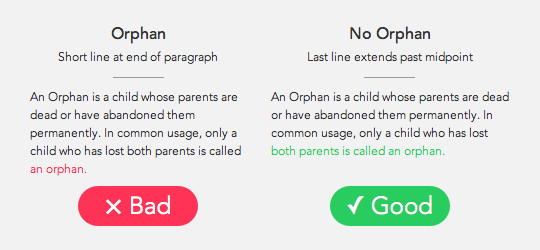 Image sourced from [Why you should remove orphans from your body text.](https://uxmovement.com/content/why-you-should-remove-orphans-from-your-body-text/)
There's also [`text-wrap: balance`](https://developer.chrome.com/blog/css-text-wrap-balance), which doesn't
prevent orphans, but does ensure the text wraps in a way that creates a
harmonious text block. I personally use `balance` for headlines and `pretty` for
paragraphs.
If you're interested in the details of the algorithm used to determine the
optimal number of lines, or performance considerations, [here's a link to the design document created by the engineer](https://docs.google.com/document/d/1jJFD8nAUuiUX6ArFZQqQo8yTsvg8IuAq7oFrNQxPeqI/edit#heading=h.cqq9czoal00g)
behind the feature, [Koji Ishii](https://developer.chrome.com/authors/kojiishi).
If you have other line breaking improvements or suggestions, we'd love to hear
them! File an issue in the [Chromium bug tracker](https://issues.chromium.org/issues/new) with the details, examples of
good and bad line breaks, and we'll get back to you.