![Adam Argyle](https://web.dev/images/authors/argyle.jpg) Adam Argyle [X](https://twitter.com/argyleink) [GitHub](https://github.com/argyleink) [Bluesky](https://bsky.app/profile/nerdy.dev)

<br />


Published: Jan 14, 2025

<br />

From Chrome 133, `text-box` lets developers and designers tailor the space
above and below text.


Browser Support

- ![Chrome: 133.](data:image/svg+xml,%3Csvg xmlns='http://www.w3.org/2000/svg' width='24' height='24' viewBox='-10 -10 276 276'%3E%3ClinearGradient id='a' x1='145' x2='34' y1='253' y2='61' gradientUnits='userSpaceOnUse'%3E%3Cstop offset='0' stop-color='%231e8e3e'/%3E%3Cstop offset='1' stop-color='%2334a853'/%3E%3C/linearGradient%3E%3ClinearGradient id='b' x1='111' x2='222' y1='254' y2='62' gradientUnits='userSpaceOnUse'%3E%3Cstop offset='0' stop-color='%23fcc934'/%3E%3Cstop offset='1' stop-color='%23fbbc04'/%3E%3C/linearGradient%3E%3ClinearGradient id='c' x1='17' x2='239' y1='80' y2='80' gradientUnits='userSpaceOnUse'%3E%3Cstop offset='0' stop-color='%23d93025'/%3E%3Cstop offset='1' stop-color='%23ea4335'/%3E%3C/linearGradient%3E%3Ccircle cx='128' cy='128' r='64' fill='%23fff'/%3E%3Cpath fill='url(%23a)' d='M96 183a64 64 0 0 1-23-23L17 64a128 128 0 0 0 111 192l55-96a64 64 0 0 1-87 23Z'/%3E%3Cpath fill='url(%23b)' d='M192 128a64 64 0 0 1-9 32l-55 96A128 128 0 0 0 239 64H128a64 64 0 0 1 64 64Z'/%3E%3Ccircle cx='128' cy='128' r='52' fill='%231a73e8'/%3E%3Cpath fill='url(%23c)' d='M96 73a64 64 0 0 1 32-9h111a128 128 0 0 0-222 0l56 96a64 64 0 0 1 23-87Z'/%3E%3C/svg%3E)
- ![Edge: 133.](data:image/svg+xml,%3Csvg xmlns='http://www.w3.org/2000/svg' xmlns:xlink='http://www.w3.org/1999/xlink' width='24' height='24' viewBox='0 0 27600 27600'%3E%3ClinearGradient id='A' gradientUnits='userSpaceOnUse'/%3E%3ClinearGradient id='B' x1='6870' x2='24704' y1='18705' y2='18705' xlink:href='%23A'%3E%3Cstop offset='0' stop-color='%230c59a4'/%3E%3Cstop offset='1' stop-color='%23114a8b'/%3E%3C/linearGradient%3E%3ClinearGradient id='C' x1='16272' x2='5133' y1='10968' y2='23102' xlink:href='%23A'%3E%3Cstop offset='0' stop-color='%231b9de2'/%3E%3Cstop offset='.16' stop-color='%231595df'/%3E%3Cstop offset='.67' stop-color='%230680d7'/%3E%3Cstop offset='1' stop-color='%230078d4'/%3E%3C/linearGradient%3E%3CradialGradient id='D' cx='16720' cy='18747' r='9538' xlink:href='%23A'%3E%3Cstop offset='.72' stop-opacity='0'/%3E%3Cstop offset='.95' stop-opacity='.53'/%3E%3Cstop offset='1'/%3E%3C/radialGradient%3E%3CradialGradient id='E' cx='7130' cy='19866' r='14324' gradientTransform='matrix(.14843 -.98892 .79688 .1196 -8759 25542)' xlink:href='%23A'%3E%3Cstop offset='.76' stop-opacity='0'/%3E%3Cstop offset='.95' stop-opacity='.5'/%3E%3Cstop offset='1'/%3E%3C/radialGradient%3E%3CradialGradient id='F' cx='2523' cy='4680' r='20243' gradientTransform='matrix(-.03715 .99931 -2.12836 -.07913 13579 3530)' xlink:href='%23A'%3E%3Cstop offset='0' stop-color='%2335c1f1'/%3E%3Cstop offset='.11' stop-color='%2334c1ed'/%3E%3Cstop offset='.23' stop-color='%232fc2df'/%3E%3Cstop offset='.31' stop-color='%232bc3d2'/%3E%3Cstop offset='.67' stop-color='%2336c752'/%3E%3C/radialGradient%3E%3CradialGradient id='G' cx='24247' cy='7758' r='9734' gradientTransform='matrix(.28109 .95968 -.78353 .22949 24510 -16292)' xlink:href='%23A'%3E%3Cstop offset='0' stop-color='%2366eb6e'/%3E%3Cstop offset='1' stop-color='%2366eb6e' stop-opacity='0'/%3E%3C/radialGradient%3E%3Cpath id='H' d='M24105 20053a9345 9345 0 01-1053 472 10202 10202 0 01-3590 646c-4732 0-8855-3255-8855-7432 0-1175 680-2193 1643-2729-4280 180-5380 4640-5380 7253 0 7387 6810 8137 8276 8137 791 0 1984-230 2704-456l130-44a12834 12834 0 006660-5282c220-350-168-757-535-565z'/%3E%3Cpath id='I' d='M11571 25141a7913 7913 0 01-2273-2137 8145 8145 0 01-1514-4740 8093 8093 0 013093-6395 8082 8082 0 011373-859c312-148 846-414 1554-404a3236 3236 0 012569 1297 3184 3184 0 01636 1866c0-21 2446-7960-8005-7960-4390 0-8004 4166-8004 7820 0 2319 538 4170 1212 5604a12833 12833 0 007684 6757 12795 12795 0 003908 610c1414 0 2774-233 4045-656a7575 7575 0 01-6278-803z'/%3E%3Cpath id='J' d='M16231 15886c-80 105-330 250-330 566 0 260 170 512 472 723 1438 1003 4149 868 4156 868a5954 5954 0 003027-839 6147 6147 0 001133-850 6180 6180 0 001910-4437c26-2242-796-3732-1133-4392-2120-4141-6694-6525-11668-6525-7011 0-12703 5635-12798 12620 47-3654 3679-6605 7996-6605 350 0 2346 34 4200 1007 1634 858 2490 1894 3086 2921 618 1067 728 2415 728 2952s-271 1333-780 1990z'/%3E%3Cuse fill='url(%23B)' xlink:href='%23H'/%3E%3Cuse fill='url(%23D)' opacity='.35' xlink:href='%23H'/%3E%3Cuse fill='url(%23C)' xlink:href='%23I'/%3E%3Cuse fill='url(%23E)' opacity='.4' xlink:href='%23I'/%3E%3Cuse fill='url(%23F)' xlink:href='%23J'/%3E%3Cuse fill='url(%23G)' xlink:href='%23J'/%3E%3C/svg%3E)
- ![Firefox: 154.](data:image/svg+xml,%3Csvg xmlns='http://www.w3.org/2000/svg' width='24' height='24' viewBox='0 0 512 512'%3E%3Cdefs%3E%3CradialGradient id='ff-b' cx='428.5' cy='55.1' r='501' gradientUnits='userSpaceOnUse'%3E%3Cstop offset='.1' stop-color='%23ffbd4f'/%3E%3Cstop offset='.2' stop-color='%23ffac31'/%3E%3Cstop offset='.3' stop-color='%23ff9d17'/%3E%3Cstop offset='.3' stop-color='%23ff980e'/%3E%3Cstop offset='.4' stop-color='%23ff563b'/%3E%3Cstop offset='.5' stop-color='%23ff3750'/%3E%3Cstop offset='.7' stop-color='%23f5156c'/%3E%3Cstop offset='.8' stop-color='%23eb0878'/%3E%3Cstop offset='.9' stop-color='%23e50080'/%3E%3C/radialGradient%3E%3CradialGradient id='ff-c' cx='245.4' cy='259.9' r='501' gradientUnits='userSpaceOnUse'%3E%3Cstop offset='.3' stop-color='%23960e18'/%3E%3Cstop offset='.3' stop-color='%23b11927' stop-opacity='.7'/%3E%3Cstop offset='.4' stop-color='%23db293d' stop-opacity='.3'/%3E%3Cstop offset='.5' stop-color='%23f5334b' stop-opacity='.1'/%3E%3Cstop offset='.5' stop-color='%23ff3750' stop-opacity='0'/%3E%3C/radialGradient%3E%3CradialGradient id='ff-d' cx='305.8' cy='-58.6' r='363' gradientUnits='userSpaceOnUse'%3E%3Cstop offset='.1' stop-color='%23fff44f'/%3E%3Cstop offset='.3' stop-color='%23ffdc3e'/%3E%3Cstop offset='.5' stop-color='%23ff9d12'/%3E%3Cstop offset='.5' stop-color='%23ff980e'/%3E%3C/radialGradient%3E%3CradialGradient id='ff-e' cx='190' cy='390.8' r='238.6' gradientUnits='userSpaceOnUse'%3E%3Cstop offset='.3' stop-color='%233a8ee6'/%3E%3Cstop offset='.5' stop-color='%235c79f0'/%3E%3Cstop offset='.7' stop-color='%239059ff'/%3E%3Cstop offset='1' stop-color='%23c139e6'/%3E%3C/radialGradient%3E%3CradialGradient id='ff-f' cx='252.2' cy='201.3' r='126.5' gradientTransform='matrix(1 0 0 1 -48 31)' gradientUnits='userSpaceOnUse'%3E%3Cstop offset='.2' stop-color='%239059ff' stop-opacity='0'/%3E%3Cstop offset='.3' stop-color='%238c4ff3' stop-opacity='.1'/%3E%3Cstop offset='.8' stop-color='%237716a8' stop-opacity='.5'/%3E%3Cstop offset='1' stop-color='%236e008b' stop-opacity='.6'/%3E%3C/radialGradient%3E%3CradialGradient id='ff-g' cx='239.1' cy='34.6' r='171.6' gradientUnits='userSpaceOnUse'%3E%3Cstop offset='0' stop-color='%23ffe226'/%3E%3Cstop offset='.1' stop-color='%23ffdb27'/%3E%3Cstop offset='.3' stop-color='%23ffc82a'/%3E%3Cstop offset='.5' stop-color='%23ffa930'/%3E%3Cstop offset='.7' stop-color='%23ff7e37'/%3E%3Cstop offset='.8' stop-color='%23ff7139'/%3E%3C/radialGradient%3E%3CradialGradient id='ff-h' cx='374' cy='-74.3' r='732.2' gradientUnits='userSpaceOnUse'%3E%3Cstop offset='.1' stop-color='%23fff44f'/%3E%3Cstop offset='.5' stop-color='%23ff980e'/%3E%3Cstop offset='.6' stop-color='%23ff5634'/%3E%3Cstop offset='.7' stop-color='%23ff3647'/%3E%3Cstop offset='.9' stop-color='%23e31587'/%3E%3C/radialGradient%3E%3CradialGradient id='ff-i' cx='304.6' cy='7.1' r='536.4' gradientTransform='rotate(84 303 4)' gradientUnits='userSpaceOnUse'%3E%3Cstop offset='0' stop-color='%23fff44f'/%3E%3Cstop offset='.1' stop-color='%23ffe847'/%3E%3Cstop offset='.2' stop-color='%23ffc830'/%3E%3Cstop offset='.3' stop-color='%23ff980e'/%3E%3Cstop offset='.4' stop-color='%23ff8b16'/%3E%3Cstop offset='.5' stop-color='%23ff672a'/%3E%3Cstop offset='.6' stop-color='%23ff3647'/%3E%3Cstop offset='.7' stop-color='%23e31587'/%3E%3C/radialGradient%3E%3CradialGradient id='ff-j' cx='235' cy='98.1' r='457.1' gradientUnits='userSpaceOnUse'%3E%3Cstop offset='.1' stop-color='%23fff44f'/%3E%3Cstop offset='.5' stop-color='%23ff980e'/%3E%3Cstop offset='.6' stop-color='%23ff5634'/%3E%3Cstop offset='.7' stop-color='%23ff3647'/%3E%3Cstop offset='.9' stop-color='%23e31587'/%3E%3C/radialGradient%3E%3CradialGradient id='ff-k' cx='355.7' cy='124.9' r='500.3' gradientUnits='userSpaceOnUse'%3E%3Cstop offset='.1' stop-color='%23fff44f'/%3E%3Cstop offset='.2' stop-color='%23ffe141'/%3E%3Cstop offset='.5' stop-color='%23ffaf1e'/%3E%3Cstop offset='.6' stop-color='%23ff980e'/%3E%3C/radialGradient%3E%3ClinearGradient id='ff-a' x1='446.9' y1='76.8' x2='47.9' y2='461.8' gradientUnits='userSpaceOnUse'%3E%3Cstop offset='.1' stop-color='%23fff44f'/%3E%3Cstop offset='.1' stop-color='%23ffe847'/%3E%3Cstop offset='.2' stop-color='%23ffc830'/%3E%3Cstop offset='.4' stop-color='%23ff980e'/%3E%3Cstop offset='.4' stop-color='%23ff8b16'/%3E%3Cstop offset='.5' stop-color='%23ff672a'/%3E%3Cstop offset='.5' stop-color='%23ff3647'/%3E%3Cstop offset='.7' stop-color='%23e31587'/%3E%3C/linearGradient%3E%3ClinearGradient id='ff-l' x1='442.1' y1='74.8' x2='102.6' y2='414.3' gradientUnits='userSpaceOnUse'%3E%3Cstop offset='.2' stop-color='%23fff44f' stop-opacity='.8'/%3E%3Cstop offset='.3' stop-color='%23fff44f' stop-opacity='.6'/%3E%3Cstop offset='.5' stop-color='%23fff44f' stop-opacity='.2'/%3E%3Cstop offset='.6' stop-color='%23fff44f' stop-opacity='0'/%3E%3C/linearGradient%3E%3C/defs%3E%3Cpath d='M479 166c-11-25-32-52-49-60a249 249 0 0 1 25 73c-27-68-73-95-111-155a255 255 0 0 1-8-14 44 44 0 0 1-4-9 1 1 0 0 0 0-1 1 1 0 0 0-1 0c-60 35-81 101-83 134a120 120 0 0 0-66 25 71 71 0 0 0-6-5 111 111 0 0 1-1-58c-25 11-44 29-58 44-9-12-9-52-8-60l-8 4a175 175 0 0 0-24 21 210 210 0 0 0-22 26 203 203 0 0 0-32 73l-1 2-2 15a229 229 0 0 0-4 34v1a240 240 0 0 0 477 40l1-9c5-41 0-84-15-121zM202 355l3 1-3-1zm55-145zm198-31z' fill='url(%23ff-a)'/%3E%3Cpath d='M479 166c-11-25-32-52-49-60 14 26 22 53 25 72v1a207 207 0 0 1-206 279c-113-3-212-87-231-197-3-17 0-26 2-40-2 11-3 14-4 34v1a240 240 0 0 0 477 40l1-9c5-41 0-84-15-121z' fill='url(%23ff-b)'/%3E%3Cpath d='M479 166c-11-25-32-52-49-60 14 26 22 53 25 72v1a207 207 0 0 1-206 279c-113-3-212-87-231-197-3-17 0-26 2-40-2 11-3 14-4 34v1a240 240 0 0 0 477 40l1-9c5-41 0-84-15-121z' fill='url(%23ff-c)'/%3E%3Cpath d='m362 195 1 1a130 130 0 0 0-22-29C266 92 322 5 331 0c-60 35-81 101-83 134l9-1c45 0 84 25 105 62z' fill='url(%23ff-d)'/%3E%3Cpath d='M257 210c-1 6-22 26-29 26-68 0-80 41-80 41 3 35 28 64 57 79l4 2 7 3a107 107 0 0 0 31 6c120 6 143-143 57-186 22-4 45 5 58 14-21-37-60-62-105-62l-9 1a120 120 0 0 0-66 25l17 16c16 16 58 33 58 35z' fill='url(%23ff-e)'/%3E%3Cpath d='M257 210c-1 6-22 26-29 26-68 0-80 41-80 41 3 35 28 64 57 79l4 2 7 3a107 107 0 0 0 31 6c120 6 143-143 57-186 22-4 45 5 58 14-21-37-60-62-105-62l-9 1a120 120 0 0 0-66 25l17 16c16 16 58 33 58 35z' fill='url(%23ff-f)'/%3E%3Cpath d='m171 151 5 3a111 111 0 0 1-1-58c-25 11-44 29-58 44 1 0 36 0 54 11z' fill='url(%23ff-g)'/%3E%3Cpath d='M18 261a242 242 0 0 0 231 197 207 207 0 0 0 206-279c8 56-20 110-64 146-86 71-169 43-186 31l-3-1c-50-24-71-70-67-110-42 0-57-35-57-35s38-28 89-4c46 22 90 4 90 4 0-2-42-19-58-35l-17-16a71 71 0 0 0-6-5l-5-3c-18-11-52-11-54-11-9-12-9-51-8-60l-8 4a175 175 0 0 0-24 21 210 210 0 0 0-22 26 203 203 0 0 0-32 73c0 1-9 38-5 57z' fill='url(%23ff-h)'/%3E%3Cpath d='M341 167a130 130 0 0 1 22 29 46 46 0 0 1 4 3c55 50 26 121 24 126 44-36 72-90 64-146-27-68-73-95-111-155a255 255 0 0 1-8-14 44 44 0 0 1-4-9 1 1 0 0 0 0-1 1 1 0 0 0-1 0c-9 5-65 92 10 167z' fill='url(%23ff-i)'/%3E%3Cpath d='M367 199a46 46 0 0 0-4-3l-1-1c-13-9-36-18-58-15 86 44 63 193-57 187a107 107 0 0 1-31-6 131 131 0 0 1-11-5c17 12 99 39 186-31 2-5 31-76-24-126z' fill='url(%23ff-j)'/%3E%3Cpath d='M148 277s12-41 80-41c7 0 28-20 29-26s-44 18-90-4c-51-24-89 4-89 4s15 35 57 35c-4 40 16 85 67 110l3 1c-29-15-54-44-57-79z' fill='url(%23ff-k)'/%3E%3Cpath d='M479 166c-11-25-32-52-49-60a249 249 0 0 1 25 73c-27-68-73-95-111-155a255 255 0 0 1-8-14 44 44 0 0 1-4-9 1 1 0 0 0 0-1 1 1 0 0 0-1 0c-60 35-81 101-83 134l9-1c45 0 84 25 105 62-13-9-36-18-58-14 86 43 63 192-57 186a107 107 0 0 1-31-6 131 131 0 0 1-11-5l-3-1 3 1c-29-15-54-44-57-79 0 0 12-41 80-41 7 0 28-20 29-26 0-2-42-19-58-35l-17-16a71 71 0 0 0-6-5 111 111 0 0 1-1-58c-25 11-44 29-58 44-9-12-9-52-8-60l-8 4a175 175 0 0 0-24 21 210 210 0 0 0-22 26 203 203 0 0 0-32 73l-1 2-2 15a279 279 0 0 0-4 34v1a240 240 0 0 0 477 40l1-9c5-41 0-84-15-121zm-24 13z' fill='url(%23ff-l)'/%3E%3C/svg%3E)
- ![Safari: 18.2.](data:image/svg+xml,%3Csvg xmlns='http://www.w3.org/2000/svg' xmlns:xlink='http://www.w3.org/1999/xlink' width='24' height='24' viewBox='195 190 135 135'%3E%3Cdefs%3E%3ClinearGradient id='s-a' x1='132.6' x2='134.4' y1='111.7' y2='-105.3' xlink:href='%23s-b'%3E%3Cstop offset='0' stop-color='%23d2d2d2' /%3E%3Cstop offset='.5' stop-color='%23f2f2f2' /%3E%3Cstop offset='1' stop-color='%23fff' /%3E%3C/linearGradient%3E%3ClinearGradient id='s-b' gradientUnits='userSpaceOnUse' /%3E%3ClinearGradient id='s-c' x1='65.4' x2='67.4' y1='115.7' y2='17.1' xlink:href='%23s-b'%3E%3Cstop offset='0' stop-color='%23005ad5' /%3E%3Cstop offset='.2' stop-color='%230875f0' /%3E%3Cstop offset='.3' stop-color='%23218cee' /%3E%3Cstop offset='.6' stop-color='%2327a5f3' /%3E%3Cstop offset='.8' stop-color='%2325aaf2' /%3E%3Cstop offset='1' stop-color='%2321aaef' /%3E%3C/linearGradient%3E%3ClinearGradient id='s-d' x1='158.7' x2='176.3' y1='96.7' y2='79.5' xlink:href='%23s-b'%3E%3Cstop offset='0' stop-color='%23c72e24' /%3E%3Cstop offset='1' stop-color='%23fd3b2f' /%3E%3C/linearGradient%3E%3CradialGradient id='s-i' cx='-69.9' cy='69.3' r='54' gradientTransform='matrix(.9 -.01 .04 2.72 -9 -120)' xlink:href='%23s-b'%3E%3Cstop offset='0' stop-color='%2324a5f3' stop-opacity='0' /%3E%3Cstop offset='1' stop-color='%231e8ceb' /%3E%3C/radialGradient%3E%3CradialGradient id='s-j' cx='109.3' cy='13.8' r='93.1' gradientTransform='matrix(-.02 1.1 -1.04 -.02 137 -115)' xlink:href='%23s-b'%3E%3Cstop offset='0' stop-opacity='0' /%3E%3Cstop offset='1' stop-color='%235488d6' stop-opacity='0' /%3E%3Cstop offset='1' stop-color='%235d96eb' /%3E%3C/radialGradient%3E%3C/defs%3E%3Crect width='220' height='220' x='22' y='-107' fill='url(%23s-a)' ry='49' transform='matrix(.57 0 0 .57 187 256)' /%3E%3Cg transform='translate(194 190)'%3E%3Ccircle cx='67.8' cy='67.7' fill='url(%23s-c)' paint-order='stroke fill markers' r='54' /%3E%3Ccircle cx='-69.9' cy='69.3' fill='url(%23s-i)' transform='translate(138 -2)' r='54' /%3E%3C/g%3E%3Cellipse cx='120' cy='14.2' fill='url(%23s-j)' rx='93.1' ry='93.7' transform='matrix(.58 0 0 .58 192 250)' /%3E%3Cg transform='matrix(.58 0 0 .57 197 182)'%3E%3Cpath fill='%23cac7c8' d='M46 192h1l72-48-7-9-66 57Z' /%3E%3Cpath fill='%23fbfffc' d='M46 191v1l66-57-7-9-59 65Z' /%3E%3Cpath fill='url(%23s-d)' d='m119 144-7-9 66-57-59 66Z' /%3E%3Cpath fill='%23fb645c' d='m105 126 7 9 66-57-1-1-72 49Z' /%3E%3C/g%3E%3Cpath stroke='%23fff' stroke-linecap='round' stroke-miterlimit='1' stroke-width='1.3' d='m287 278 3-2m-12-17 8-2m-8-3h4m-4-13 8 2m-8 3h4m-1-13 7 3m-4-11 7 4m-2-11 6 6m0-12 6 7m1-11 4 6m4-10 3 7m5-9 2 7m15-7-1 7m10-5-3 7m11-4-4 7m11-2-5 6m16 7-7 4m10 4-7 3m10 6-8 1m8 16-8-2m5 10-7-3m4 11-7-4m2 11-6-5m0 11-5-6m-2 11-4-7m-4 11-3-8m-6 10-1-8m-16 8 2-8m-10 5 3-7m-11 4 4-7m-11 2 5-6m-8 3 3-3m4 8 2-3m5 8 2-4m6 7 1-4m8 5v-4m8 4v-4m9 3-1-4m9 1-2-4m9 0-2-4m9-2-3-3m8-4-3-2m8-5-4-2m7-6-4-1m5-8h-4m4-8h-4m3-9-4 1m1-9-4 2m-1-9-3 2m-2-9-3 3m-4-8-2 3m-5-8-2 4m-6-6-1 3m-8-5v4m-8-4v4m-9-2 1 3m-9 0 2 3m-9 1 2 3m-9 2 3 3m-8 4 3 2m-8 5 4 2m-7 6 4 1m-4 25 4-1m-2 5 7-3m-6 7 4-2m-2 6 7-4m-13-21h8m41-41v-8m0 99v-8m49-42h-8' transform='translate(-65 8)' /%3E%3C/svg%3E)

[Source](https://developer.mozilla.org/docs/Web/CSS/Reference/Properties/text-box)

<br />

**Longhand:**

    text-box-trim: trim-start | trim-end | trim-both | none;
    text-box-edge: cap | ex | text | leading + alphabetic | text;

**Shorthand:**

    text-box: trim-both cap alphabetic;

This property lets you control the space above and below text, for example
`<h1>`, `<button>` and `<p>`. Every font produces a different amount of this
block directional space which contributes to the element's size. This chaotic
space contribution is not easily measured, and has been impossible to control,
until now.

The font knows, now CSS knows, too.
[Try it on CodePen](https://codepen.io/web-dot-dev/pen/xbKjRxL)

The space above and below a font exists because of how the web lays out text,
called "half-leading". This is expertly covered in a post by
[Matthias Ott](https://matthiasott.com/) called
[The Thing With Leading In CSS](https://matthiasott.com/notes/the-thing-with-leading-in-css).
Essentially, when typesetting was done by hand, pieces of metal lead were used
to separate lines of text. The web, inspired by leading, splits the lead into
two pieces and distributes a piece above and a piece below the content.

![](https://developer.chrome.com/static/blog/css-text-box-trim/image/half-leading.png) A headline is shown with a hot pink bar above and below the text to demonstrate half-leading. [Source](https://matthiasott.com/notes/the-thing-with-leading-in-css)

This history is meaningful because, `text-box` gives us names for each half:
over and under. Plus, the ability to trim it off.

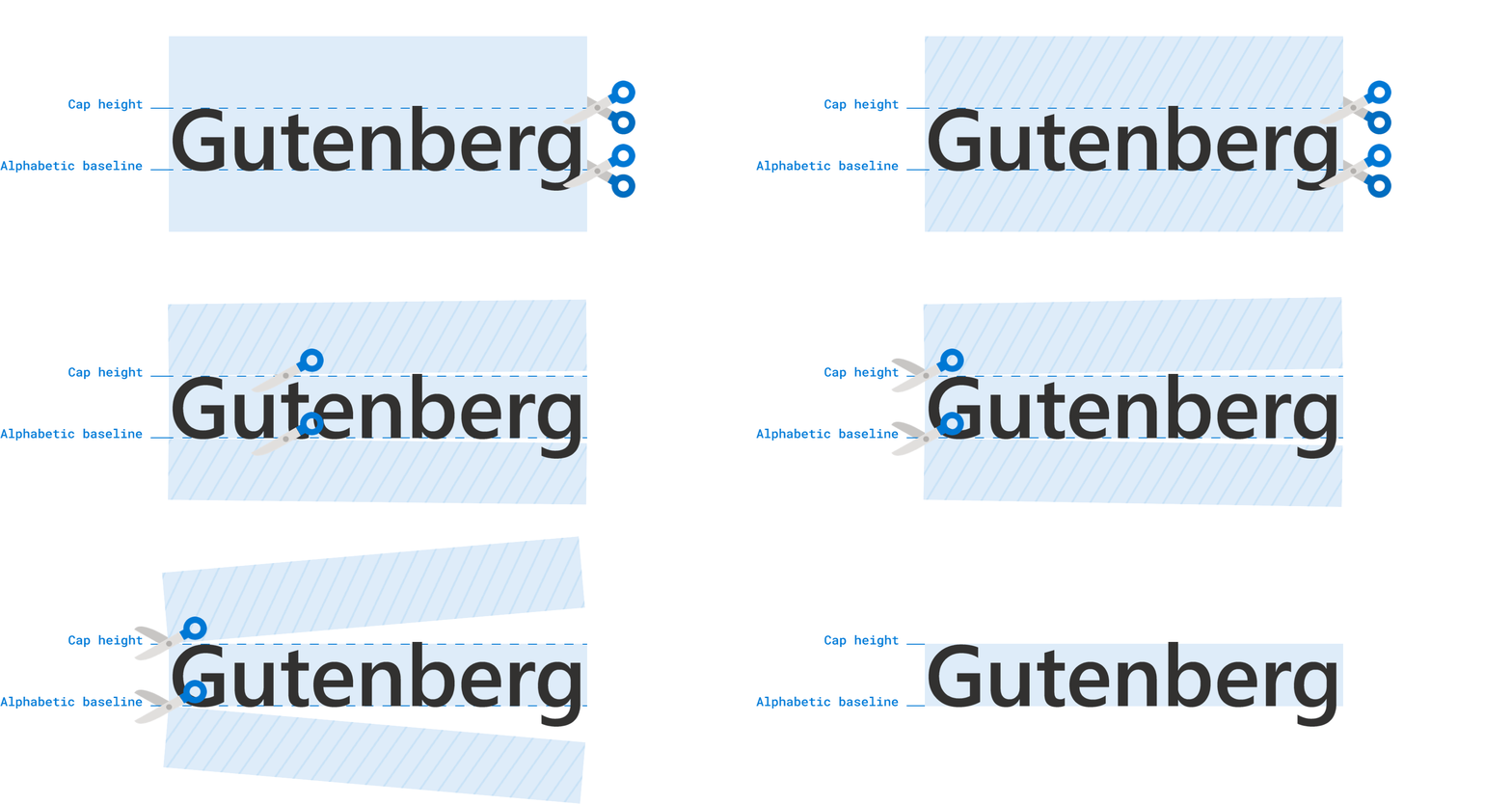
There is prior art to `text-box` also, you may recall the exciting post from
Ethan Wang called [Leading-Trim: The Future Of Digital Typesetting](https://medium.com/microsoft-design/leading-trim-the-future-of-digital-typesetting-d082d84b202),
where `leading-trim` (the name `text-box` previously had) was first introduced.
![A headline with excess space above and below appear to be cut with scissors and removed.](https://developer.chrome.com/static/blog/css-text-box-trim/image/gutenberg-leading-trim.gif)

Your entry point into text trimming might be from
[Figma and its "vertical trim" controls](https://help.figma.com/hc/en-us/articles/360039956634-Explore-text-properties#h_01H96FW9Z3W7J7Z2HEN8V17BZT)
for designers. [This X post demonstrates where this vertical trim option is](https://x.com/figma/status/1640750882613493760)
and how it's helpful for buttons.
[Source](https://x.com/figma/status/1640750882613493760)

Regardless of how you got here, this small sounding typography control can
make a big difference.

## Feature and syntax

Here, in my opinion, are the two most common one-liners you'll need when working
with `text-box`:

    h1 {
      /* trim both sides to the capital letters */
      text-box: trim-both cap alphabetic;

      /* trim both sides to the lowercase letter x */
      text-box: trim-both ex alphabetic;
    }

Trimming both to `cap alphabetic` will be the most common use of this feature.
The following demos use this many times. However, the previous example also
shows `ex alphabetic` because it's useful for optical balance in its own
unique ways.

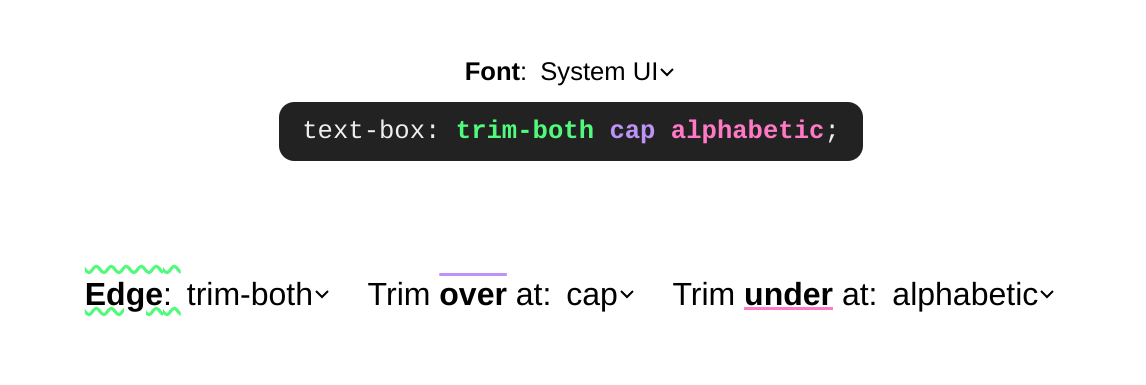
### Explorer playground

[Explore the syntax in our playground](https://codepen.io/web-dot-dev/pen/RNbyooE),
and see results using drop-down menus. You can change fonts, change over and
under trim values, and follow along with the color coded visuals and labels.
![](https://developer.chrome.com/static/blog/css-text-box-trim/image/syntax-explorer.png) The syntax preview with text-box: trim-both cap alphabetic syntax highlighted and shown. There's 3 more drop-downs to choose trim values.

**Things to try:**

1. Visually inspecting how `text-box-trim` works across single line and multi-line text variants.
2. Hovering over a variant, seeing the trim values used to achieve that effect.
3. Changing the font.
4. Trimming only one side of a text box.
5. Review the syntax as you play.

[Try it on CodePen](https://codepen.io/web-dot-dev/pen/RNbyooE)

## What can I build and what problems does it solve?

There are some much simpler centering and alignment solutions that emerge from this trim capability. You can even get closer to proper leading, where something like `gap` can be used between contents.
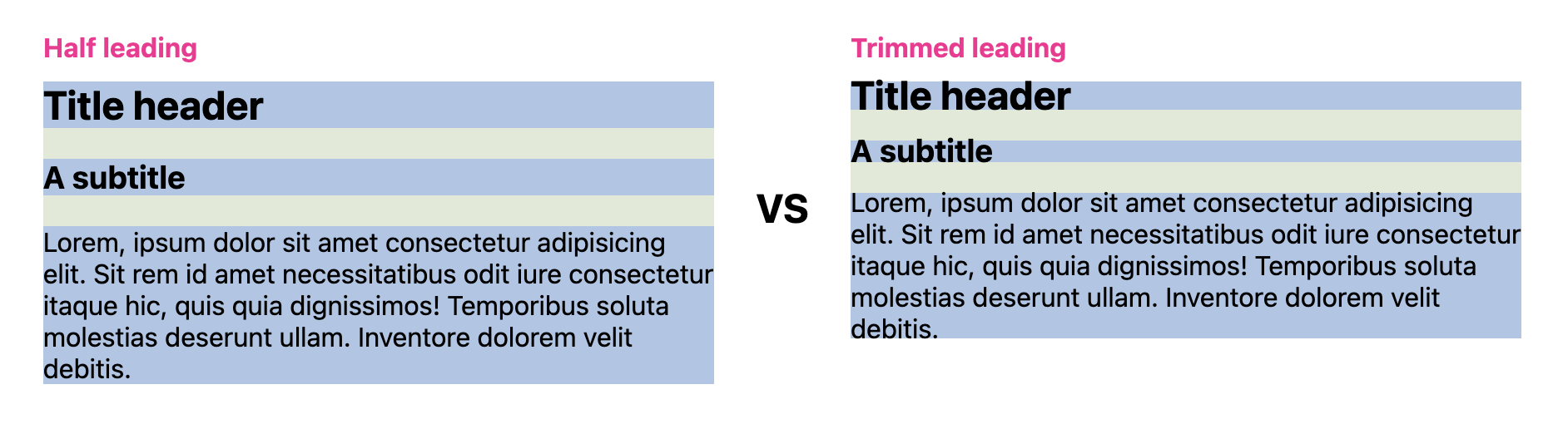
![A comparison between 2 groups of content.](https://developer.chrome.com/static/blog/css-text-box-trim/image/leading.png) The first group has half-leading, the second has trimmed leading. The result is the second group is tighter together. [Try it on CodePen](https://codepen.io/web-dot-dev/pen/RNbyoKE)

### Easier centering

For smaller, more inline and content intrinsic components, `padding: 10px` is a reasonable style to specify for an element for equal spacing on all sides. However, the result can confuse people, as it often has extra space on the top and bottom.

To work around this, developers often explicitly putting less padding on the top and bottom (block) to offset the effects of half leading.

    button {
      padding-block: 5px;
      padding-inline: 10px;
    }

At this point we're left to try value combinations until things are optically
centered. This might look good on one screen and operating system, but not
on another.

`text-box` allows us to trim the half leading space from the text, making equal
padding values like `10px` useful:

    button {
      text-box: trim-both cap alphabetic;
      padding: 10px;
    }
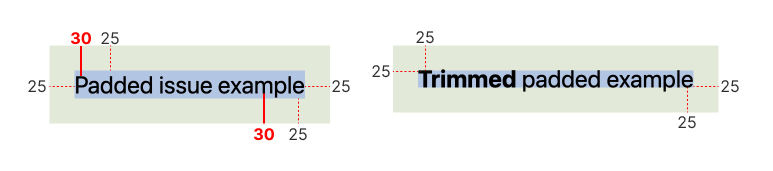
![Two examples are shown.](https://developer.chrome.com/static/blog/css-text-box-trim/image/centering.png) The first shows an element with padding: 10px and half-leading. The second shows the same element with text-box: trim-both cap alphabetic. The result is the second button is optically centered. [Try it on CodePen](https://codepen.io/web-dot-dev/pen/NPKMbgq)

> [!NOTE]
> **Note:** The following examples show a regular sans serif font and an alternative fancy or fun font. Showing multiple fonts helps illustrate the dynamic capabilities of `text-box` and how it works across font families.

Here are a few `<button>` elements that show how trimming the space with
`text-box` makes `padding: 10px` look equal on all sides in a practical
interactive element. Notice how the alternative font can produce some wildly
different half leading space.
![Three groups of buttons. The first uses a regular sans serif font, the second uses a fancy or fun font, and the third uses the same effect with a hand writing font.](https://developer.chrome.com/static/blog/css-text-box-trim/buttons.png) Each font has different half leading space, but the trim values are the same and can normalize the space. [Try it on CodePen](https://codepen.io/web-dot-dev/pen/mybLOMg)

Here are `<span>` elements, often used to show categories or badges. Another
moment where equal sided padding should be the best solution, but until
`text-box` we've had to work around it.
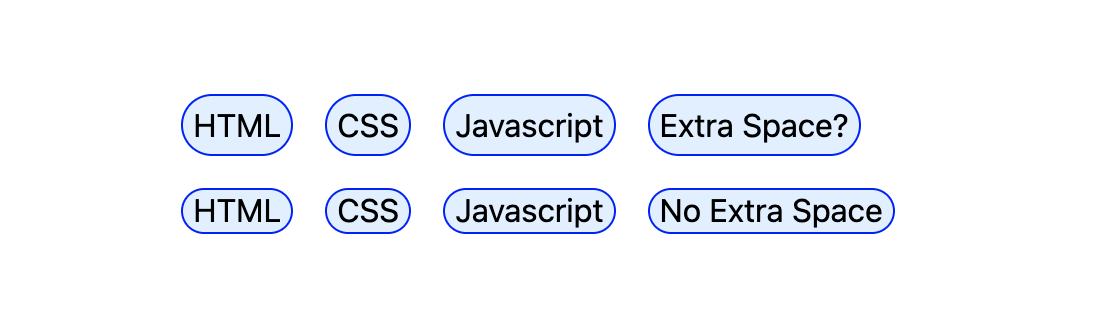
![Tags are shown compared side-by-side. The first group has half-leading, the second has trimmed leading.](https://developer.chrome.com/static/blog/css-text-box-trim/image/tags.png) The second group of tags are tighter and optically centered, thanks to trimmed leading.

### Easier alignment

The extra, uncontrollable, half leading space above (`over`) and below (`under`)
a text box also makes alignment difficult. The following examples show when half
leading can make alignment difficult and how trimming the block sides of a text
box can create better alignments.

Here an image is placed next to text. The image grows to the height that
the text needs. Without `text-box`, the image is always a little bit taller.
With `text-box`, the image can perfectly align with the text content.
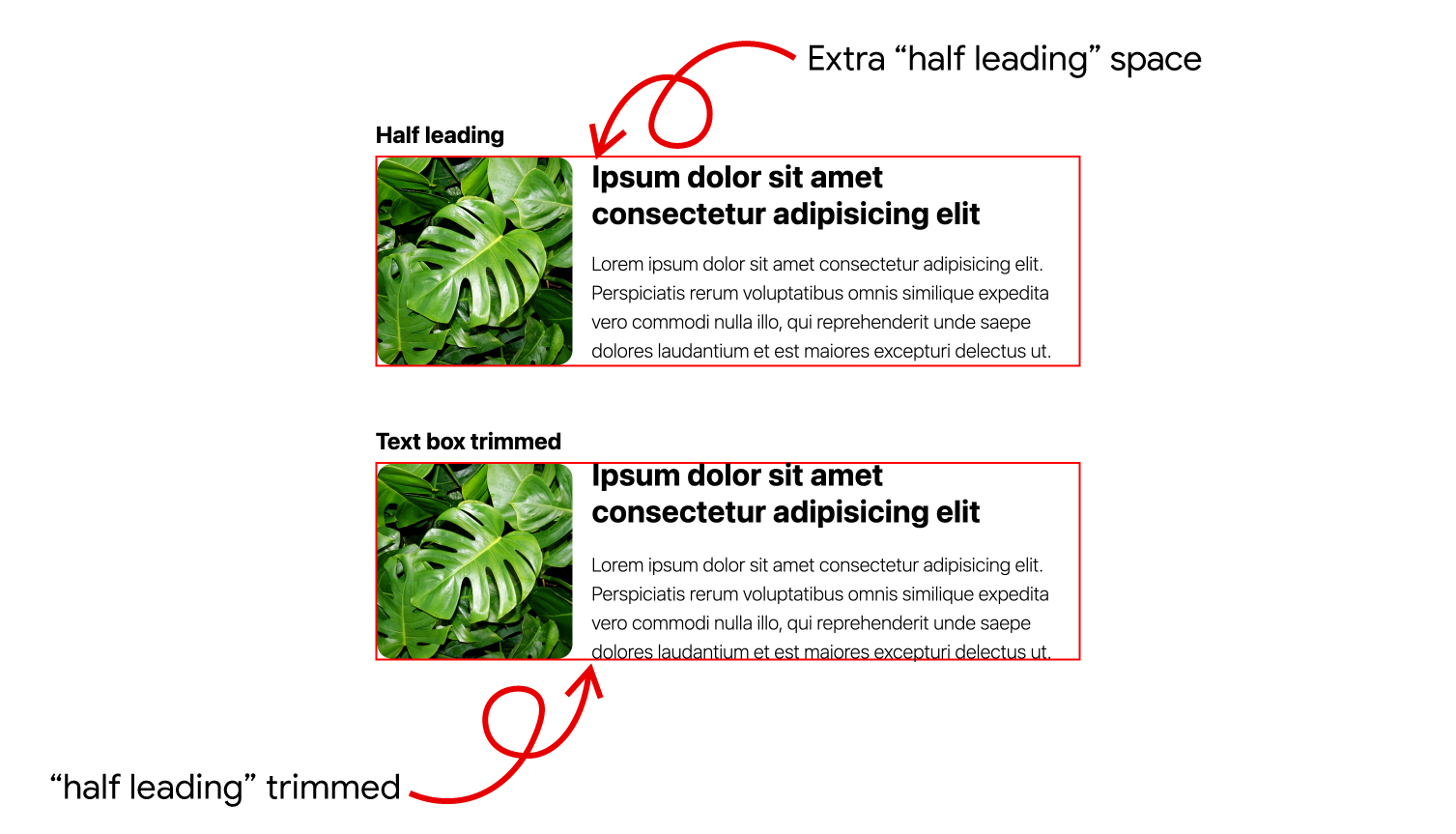
![](https://developer.chrome.com/static/blog/css-text-box-trim/image/trimmed-half-leading-for-alignment.jpg) [Try it on CodePen](https://codepen.io/web-dot-dev/pen/yyBjVpg)

Notice the whitespace is above the first formatted line of text and below the
last formatted line of text in scenarios with line wrapping.

In the following example, notice how the feature
[logically adapts](https://web.dev/learn/css/logical-properties) to a change in
[`writing-mode`](https://developer.mozilla.org/docs/Web/CSS/writing-mode). Try
changing the text, watch how the layout continues to stay aligned.
![](https://developer.chrome.com/static/blog/css-text-box-trim/image/super-rad-design.png) [Try it on CodePen](https://codepen.io/web-dot-dev/pen/dPbeOJQ)

## Continue studying

Want to know more? The following list of links offer various amounts of
additional information and use cases.

- [Codepen collection of all the demos](https://codepen.io/collection/zxQBaL).
- [Great research and demos](https://github.com/jantimon/text-box-trim-examples) by Jan Nicklas.
- [Two CSS Properties for Trimming Text Box Whitespace](https://css-tricks.com/two-css-properties-for-trimming-text-box-whitespace/) on CSS Tricks.
- [CSS Inline Layout on text edges](https://drafts.csswg.org/css-inline-3/#text-edges).
- Not to be [confused with `size-adjust` or `ascent-override`](https://web.dev/articles/css-size-adjust)
- [CSS Baseline: The Good, The Bad And The Ugly](https://www.smashingmagazine.com/2012/12/css-baseline-the-good-the-bad-and-the-ugly/).
- Applied to many HTML elements: [CodePen](https://codepen.io/nileshprajapati/pen/RweKdmw).
- [Safari's blog post](https://webkit.org/blog/16301/webkit-features-in-safari-18-2/).
- [Why I'm excited about text-box-trim as a designer](https://piccalil.li/blog/why-im-excited-about-text-box-trim-as-a-designer/).