 Eiji Kitamura [X](https://twitter.com/agektmr) [GitHub](https://github.com/agektmr) [Mastodon](https://infosec.exchange/@agektmr) [Bluesky](https://bsky.app/profile/agektmr.com)
To provide a sophisticated user experience, it's important to help users
authenticate themselves to your website. Authenticated users can interact with
each other using a dedicated profile, sync data across devices, or process data
while offline; the list goes on and on. But creating, remembering and typing
passwords tends to be cumbersome for end users, especially on mobile screens
which leads them to re-using the same passwords on different sites. This of course
is a security risk.
The latest version of Chrome (51) supports the **[Credential Management API](http://w3c.github.io/webappsec-credential-management/)**. It's a
standards-track proposal at the W3C that gives developers programmatic access to
a browser's credential manager and helps users sign in more easily.
> [!WARNING]
> **Warning:** This API has been drastically updated and sample codes in this article won't work any longer. Checkout [the updated integration
> guide](https://web.dev/articles/security-credential-management) or [the update
> summary](https://developer.chrome.com/blog/credential-management-updates).
> [!NOTE]
> **Note:** The new [one tap sign-up and automatic sign-in API](https://developers.google.com/identity/gsi/web/guides/overview), built on the Credential Management API, combines Google sign-in and password-based sign-in into one API call, and adds support for one-tap account creation. Consider using this new API instead of directly using the Credential Management API.
## What is the Credential Management API?
The Credential Management API enables developers to store and retrieve password
credentials and federated credentials and it provides 3 functions:
- `navigator.credentials.get()`
- `navigator.credentials.store()`
- `navigator.credentials.requireUserMediation()`
By using these simple APIs, developers can do powerful things like:
- Enable users to sign in with just one tap.
- Remember the federated account the user has used to sign in with.
- Sign users back in when a session expires.
[Video](https://www.youtube.com/watch?v=O3mBdKYMsMY)
In Chrome's implementation, credentials will be stored in Chrome's password
manager. If users are signed into Chrome, they can sync the user's passwords
across devices. Those synced passwords can also be shared with Android apps
which have integrated the [Smart Lock for Passwords API for Android](https://developers.google.com/identity/smartlock-passwords/android/)
[for a seamless cross-platform experience](https://developers.google.com/identity/smartlock-passwords/android/).
## Integrating the Credential Management API with your site
The way you use the Credential Management API with your website can vary
depending on its architecture. Is it a single page app? Is it a legacy
architecture with page transitions? Is the sign-in form located only at the top
page? Are sign-in buttons located everywhere? Can users meaningfully browse your
website without signing in? Does federation work within popup windows? Or does it
require interaction across multiple pages?
It's nearly impossible to cover all those cases, but let's have a look at a
typical single page app.
- The top page is a registration form.
- By tapping on "Sign In" button, users will navigate to a sign-in form.
- Both the registration and sign-in forms have the typical options of id/password credentials and federation, e.g. with Google Sign-In and Facebook Sign-In.
By using Credential Management API, you will be able to add the following
features to the site, for example:
- **Show an account chooser when signing in:** Shows a native account chooser UI when a user taps "Sign In".
- **Store credentials:** Upon *successful* sign-in, offer to store the credential information to the browser's password manager for later use.
- **Let the user automatically sign back in:** Let the user sign back in if a session is expired.
- **Mediate auto sign-in:** Once a user signs out, disable automatic sign-in for the next visit of the user.
You can experience these features implemented in [a demo site](https://credential-management-sample.appspot.com) with [its sample code](https://github.com/GoogleChrome/credential-management-sample).
> [!NOTE]
> **Note:** This API needs to be used on secure origins such as HTTPS domains or localhost.
### Show the Account Chooser when signing in
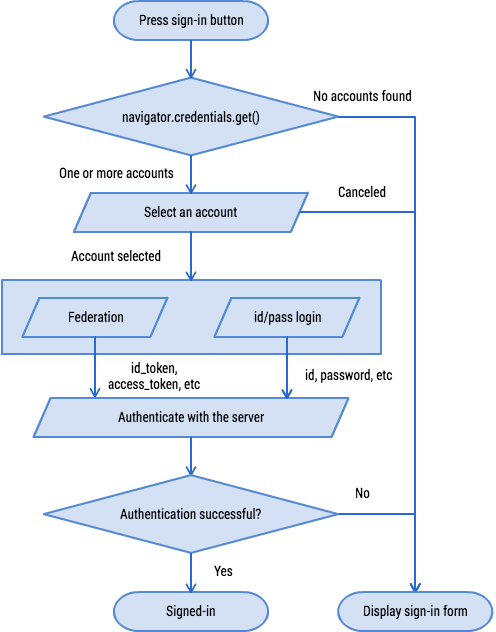
Between a user tap of a "Sign In" button and navigation to a sign-in form, you
can use
[navigator.credentials.get()](https://developer.mozilla.org/docs/Web/API/CredentialsContainer/get)
to get credential information. Chrome will show an account chooser UI from which
the user can pick an account.
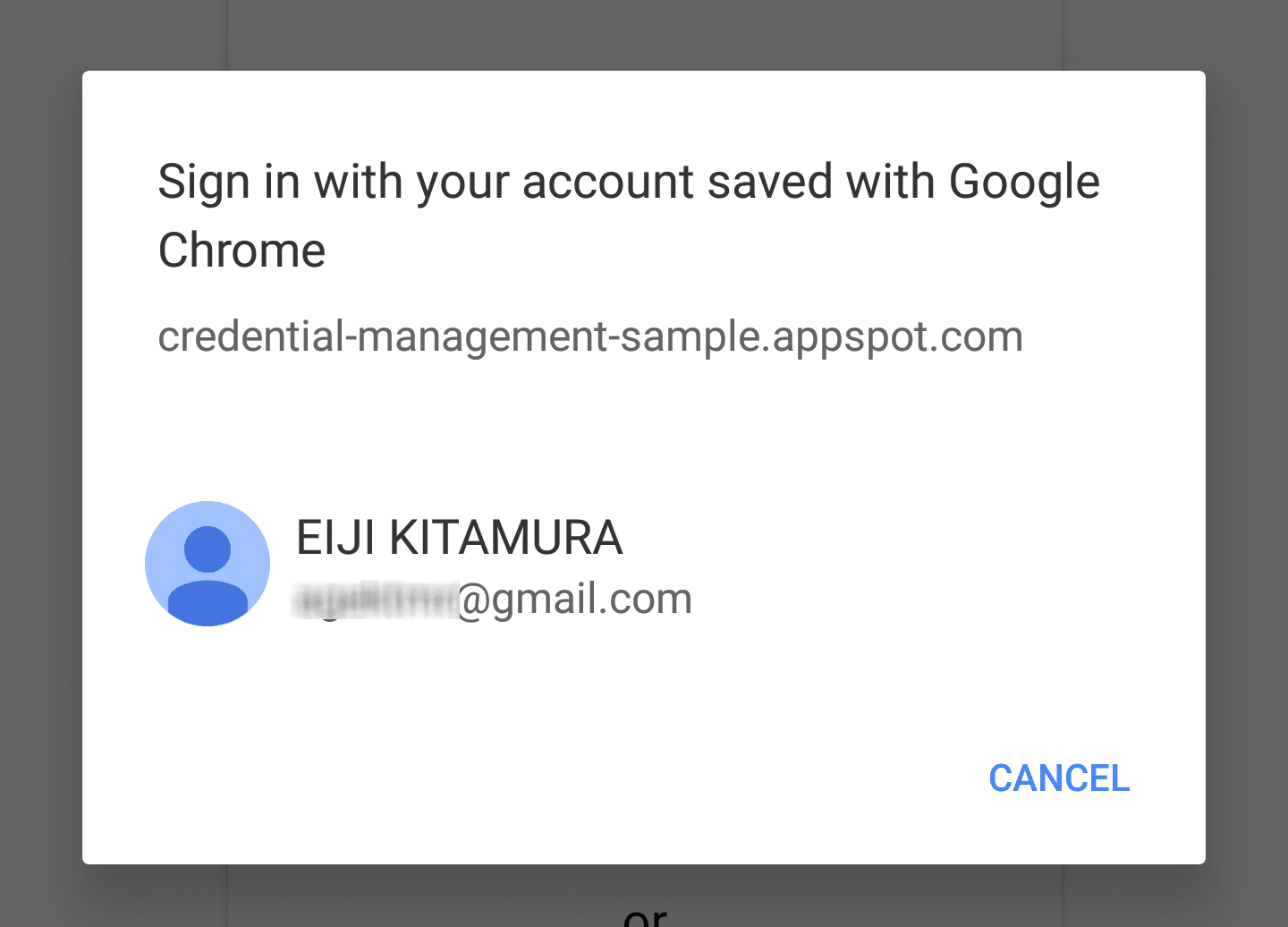 An account chooser UI pops up for user to select an account to sign-in
#### Getting a password credential object
To show password credentials as account options, use `password: true`.
navigator.credentials.get({
password: true, // `true` to obtain password credentials
}).then(function(cred) {
// continuation
...
#### Using a password credential to sign in
Once the user makes an account selection, the resolving function will receive a
password credential. You can send it to the server using `fetch()`:
// continued from previous example
}).then(function(cred) {
if (cred) {
if (cred.type == 'password') {
// Construct FormData object
var form = new FormData();
// Append CSRF Token
var csrf_token = document.querySelector('csrf_token').value;
form.append('csrf_token', csrf_token);
// You can append additional credential data to `.additionalData`
cred.additionalData = form;
// `POST` the credential object as `credentials`.
// id, password and the additional data will be encoded and
// sent to the url as the HTTP body.
fetch(url, { // Make sure the URL is HTTPS
method: 'POST', // Use POST
credentials: cred // Add the password credential object
}).then(function() {
// continuation
});
} else if (cred.type == 'federated') {
// continuation
#### Using a federated credential to sign in
To show federated accounts to a user, add `federated`, which takes an array
of identity providers, to the `get()` options.
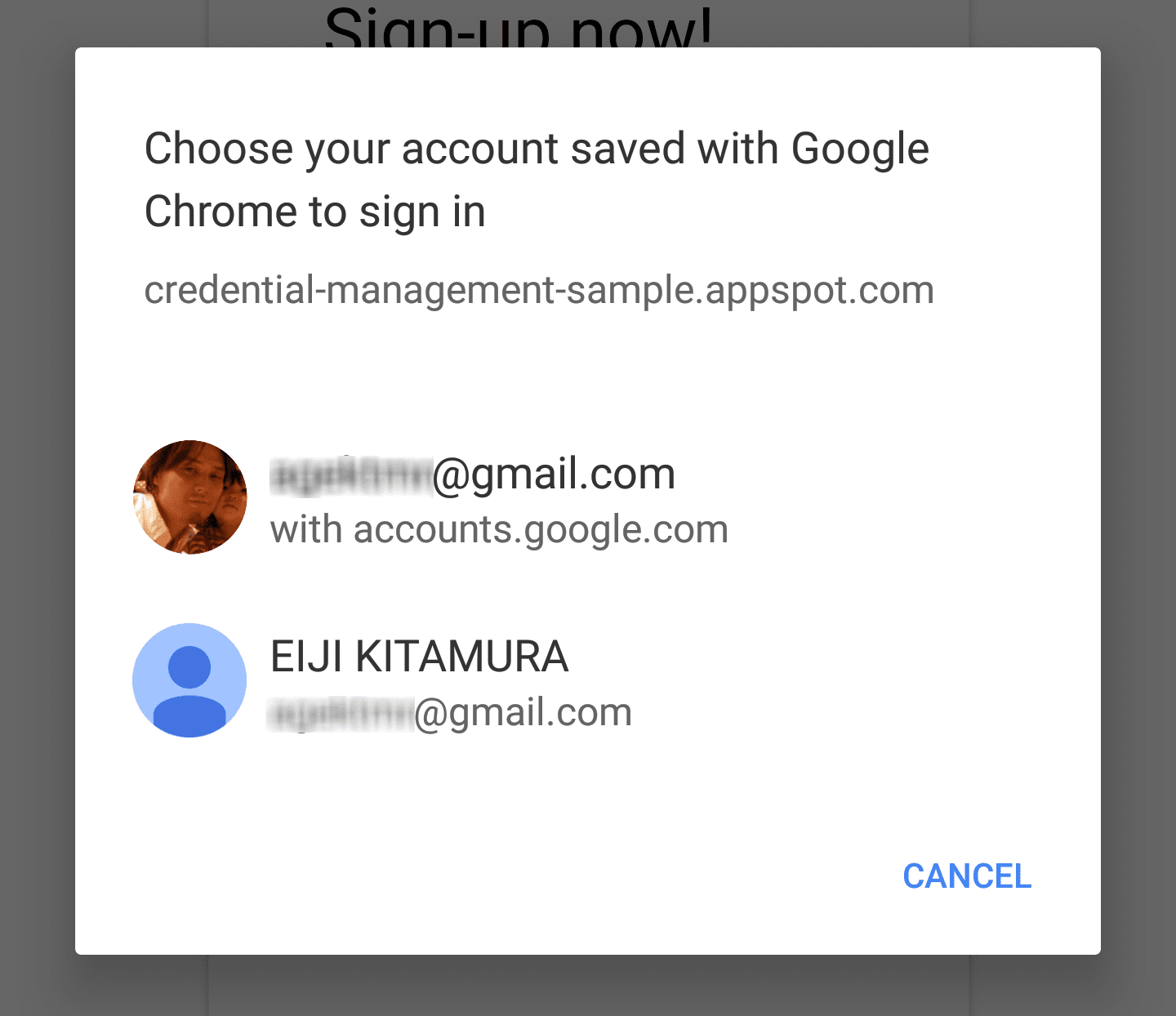 When multiple accounts are stored in the password manager
navigator.credentials.get({
password: true, // `true` to obtain password credentials
federated: {
providers: [ // Specify an array of IdP strings
'https://accounts.google.com',
'https://www.facebook.com'
]
}
}).then(function(cred) {
// continuation
...
You can examine the `type` property of the credential object to see if it's `PasswordCredential`
(`type == 'password'`) or `FederatedCredential` (`type == 'federated'`).
If the credential is a
[`FederatedCredential`](https://developer.mozilla.org/docs/Web/API/FederatedCredential),
you can call the appropriate API using information it contains.
});
} else if (cred.type == 'federated') {
// `provider` contains the identity provider string
switch (cred.provider) {
case 'https://accounts.google.com':
// Federated login using Google Sign-In
var auth2 = gapi.auth2.getAuthInstance();
// In Google Sign-In library, you can specify an account.
// Attempt to sign in with by using `login_hint`.
return auth2.signIn({
login_hint: cred.id || ''
}).then(function(profile) {
// continuation
});
break;
case 'https://www.facebook.com':
// Federated login using Facebook Login
// continuation
break;
default:
// show form
break;
}
}
// if the credential is `undefined`
} else {
// show form
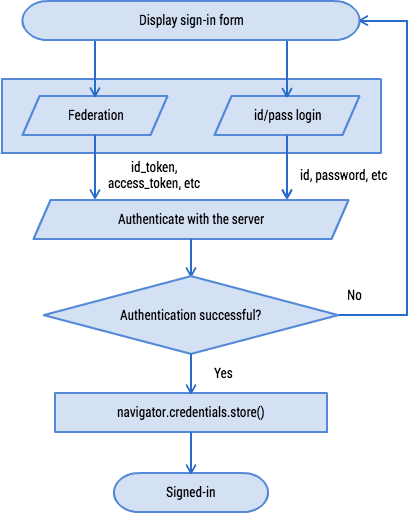
### Store credentials
When a user signs in to your website using a form, you can use
[navigator.credentials.store()](https://developer.mozilla.org/docs/Web/API/CredentialsContainer/store)
to store the credential. The user will be prompted to store it or not. Depending
on the type of the credential, use [`new
PasswordCredential()`](https://developer.mozilla.org/docs/Web/API/PasswordCredential)
or [`new
FederatedCredential()`](https://developer.mozilla.org/docs/Web/API/FederatedCredential)
to create a credential object you'd like to store.
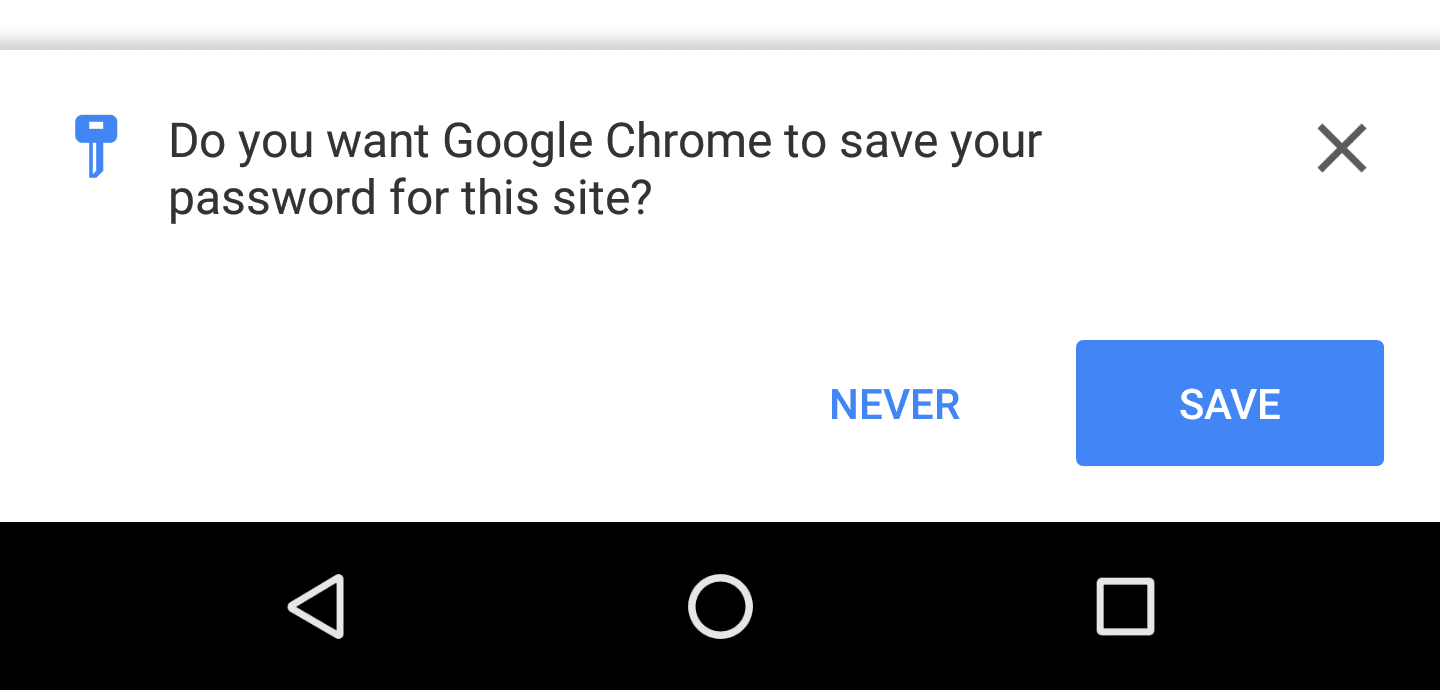 Chrome asks users if they want to store the credential (or a federation provider)
#### Creating and storing a password credential from a form element
The following code uses `autocomplete` attributes to automatically
[map](http://w3c.github.io/webappsec-credential-management/#passwordcredential-form-constructor)
the form's elements to [PasswordCredential](https://developer.mozilla.org/docs/Web/API/PasswordCredential)
object parameters.
HTML
`html
`
JavaScript
var form = document.querySelector('\#form');
var cred = new PasswordCredential(form);
// Store it
navigator.credentials.store(cred)
.then(function() {
// continuation
});
#### Creating and storing a federated credential
// After a federation, create a FederatedCredential object using
// information you have obtained
var cred = new FederatedCredential({
id: id, // The id for the user
name: name, // Optional user name
provider: 'https://accounts.google.com', // A string that represents the identity provider
iconURL: iconUrl // Optional user avatar image url
});
// Store it
navigator.credentials.store(cred)
.then(function() {
// continuation
});
### Let the user automatically sign back in
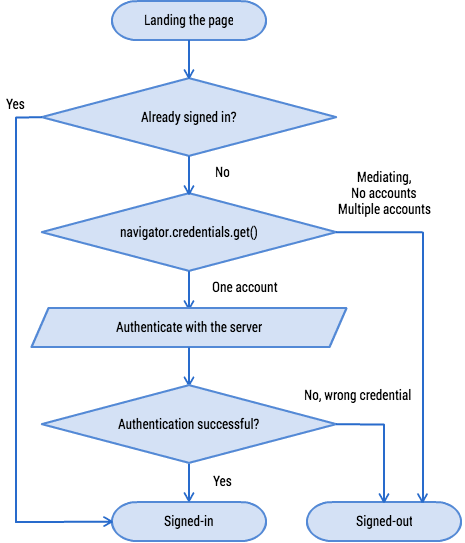
When a user leaves your website and comes back later, it's possible that the
session is expired. Don't bother the user to type their password every time they
come back. Let the user automatically sign back in.
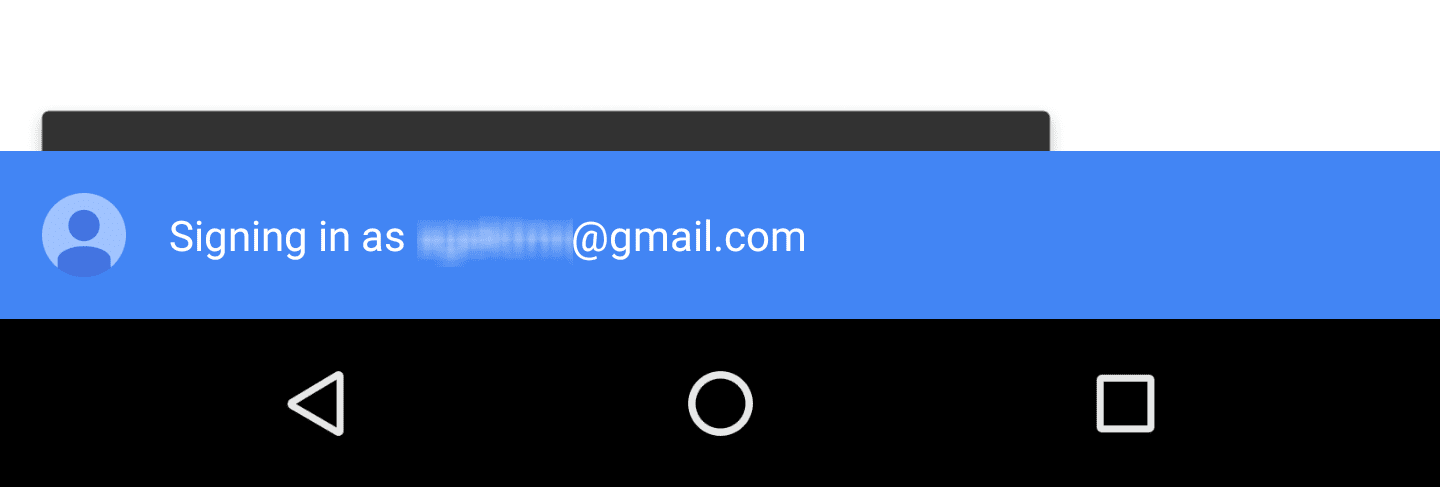 When a user is automatically signed in, a notification will pop up.
#### Getting a credential object
navigator.credentials.get({
password: true, // Obtain password credentials or not
federated: { // Obtain federation credentials or not
providers: [ // Specify an array of IdP strings
'https://accounts.google.com',
'https://www.facebook.com'
]
},
unmediated: true // `unmediated: true` lets the user automatically sign in
}).then(function(cred) {
if (cred) {
// auto sign-in possible
...
} else {
// auto sign-in not possible
...
}
});
The code should look similar to what you've seen in the "Show Account Chooser
when Signing In" section. The only difference is that you will set
`unmediated: true`.
This resolves the function immediately and gives you the credential to
automatically sign the user in. There are a few conditions:
- The user has acknowledged the automatic sign-in feature in a warm welcome.
- The user has previously signed in to the website using the Credential Management API.
- The user has only one credential stored for your origin.
- The user did not explicitly sign out in the previous session.
If any of these conditions are not met, the function will be rejected.
### Mediate auto sign-in
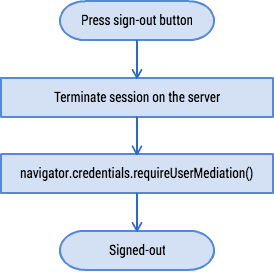
When a user signs out from your website, **it's your responsibility to ensure
that the user will not be automatically signed back in** . To ensure
this, the Credential Management API provides a mechanism called **mediation** .
You can enable mediation mode by calling
[`navigator.credentials.requireUserMediation()`](https://developer.mozilla.org/docs/Web/API/CredentialsContainer/requireUserMediation).
As long as the user's mediation status for the origin is turned on, using
`unmediated: true` with `navigator.credentials.get()`, that function will
resolve with `undefined`.
#### Mediating auto sign-in
navigator.credentials.requireUserMediation();
## FAQ
**Is it possible for JavaScript on the website to retrieve a raw
password?**
No. You can only obtain passwords as a part of `PasswordCredential` and it's not
exposable by any means.
**Is it possible to store 3 set of digits for an id using Credential
Management API?**
Not currently. Your [feedback on the specification](https://github.com/w3c/webappsec-credential-management) will be
highly appreciated.
**Can I use the Credential Management API inside an iframe?**
The API is restricted to top-level contexts. Calls to `.get()` or `.store()`
in an iframe will resolve immediately without effect.
**Can I integrate my password management Chrome extension with the Credential
Management API?**
You may override `navigator.credentials` and hook it to your Chrome Extension to
`get()` or `store()` credentials.
## Resources
To learn more about the Credential Management API, checkout [Integration Guide](https://developers.google.com/web/fundamentals/security/credential-management/).
- [API Specification](https://www.w3.org/TR/credential-management/)
- [Spec discussions \& feedback](https://github.com/w3c/webappsec-credential-management)
- [MDN API Reference](https://developer.mozilla.org/docs/Web/API/Credential_Management_API)
- [Credential Management API Integration Guide](https://developers.google.com/web/fundamentals/security/credential-management/)
- [Demo](https://credential-management-sample.appspot.com)
- [Demo source code](https://github.com/GoogleChrome/credential-management-sample)
- [Codelab "Enabling auto sign-in with Credential Management API"](https://g.co/codelabs/cmapi)