Hongchan Choi [X](https://twitter.com/hochsays) [Homepage](https://hoch.io/)
> [!NOTE]
> **Note:** Audio Worklet is enabled by default in Chrome 66.
Chrome 64 comes with a highly anticipated new feature in Web Audio API -
[AudioWorklet](https://webaudio.github.io/web-audio-api/#AudioWorklet). Here you'll learn concepts and usage to create a
custom audio processor with JavaScript code. Take a look at the
[live demos](https://googlechromelabs.github.io/web-audio-samples/audio-worklet/).
The next article in series, [Audio Worklet Design Pattern](https://developer.chrome.com/blog/audio-worklet-design-pattern),
might be an interesting read for building an advanced audio app.
## Background: ScriptProcessorNode
Audio processing in Web Audio API runs in a separate thread from the main
UI thread, so it runs smoothly. To enable custom audio processing in
JavaScript, the Web Audio API proposed a ScriptProcessorNode which used
event handlers to invoke user script in the main UI thread.
There are two problems in this design: the event handling is asynchronous
by design, and the code execution happens on the main thread. The former
induces the latency, and the latter pressures the main thread that is
commonly crowded with various UI and DOM-related tasks causing either UI
to "jank" or audio to "glitch". Because of this fundamental design flaw,
`ScriptProcessorNode` is deprecated from the specification and
replaced with AudioWorklet.
## Concepts
Audio Worklet keeps the user-supplied JavaScript code all within the
audio processing thread. That means it doesn't have to jump over to the main
thread to process audio. This means the user-supplied script code gets to run
on the audio rendering thread (`AudioWorkletGlobalScope`) along with other
built-in `AudioNodes`, which ensures zero additional latency and synchronous
rendering.
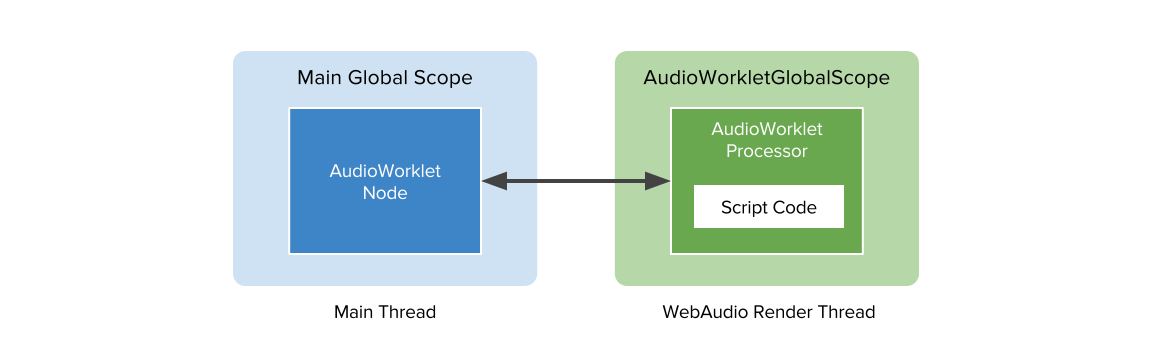 Fig.1
### Registration and instantiation
Using Audio Worklet consists of two parts: `AudioWorkletProcessor` and
`AudioWorkletNode`. This is more involved than using ScriptProcessorNode,
but it is needed to give developers the low-level capability for custom audio
processing. `AudioWorkletProcessor` represents the actual audio processor
written in JavaScript code, and it lives in the `AudioWorkletGlobalScope`.
`AudioWorkletNode` is the counterpart of `AudioWorkletProcessor` and takes
care of the connection to and from other `AudioNodes` in the main thread. It
is exposed in the main global scope and functions like a regular `AudioNode`.
Here's a pair of code snippets that demonstrate the registration and the
instantiation.
// The code in the main global scope.
class MyWorkletNode extends AudioWorkletNode {
constructor(context) {
super(context, 'my-worklet-processor');
}
}
let context = new AudioContext();
context.audioWorklet.addModule('processors.js').then(() => {
let node = new MyWorkletNode(context);
});
To create an `AudioWorkletNode`, you must add an AudioContext
object and the processor name as a string. A processor definition can be
loaded and registered by the new Audio Worklet object's `addModule()` call.
Worklet APIs including Audio Worklet are only available in a
[secure context](https://w3c.github.io/webappsec-secure-contexts/), thus a
page using them must be served over HTTPS, although `http://localhost` is
considered a secure for local testing.
You can subclass `AudioWorkletNode` to define
a custom node backed by the processor running on the worklet.
// This is the "processors.js" file, evaluated in AudioWorkletGlobalScope
// upon audioWorklet.addModule() call in the main global scope.
class MyWorkletProcessor extends AudioWorkletProcessor {
constructor() {
super();
}
process(inputs, outputs, parameters) {
// audio processing code here.
}
}
registerProcessor('my-worklet-processor', MyWorkletProcessor);
The `registerProcessor()` method in the `AudioWorkletGlobalScope` takes a
string for the name of processor to be registered and the class definition.
After the completion of script code evaluation in the global scope, the
promise from `AudioWorklet.addModule()` will be resolved notifying users
that the class definition is ready to be used in the main global scope.
### Custom audio parameters
One of the useful things about AudioNodes is schedulable parameter
automation with `AudioParam`. AudioWorkletNodes can use these to get
exposed parameters that can be controlled at the audio rate automatically.
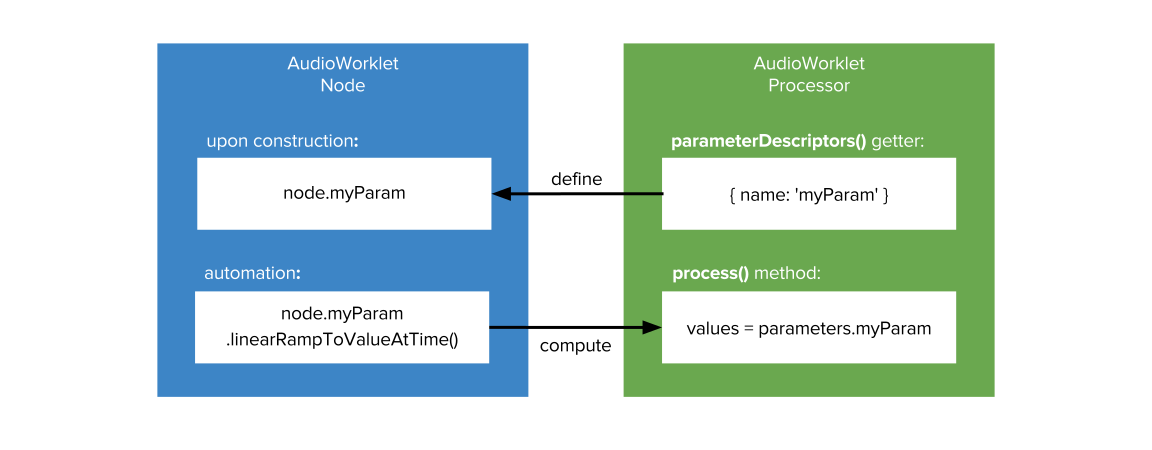 Fig.2
User-defined audio parameters can be declared in an `AudioWorkletProcessor`
class definition by setting up a set of `AudioParamDescriptor`. The
underlying WebAudio engine picks up this information during the
construction of an AudioWorkletNode, and then creates and links
`AudioParam` objects to the node accordingly.
/* A separate script file, like "my-worklet-processor.js" */
class MyWorkletProcessor extends AudioWorkletProcessor {
// Static getter to define AudioParam objects in this custom processor.
static get parameterDescriptors() {
return [{
name: 'myParam',
defaultValue: 0.707
}];
}
constructor() { super(); }
process(inputs, outputs, parameters) {
// |myParamValues| is a Float32Array of either 1 or 128 audio samples
// calculated by WebAudio engine from regular AudioParam operations.
// (automation methods, setter) Without any AudioParam change, this array
// would be a single value of 0.707.
const myParamValues = parameters.myParam;
if (myParamValues.length === 1) {
// |myParam| has been a constant value for the current render quantum,
// which can be accessed by |myParamValues[0]|.
} else {
// |myParam| has been changed and |myParamValues| has 128 values.
}
}
}
### `AudioWorkletProcessor.process()` method
The actual audio processing happens in the `process()` callback method in the
`AudioWorkletProcessor`. It must be implemented by a user in the class
definition. The WebAudio engine invokes this function in an isochronous
fashion to feed **inputs** and parameters and fetch **outputs**.
/* AudioWorkletProcessor.process() method */
process(inputs, outputs, parameters) {
// The processor may have multiple inputs and outputs. Get the first input and
// output.
const input = inputs[0];
const output = outputs[0];
// Each input or output may have multiple channels. Get the first channel.
const inputChannel0 = input[0];
const outputChannel0 = output[0];
// Get the parameter value array.
const myParamValues = parameters.myParam;
// if |myParam| has been a constant value during this render quantum, the
// length of the array would be 1.
if (myParamValues.length === 1) {
// Simple gain (multiplication) processing over a render quantum
// (128 samples). This processor only supports the mono channel.
for (let i = 0; i < inputChannel0.length; ++i) {
outputChannel0[i] = inputChannel0[i] * myParamValues[0];
}
} else {
for (let i = 0; i < inputChannel0.length; ++i) {
outputChannel0[i] = inputChannel0[i] * myParamValues[i];
}
}
// To keep this processor alive.
return true;
}
Additionally, the return value of the `process()` method can be used to
control the lifetime of `AudioWorkletNode` so that developers can manage
the memory footprint. Returning `false` from `process()` method marks
the processor inactive, and the `WebAudio` engine no longer invokes the
method. To keep the processor alive, the method must return `true`.
Otherwise, the node and processor pair is garbage collected by the system
eventually.
### Bi-directional communication with MessagePort
Sometimes, a custom `AudioWorkletNode` wants to expose controls that don't
map to `AudioParam`, such as a string-based `type` attribute
used to control a custom filter. For this purpose and beyond,
`AudioWorkletNode` and `AudioWorkletProcessor` are equipped with a
`MessagePort` for bi-directional communication. Any kind of custom data
can be exchanged through this channel.
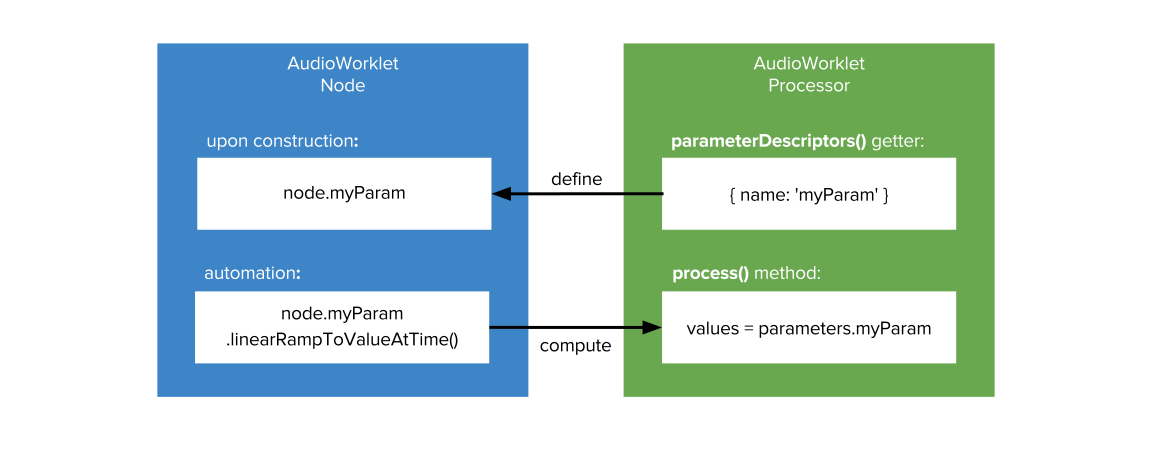 Fig.2
MessagePort can be accessed with the `.port` attribute on both the node and
the processor. The node's `port.postMessage()` method sends a message to
the associated processor's `port.onmessage` handler and in reverse.
/* The code in the main global scope. */
context.audioWorklet.addModule('processors.js').then(() => {
let node = new AudioWorkletNode(context, 'port-processor');
node.port.onmessage = (event) => {
// Handling data from the processor.
console.log(event.data);
};
node.port.postMessage('Hello!');
});
/* "processors.js" file. */
class PortProcessor extends AudioWorkletProcessor {
constructor() {
super();
this.port.onmessage = (event) => {
// Handling data from the node.
console.log(event.data);
};
this.port.postMessage('Hi!');
}
process(inputs, outputs, parameters) {
// Do nothing, producing silent output.
return true;
}
}
registerProcessor('port-processor', PortProcessor);
`MessagePort` supports transferable, which lets you
transfer data storage or a WASM module over the thread boundary. This opens
up countless possibility on how the Audio Worklet system can be used.
## Walk through: Build a GainNode
Here's a complete example of GainNode built on top of
`AudioWorkletNode` and `AudioWorkletProcessor`.
The `index.html` file:
The `gain-processor.js` file:
class GainProcessor extends AudioWorkletProcessor {
// Custom AudioParams can be defined with this static getter.
static get parameterDescriptors() {
return [{ name: 'gain', defaultValue: 1 }];
}
constructor() {
// The super constructor call is required.
super();
}
process(inputs, outputs, parameters) {
const input = inputs[0];
const output = outputs[0];
const gain = parameters.gain;
for (let channel = 0; channel < input.length; ++channel) {
const inputChannel = input[channel];
const outputChannel = output[channel];
if (gain.length === 1) {
for (let i = 0; i < inputChannel.length; ++i)
outputChannel[i] = inputChannel[i] * gain[0];
} else {
for (let i = 0; i < inputChannel.length; ++i)
outputChannel[i] = inputChannel[i] * gain[i];
}
}
return true;
}
}
registerProcessor('gain-processor', GainProcessor);
This covers the fundamental of Audio Worklet system. Live demos are available
at [Chrome WebAudio team's GitHub repository](https://googlechromelabs.github.io/web-audio-samples/audio-worklet/).
## Feature transition: Experimental to Stable
Audio Worklet is enabled by default for Chrome 66 or later. In Chrome 64 and 65, the feature was behind the experimental flag.